
How to Build a Lone Worker Policy That Actually Works
At a lot of sites, the lone worker policy already exists. It’s signed, filed, and technically approved. Then a technician gets called in at 2 a.m. for a burst pipe, a nurse drives to a home visit after dark, or a security officer starts a patrol in a half-empty building, and the question shows up: who is watching, who gets the alert, and how fast does anybody act?
That’s where most lone worker policies fail. Not on wording. On operations. The document says people must check in. The app isn’t armed. The supervisor assumes someone else is monitoring. The response chain lives in a binder nobody opens at night.
A working lone worker policy isn’t a legal ornament. It’s an operating system for isolated work. If it doesn’t assign ownership, define triggers, and force action when a worker goes quiet, it’s shelfware.
Table of Contents
- What a Lone Worker Policy Really Has to Do
- Defining Scope, Roles, and the Policy Statement
- Running the Risk Assessment That Drives Everything Else
- Choosing Monitoring and Check-In Methods That Hold Up
- Response and Escalation Procedures Worth Following
- Training, Drills, and Manager Accountability
- Turning the Policy Into a Living Safety System
What a Lone Worker Policy Really Has to Do
A maintenance technician is alone in a mechanical room in the middle of the night. He slips, hits the floor, and drops his phone. The policy says lone workers must maintain communication and report hazards immediately. That sentence is useless now. He can’t call. Nobody nearby heard the fall. The only thing that matters is whether the organization built a system that detects the gap and starts moving within minutes.
That’s the standard you should hold your lone worker policy to.
It has three jobs
First, it sets the duty of care baseline. In the U.S., national work injury figures remain stubborn enough to justify treating lone work as a serious control issue, not a paperwork exercise. The Bureau of Labor Statistics recorded 5,283 fatal work injuries in 2023 with a fatality rate of 3.5 per 100,000 full-time equivalent workers, down from 3.7 in 2022, and 5,070 fatalities in 2024 with a rate of 3.3 per 100,000 FTE workers according to the BLS Census of Fatal Occupational Injuries release. Those numbers aren’t lone-worker-specific, but they are the baseline many organizations use when justifying check-ins, escalation rules, and emergency response.
Second, it must trigger concrete monitoring when someone is alone. Not “appropriate communication should be maintained.” That phrase belongs in the trash. The policy needs to say who must check in, what device or method they use, who is monitoring, and what happens if the check-in doesn’t happen.
Third, it must define the first response window after an alert or missed check-in. The first call, the second escalation, the location lookup, the welfare check, the emergency services handoff. If those steps aren’t explicit, people improvise. Improvisation is slow.
Practical rule: If your policy doesn’t tell a night supervisor exactly what to do when a worker misses a check-in, you don’t have a working policy.
Why policies get shelved
The failure patterns are painfully consistent:
- Vague language that sounds compliant but gives no one a decision rule.
- Unowned responsibilities where supervisors, dispatch, and safety each assume someone else has the lead.
- Missing escalation paths for after-hours, weak signal areas, and no-response situations.
- No latency targets at all, which means nobody measures whether the system works.
A lone worker policy has to behave like an operational control. If it can’t produce fast action on a bad night, it isn’t finished.
Defining Scope, Roles, and the Policy Statement
Most bad rewrites start with bad scope. Somebody drafts a generic document for “employees who may work alone,” then spends the next six months patching exceptions. Fix that first.
Define scope before you argue about controls
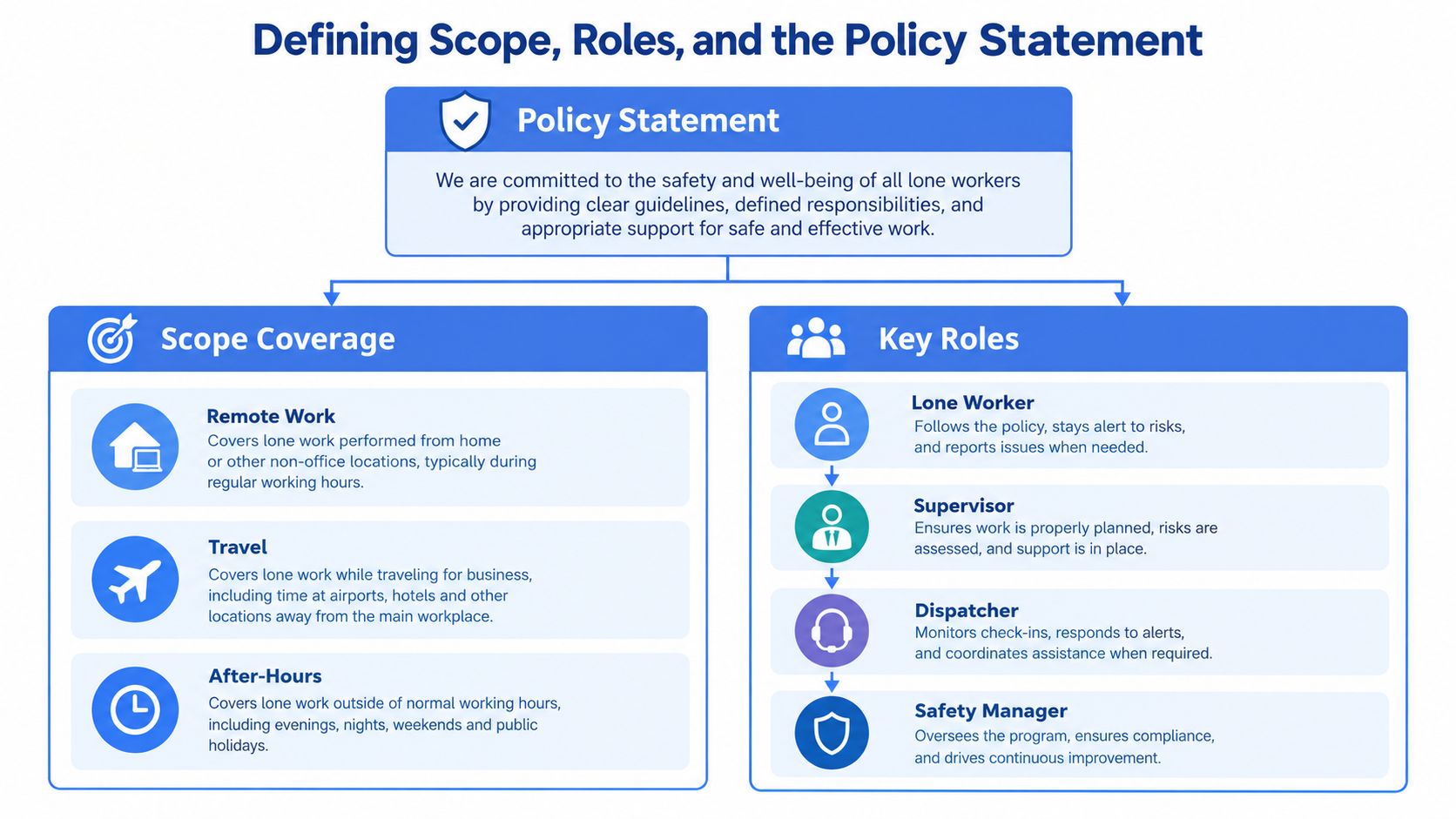
Your scope should list which roles work alone, when they work alone, and where they work alone. That means more than field technicians. It includes after-hours cleaners, opening and closing staff, home-visit clinicians, warehouse staff in isolated zones, managers traveling between sites, remote workers meeting clients, and anyone left alone on site after the rest of the team clocks out.
Don’t confuse scope with assessment. Scope answers coverage. Risk assessment answers severity.
If you manage mixed operations, it helps to look at how other policy sets separate role definitions from operating rules. Hospitality teams, for example, often struggle with after-hours openers, closers, and delivery handling. This breakdown of restaurant employee policies is useful because it shows how clean policy scope prevents confusion at shift level.
The four roles every usable policy needs
Every lone worker policy I trust has four named role buckets:
- Lone worker. The person doing the job alone. Their duties include using the assigned monitoring method, confirming status, and reporting changed conditions before the task starts.
- Line manager. The person who approves the task, checks that controls are in place, and stops the work if they aren’t.
- Monitoring response lead. This may be a dispatcher, control room operator, duty manager, or contracted monitoring center. They own the live response when a check-in is missed or an alert fires.
- Policy owner. Usually health and safety, security, or operations. This person maintains the document, reviews incidents, and forces updates when the field reality changes.
A policy without named role ownership always drifts toward “someone should have known.”
Write a policy statement that sounds like your company
Your policy statement should fit in one paragraph. If it runs long, you’re hiding indecision.
Include these points:
- The organization accepts a duty to protect workers who operate alone.
- Lone work will be controlled through risk assessment and task-specific measures.
- Managers must not authorize lone work without the required controls.
- The document owner, review cycle, and approval date are stated clearly.
If you leave out contractors, agency staff, volunteers, or self-employed people working under your control, you’ve already created a hole. The UK framework is a useful reference point here because it treats lone working as a risk-management issue. The Health and Safety Executive says employers must manage the risks to anyone working alone, and the Management of Health and Safety at Work Regulations 1999 require a suitable and sufficient risk assessment, as reflected in UK HSE guidance and statistics resources. That’s the right mindset. Don’t ban lone work by slogan. Control it properly.
Running the Risk Assessment That Drives Everything Else
A lone worker policy becomes real when the risk assessment stops being generic. “Violence,” “slips,” and “vehicle risk” aren’t enough. You need exposure by task, place, and time.
Use a five-stage workflow
I use a simple sequence because teams can repeat it across sites without reinventing the method.
- Identify hazards. Look for the hazards that get worse when no one is nearby. Slips and falls. Sudden medical events. Violence and aggression. Equipment failure. Heat, cold, noise, or fumes. Vehicle incidents. Fatigue.
- Evaluate exposure. Which role faces the hazard, where, and at what time? A daylight community nurse and a night patrol officer can both face aggression, but the context is not the same.
- Choose controls in order. Start with elimination and substitution if possible. Then engineering controls, administrative rules, and PPE. Too many teams jump straight to an app and call that a system.
- Record findings. Use one register format every time.
- Review on cadence and trigger events. Review after incidents, near-misses, site changes, staffing changes, or new equipment. Don’t wait for the annual date.
Independent reporting cited by the CDC puts the issue in scale. It notes roughly 53 million lone workers across the U.S., Canada, and Europe, about 15% of the workforce, and reports that nearly 70% of organizations had a lone-worker incident in the previous three years, with 1 in 5 of those incidents severe, as summarized in the NIOSH lone worker bulletin. That’s why blanket policies fail. Coverage has to match exposure.
Risk Assessment Register Template
| Hazard | Exposure Scenario | Likelihood x Impact | Risk Score | Control | Owner |
|---|---|---|---|---|---|
| Slip or fall | Worker alone in plant room after hours | Medium x High | Site-defined | Timed check-ins, restricted access, man-down device | Line manager |
| Violence or aggression | Home visit in unfamiliar setting | Medium x High | Site-defined | Visit protocol, duress alert, pre-visit notes, escalation plan | Service manager |
| Medical event | Solo driving between sites | Low x High | Site-defined | Journey monitoring, expected arrival checks, welfare escalation | Operations lead |
| Equipment failure | Isolated maintenance task | Medium x Medium | Site-defined | Permit controls, communications test, standby escalation | Supervisor |
Score the same hazard differently when the exposure changes
Take aggression risk. A night-shift security patrol in a largely empty commercial site may face delayed assistance, low witness presence, and poor line of sight. A daytime clinician visiting homes faces unpredictability, but may have better ambient activity and scheduled visit sequencing. Same hazard. Different rating. Different controls.
That’s why role-based thinking matters. If your managers need a refresher on writing practical, decision-ready assessments, this guide to HR risk assessment for managers is worth reading because it forces ownership and review discipline instead of vague hazard lists.
For remote and hybrid teams, the same principle applies outside the traditional field environment. Isolated work from home, travel between appointments, and dispersed supervision all change exposure. That’s why I’d also point teams to this practical look at remote worker safety when mapping non-site-based lone work.
Your assessment should point directly to policy clauses. If a hazard appears in the register, the policy should show the monitoring method, escalation trigger, and responsible owner.
Choosing Monitoring and Check-In Methods That Hold Up
A technician starts a solo night callout in a plant basement. Signal drops. Gloves stay on. Ten minutes later, a scheduled text check-in is missed. If your policy still counts that as an acceptable control, the policy is paperwork, not protection.
Choose monitoring methods by what happens when the worker cannot respond, not by what looked tidy in procurement.
Compare methods by failure point
Manual phone check-ins suit low-risk, short-duration work with active supervision. They break down fast when the worker is driving, dealing with a member of the public, handling tools, injured, or out of coverage. They also create a predictable bad habit. Managers start treating missed check-ins as admin drift instead of a possible emergency.
Buddy systems fail for a different reason. The second person is rarely dedicated to monitoring. They are doing their own job, miss the time window, and assume someone else followed up. Shared calendars and route plans help with visibility, but they do not count as live monitoring.
App-based tools are a better fit where the risk profile justifies them, but only if they include missed-check-in workflows, SOS activation, location context, and a monitored escalation path. Dedicated devices go further for higher-risk roles because they can support persistent tracking and automated alerts when a worker cannot press anything at all.
That last point matters more than teams admit. A policy built around manual SOS assumes the worker stays conscious, has access to the device, has enough signal, and feels able to trigger it. Real incidents do not respect those assumptions.
Lone Worker Monitoring Methods Compared
| Method | Response Latency | After-Hours Coverage | Cost per Worker/Month | Best Fit |
|---|---|---|---|---|
| Manual phone check-ins | Variable and often delayed | Weak unless staffed | Low | Low-risk, short-duration tasks with active supervision |
| Buddy system with calendar visibility | Depends on human attention | Weak to moderate | Low | Small teams in predictable environments |
| Smartphone app with SOS and automated prompts | Moderate to strong if linked to active monitoring | Strong | Moderate | Mobile staff, travel, home visits, night shifts |
| Dedicated device with always-on monitoring | Strong if coverage and monitoring are reliable | Strong | Higher | Higher-risk field roles, isolated sites, extended lone work |
Do not turn that table into a shopping exercise. Turn it into an operating standard.
Set the method by risk tier and response target
The right question is not, “Do we have a check-in method?” The right question is, “How fast can we detect a problem, confirm context, and act?”
Set the method against three factors:
- Task and shift profile. Long solo shifts, night work, and off-hours callouts need stronger monitoring than occasional daytime isolation.
- Environment. Cell coverage, indoor dead zones, remote routes, and secure areas decide whether phones, apps, or dedicated devices will hold up.
- Worker condition at failure. If a person may be unconscious, immobilized, or too distressed to ask for help, use automatic triggers and monitored escalation.
Add a response-latency standard to the policy. Spell out the expected time to detect a missed check-in, the time to first contact attempt, and the point where the issue leaves line management and moves into formal escalation. If you do not set those thresholds, response speed becomes guesswork and drift sets in within weeks.
One useful example in the app-based category is employee safety monitoring. It adds live location and real-time oversight, which helps when managers need context, not just a missed text or a map pin. That matters for travel, late-night work, home visits, and other mobile roles where worker confidence depends on knowing someone will notice and act.
Psychological safety belongs here too. Workers stop trusting a lone worker system when alerts go unanswered, check-ins feel performative, or supervisors treat activations as overreactions. Once that trust is gone, reporting drops and workarounds begin.
Write the policy so each risk tier maps to a named monitoring method, a response target, and an owner. High-risk lone work should never rely on a worker remembering to send a text on time.
Response and Escalation Procedures Worth Following
A worker misses a check-in at 9:40 p.m. The supervisor assumes the signal dropped. Ten minutes later, nobody has called. Twenty minutes later, the app still shows the last location, but no one has taken ownership. That is how a signed policy fails in real work. Response procedures decide whether the system catches a routine delay, or leaves someone waiting while every manager assumes somebody else is dealing with it.
Build a tiered escalation flow
Your escalation flow should remove hesitation. Every stage needs a trigger, a time limit, and a named role with authority to act.
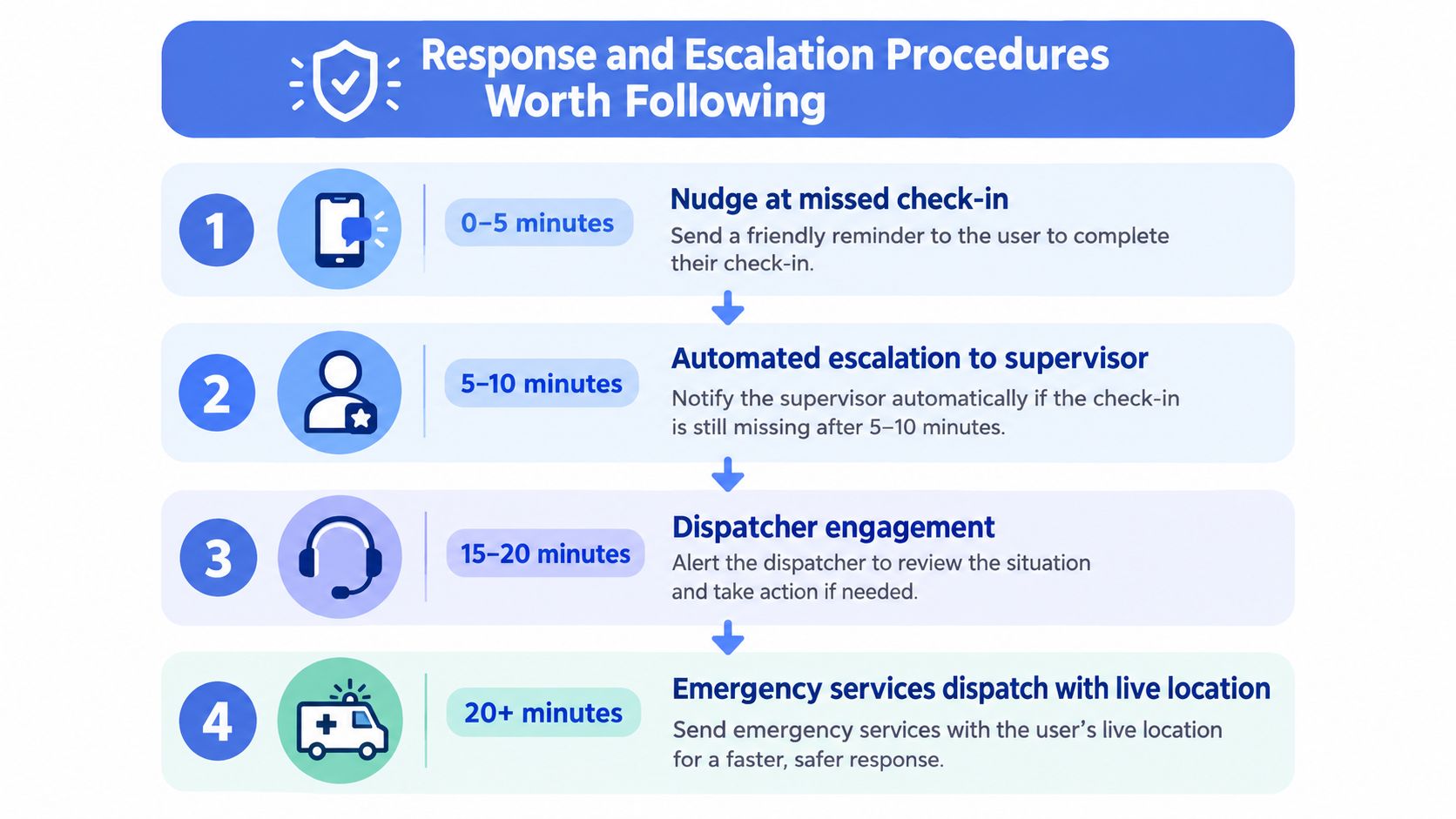
A practical flow looks like this:
- Missed check-in. Send an automated prompt or make a direct contact attempt at once.
- Short non-response window. Hand it to the supervisor or duty lead to verify the task, contact the worker directly, and check whether the risk level has changed.
- Extended non-response. Transfer control to the dispatcher or monitoring lead, confirm the last known location, contact site resources, and assess the situation against the worker’s task and known hazards.
- Confirmed or likely emergency. Call emergency services, provide location and access details, and activate internal responders.
Do not write “notify management” and leave it there. State who calls first, who can request emergency services, who opens site access, who logs the incident, and who contacts family after confirmation. Roles beat vague departments every time.
Set response times that people can actually follow
Policies get ignored when timing is fuzzy. “Respond promptly” is useless. Set hard standards.
For example, define how long a worker can be late before the system flags a missed check-in. Define how quickly the first contact attempt must happen. Define the point where the matter leaves line management and becomes a formal escalation. If your policy does not contain those thresholds, each supervisor will make up their own version under pressure.
After-hours coverage needs special treatment. As noted earlier, confirmed emergencies are not neatly confined to daytime hours. If your response chain slows down at night, on weekends, or during lone shifts with reduced staffing, your policy has a hole in it. Fix it on paper, then prove it works in practice.
Workers notice the gap between written rules and actual follow-through. Peoplesafe’s independent survey coverage reported that many lone workers had felt unsafe and that concerns often went nowhere. That failure does more than damage trust. It trains people to stay quiet, delay reporting, and avoid using the system until a situation is already worse.
Before you approve the escalation tree, clean up the contact data behind it. Stale phone numbers, missing alternates, and unclear ownership break response chains fast. Keep responder details in one maintained system, and assign someone to review it on a fixed schedule. This guide on maintaining emergency contact lists covers the basics well.
Here’s a short explainer worth using in training or supervisor briefings:
If your escalation chart has not been tested in a live drill, treat it as draft material.
Plan for broken phones and false alarms
Real incidents are messy. Your policy should say what happens when the device battery is dead, the worker is in a dead zone, the alert looks accidental, or the location data is incomplete.
Use simple rules:
- Device unreachable. Switch to location checks, site contact, route verification, and welfare action. Do not waste time repeating the same unanswered call.
- False alarm. Close it formally, record why it happened, and adjust settings, instructions, or equipment.
- Manual override. Let designated responders escalate on judgment when the system record looks normal but the context says otherwise.
A good lone worker policy does not stop at alert generation. It tells people what to do next, how fast to do it, and who owns the decision when the situation is unclear. That is what makes it a working safety control instead of a compliance file.
Training, Drills, and Manager Accountability
Most lone worker training is too polite. It tells workers what the policy says. It doesn’t force them to practice the moments that go wrong.
Train for behavior under pressure
The starter curriculum should cover four things well: situational awareness, de-escalation, device use, and self-rescue basics. Workers need to know how to arm the app or device, what triggers an alert, how to respond to prompts, when to stop work, and how to move to a safer location if they can.
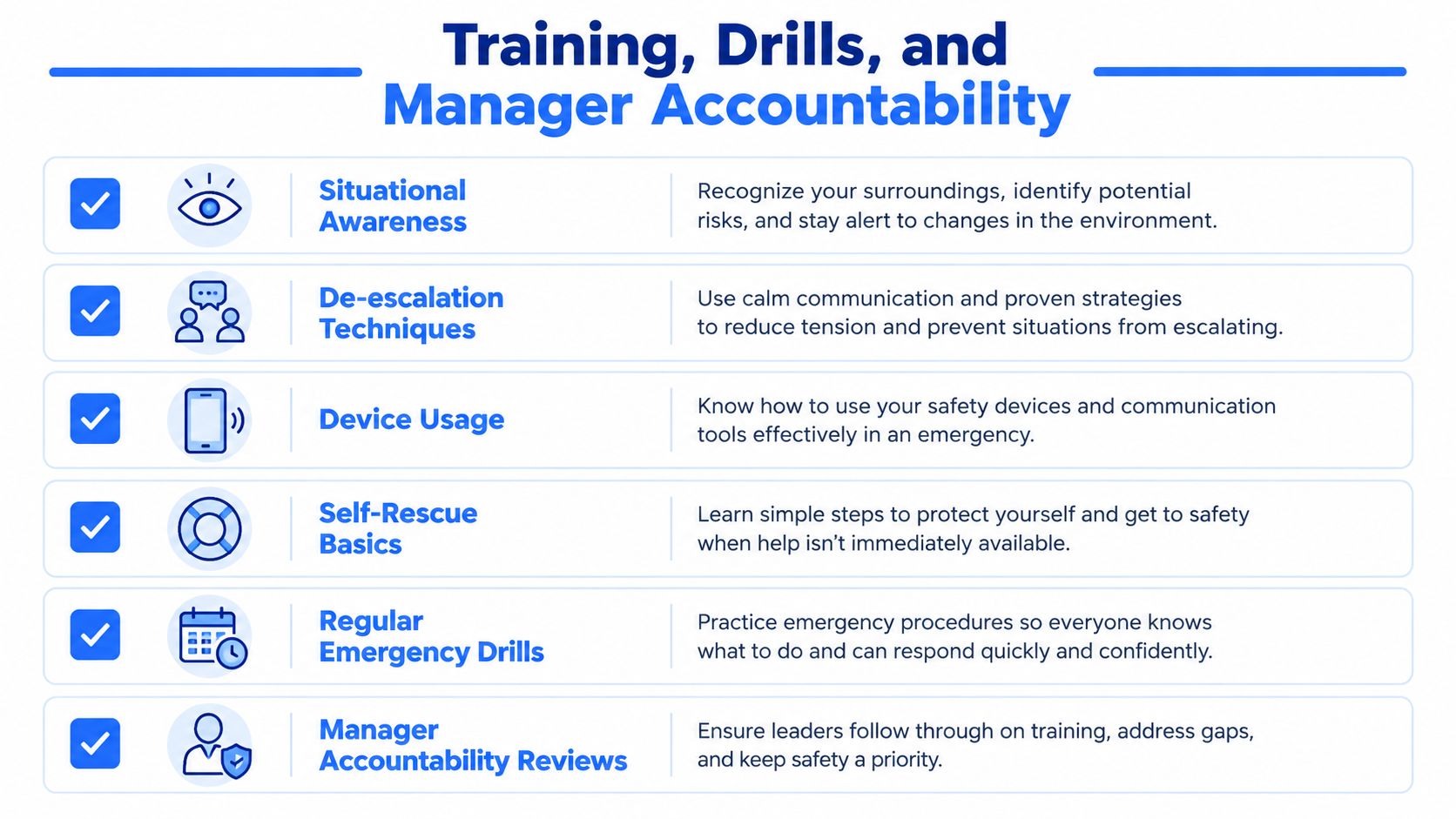
Then repeat it. Refresher training should be scheduled, not improvised after an incident. Run drills often enough that the process feels familiar, and include at least one unannounced scenario so you see how supervisors and responders behave without warning.
Managers have to carry part of the load
A lone worker policy fails fastest at manager level. Not because managers don’t care. Because they get busy and treat lone-working controls as one more admin item.
Their responsibilities should be explicit:
- Confirm monitoring status at shift start. Every lone worker. Every time.
- Review missed check-ins regularly. Patterns matter more than isolated misses.
- Own corrective action. If a worker isn’t using the method assigned in the assessment, the manager fixes it.
- Escalate policy drift. Dead batteries, bad signal zones, weak response ownership, and repeated workarounds are management problems.
Workers won’t report near-misses honestly if managers treat every report like a disciplinary event.
Psychological safety belongs here, not in a side note. If workers expect blame after reporting a failure, they’ll keep quiet until the next incident is worse. That’s not culture language. That’s operational risk.
What to track
Track training completion. Track drill performance. Track whether missed-check-in trends are improving or getting ignored. Use those as leading indicators. They show you whether the policy is being used before a serious event exposes the gap.
Turning the Policy Into a Living Safety System
A lone worker policy has to move from document control into operating discipline. That means legal duty, fatigue risk, incident learning, and worker trust all have to land in the same management rhythm.
Build habits, not annual paperwork
Fatigue belongs in the conversation now. Traditional lone-worker policies focused on isolation and violence. That’s still necessary, but it’s no longer enough. A workplace safety report covering global workers found 32% of workers were lone workers, 32% of lone workers reported an accident in 2025, and fatigue became the top concern in 2025, overtaking stress and mental health, according to the EcoOnline Workplace Safety Report. If your policy ignores fatigue, especially for night shifts, travel, and mobile roles, it’s behind the field.
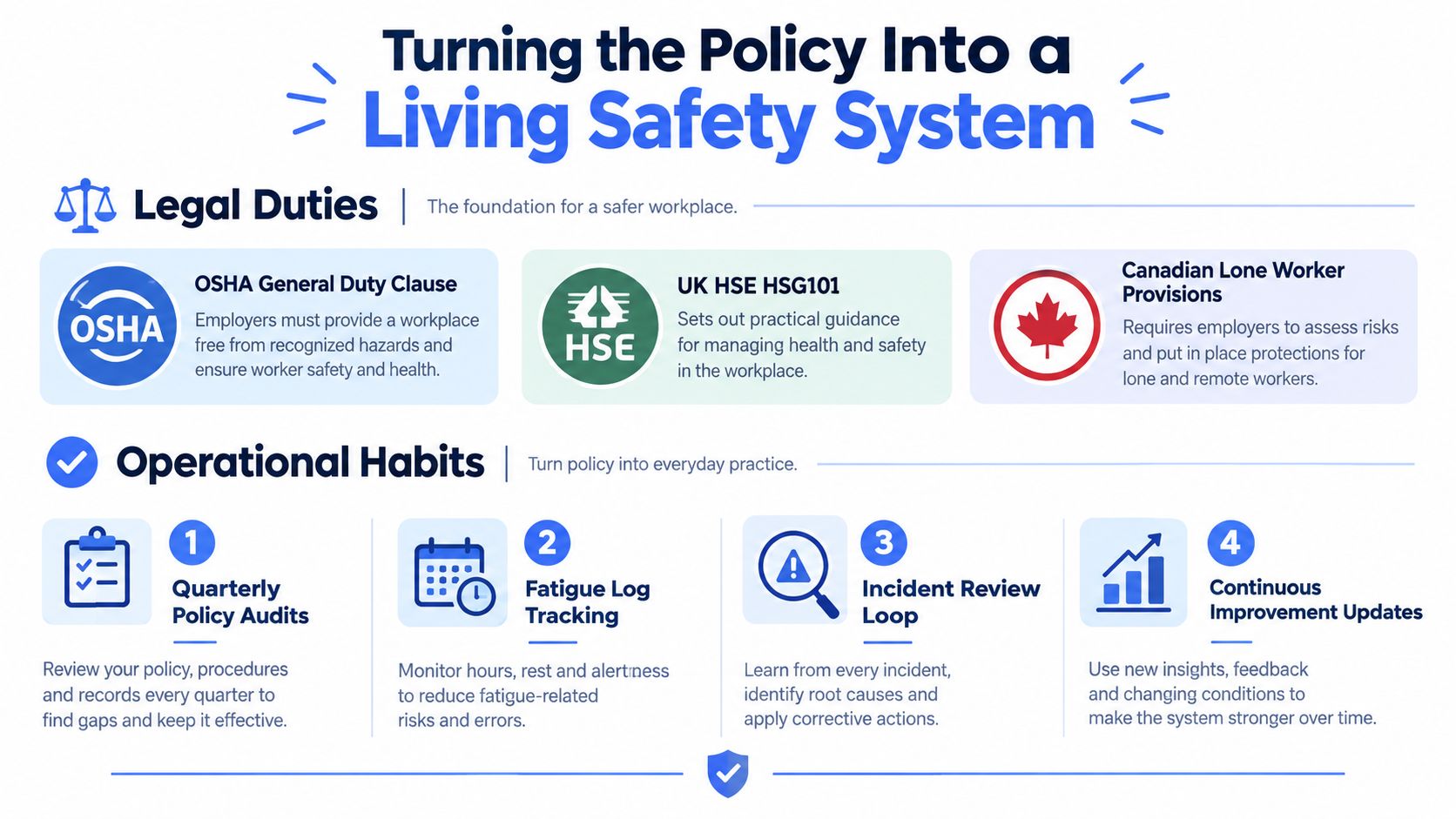
Pair the legal duty with four operating habits:
- Quarterly policy audits. Check whether the document still matches actual work patterns.
- Fatigue log review. Supervisors should review shift strain, travel load, and repeated after-hours work.
- Anonymous pulse feedback. Ask workers whether they feel safe raising concerns and whether the response process works.
- 30-60-90 day dashboard follow-through. Track check-in compliance, response time, and near-miss reporting after rollout or revision.
Measure what predicts failure
The metrics worth watching are plain:
- Time to acknowledgement
- Escalation accuracy
- Training completion
- Near-miss reporting health
- Follow-through on raised concerns
Don’t get distracted by vanity metrics. Policy sign-off rates look tidy and often tell you very little. I’d rather see a rough dashboard that proves responders answer alerts quickly than a perfect compliance report that hides field non-use.
The week-one starter list is simple:
- Name the policy owner.
- Schedule the first audit date.
- Pilot one monitoring method with one frontline team.
- Brief supervisors on escalation ownership.
- Ask workers where the policy breaks in real life.
Do that next Monday and you’re building a system. Skip it, and you’re just formatting another binder.
3rd-i offers a personal safety platform that fits the operational side of a lone worker policy, including live video, audio, location sharing, Safety Agent support, and emergency escalation through RapidSOS. If you need a way to turn check-ins, visibility, and escalation into something people can use during late shifts, travel, or isolated work, visit 3rd-i .