
Lone Worker Safety Live Monitoring Guide
A late-shift maintenance worker arrives at a quiet site, checks the job details, and starts work alone. If a fall, sudden illness, or threatening encounter leaves them unable to call for help, the key question is simple: who would notice, and what would that person do next? Live monitoring is designed to make that chain of awareness and response clearer, not to promise that every incident can be prevented.
The risk is part of a wider occupational-safety problem. The International Labour Organization estimates that about 2.93 million workers die each year from work-related accidents and diseases worldwide, and about 395 million sustain non-fatal work injuries annually (ILO global occupational-safety estimates). For a lone worker, an injury can become harder to manage when nobody is nearby to see it or summon assistance.
Table of Contents
- Why Live Oversight Matters for Lone Work
- How Live Worker Monitoring Works
- Core Signals in a Live Safety System
- Build a Live Monitoring Workflow
- Choose the Right Response for Each Scenario
- Protect Privacy While Maintaining Safety
- Deploy Live Monitoring Across Campuses and Worksites
- Verify the System Before You Rely On It
Why Live Oversight Matters for Lone Work
Consider a technician sent to inspect equipment after hours. A scheduled check-in at the end of the visit may confirm that everything went well, but it won’t reveal a problem that occurs during the task. If the worker misses that check-in, a supervisor still needs to know whether the cause is a delay, a dead phone, or an emergency.
Live oversight can narrow that uncertainty by connecting the worker’s location and communications with a person who knows how to respond. A manager might see that the worker has stopped moving near the worksite, try to make contact, and follow a pre-agreed escalation plan if there’s no reply. That doesn’t guarantee rescue or replace safe work practices. It gives people a defined way to notice a missing signal and act.
The need isn’t limited to industrial sites. In the United States, OSHA recorded 5,283 fatal workplace injuries in 2023, including 740 deaths caused by violent acts. Working alone or in isolated areas is among the factors OSHA identifies as increasing exposure to workplace violence, with risks relevant to roles such as delivery drivers, healthcare workers, and public-facing employees (OSHA workplace violence guidance).
Practical rule: Monitoring should support a risk assessment, not stand in for it. Identify hazards, choose controls, record the plan, and review it as work conditions change.
A live-safety service is one control among others: training, safer procedures, suitable equipment, and emergency plans still matter. The central problem it addresses is the gap between an incident happening and another person learning that help may be needed. Employers weighing tools can compare these lone worker safety app options or start from 3rd-i’s lone worker safety program.
How Live Worker Monitoring Works
Live worker safety monitoring is an active safety channel. It can bring together video, audio, location, two-way communication, and a defined escalation path so that a person can interpret what’s happening instead of receiving only a pin on a map or a generic alert.
Think of the process like a relay race. The worker supplies the first signal by starting a session, responding to a check-in, or activating SOS. A chosen watcher stays aware of the trip or task. If something looks wrong, a trained Safety Agent can assess the situation and communicate with the worker. Emergency services are the next stage when the situation meets the organization’s escalation criteria or the worker needs immediate help.
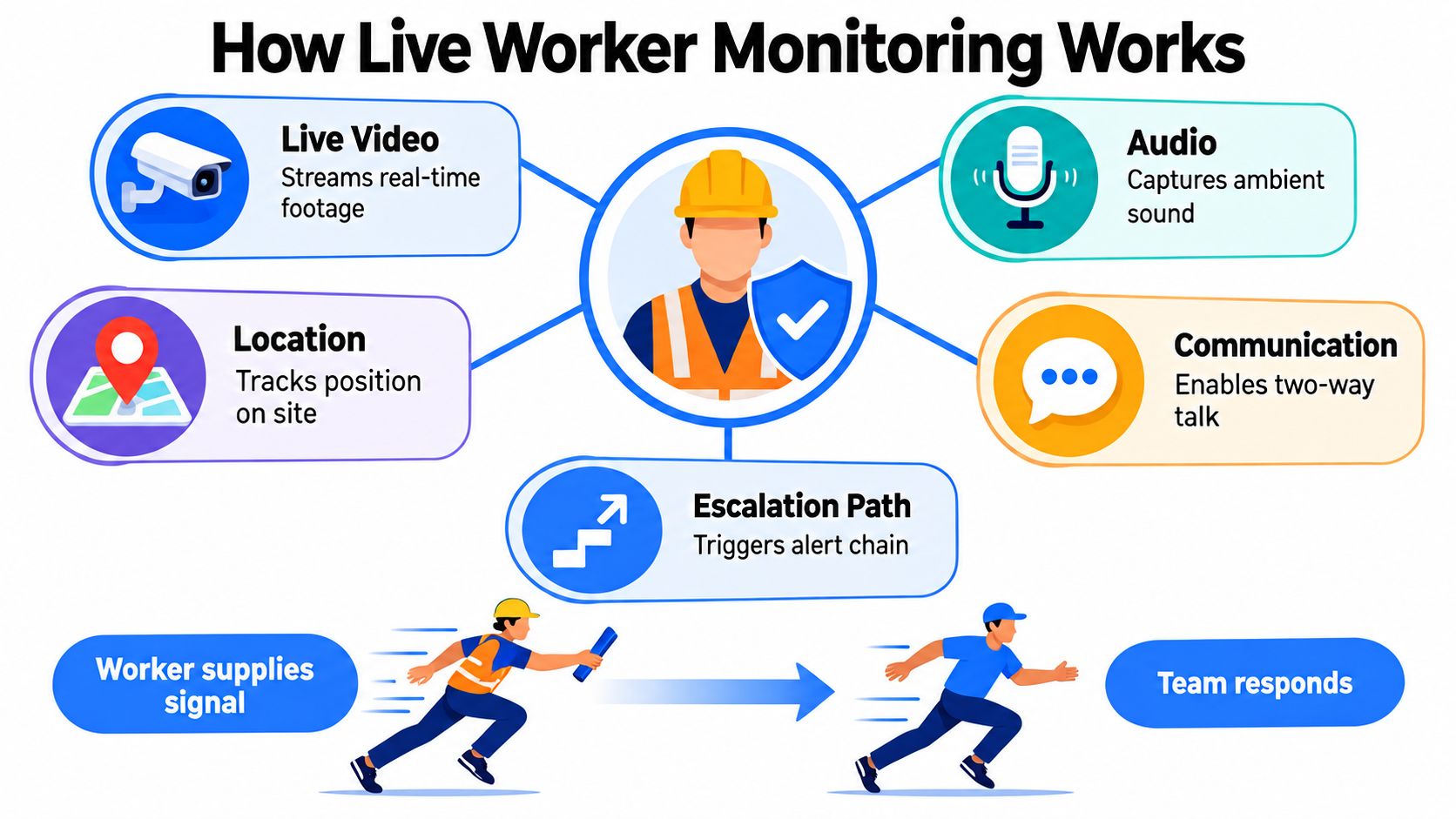
That relay differs from passive tracking. A location record can show where a phone was, but it doesn’t confirm that anyone is watching, knows the worker’s task, or is authorized to act. In a live workflow, each role has a job: the worker shares signals, the watcher checks progress, and the Safety Agent handles concern or escalation according to the service’s procedures.
Three states, three different responses
A useful workflow distinguishes routine monitoring, concern, and confirmed emergency. During routine monitoring, the worker is following the plan and check-ins are arriving as expected. A missed signal moves the situation into concern: the watcher attempts contact and follows the agreed time limits. A confirmed emergency calls for action under the escalation plan, which may include contacting emergency services.
Not every alert should trigger the same response. A missed end-of-task confirmation may first call for a check-in, while an SOS or clear sign of immediate danger may require urgent escalation. A live stream can help provide context, but monitoring is not the same as emergency response. If immediate help is required, the worker or watcher should contact emergency services through the available route. For teams managing connected devices in public or shared spaces, how venue WiFi content filtering works offers related context on how network controls can shape access to online services.
Core Signals in a Live Safety System
A live safety system is useful when its signals answer practical questions. Video may show what’s happening around a worker. Audio can help clarify whether they can speak or need assistance. A route can indicate whether someone is progressing toward the expected destination. Direct interaction lets a watcher check in rather than infer too much from data alone.
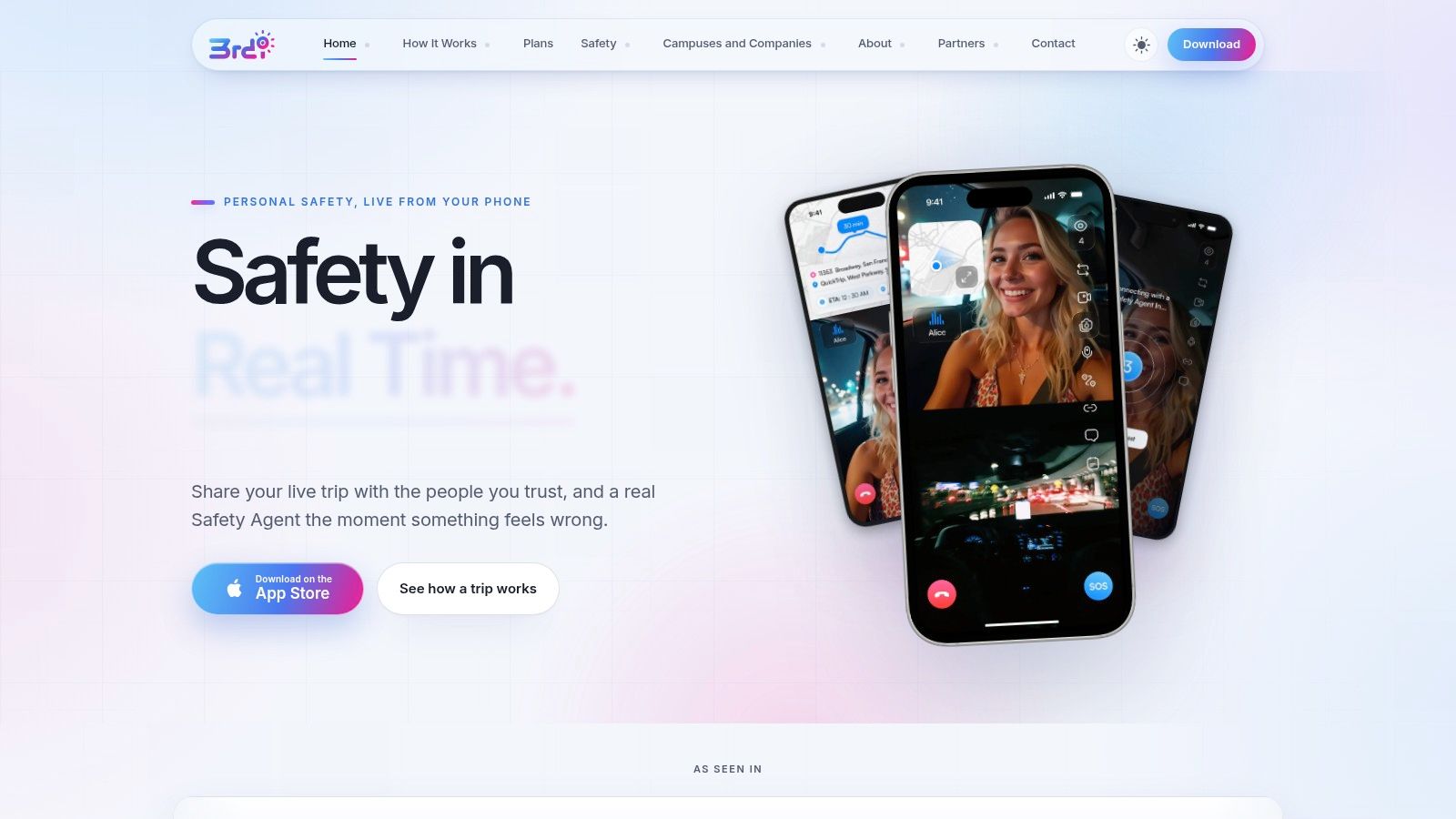
For example, 3rd-i’s iOS Go Live workflow can stream front and rear camera views, audio, and a live route. Selected watchers can view the route and video together, with the squad’s watcher count visible. That combination can help a watcher distinguish “the worker is still moving along the planned route” from “the worker has stopped and may need a check-in.” It doesn’t prove that the worker is safe, nor can a camera show everything outside its field of view.
Signals should support decisions
- Video and audio: A live view may help a watcher understand the immediate surroundings or hear the worker’s response. It can’t establish every detail of an incident, and it shouldn’t be treated as a substitute for trained judgment.
- Route and location: A route helps watchers track progress and can give responders a starting point. Location alone may not identify the right doorway or access point.
- Direct interaction: One-tap Nudges such as “You good?” and simple responses can reduce the need to type while walking. Critical Alerts can notify selected contacts even when a phone is set to Do Not Disturb, and Lock Screen access can make Go Live or SOS easier to reach.
- Movement and exceptions: Movement detection prompts can support a planned check-in routine. If no response arrives, the watcher needs a clear next step, not just a notification.
- Responder access: An Emergency Entry Pin can help guide responders toward a suitable entrance. Ghost mode offers temporary visibility control, so its use should be understood by the worker and watcher before a session begins.
Features only help when people know what they mean and how to act on them. A camera view can clarify a scene; a watcher still needs authority, training, and a reliable escalation procedure.
Build a Live Monitoring Workflow
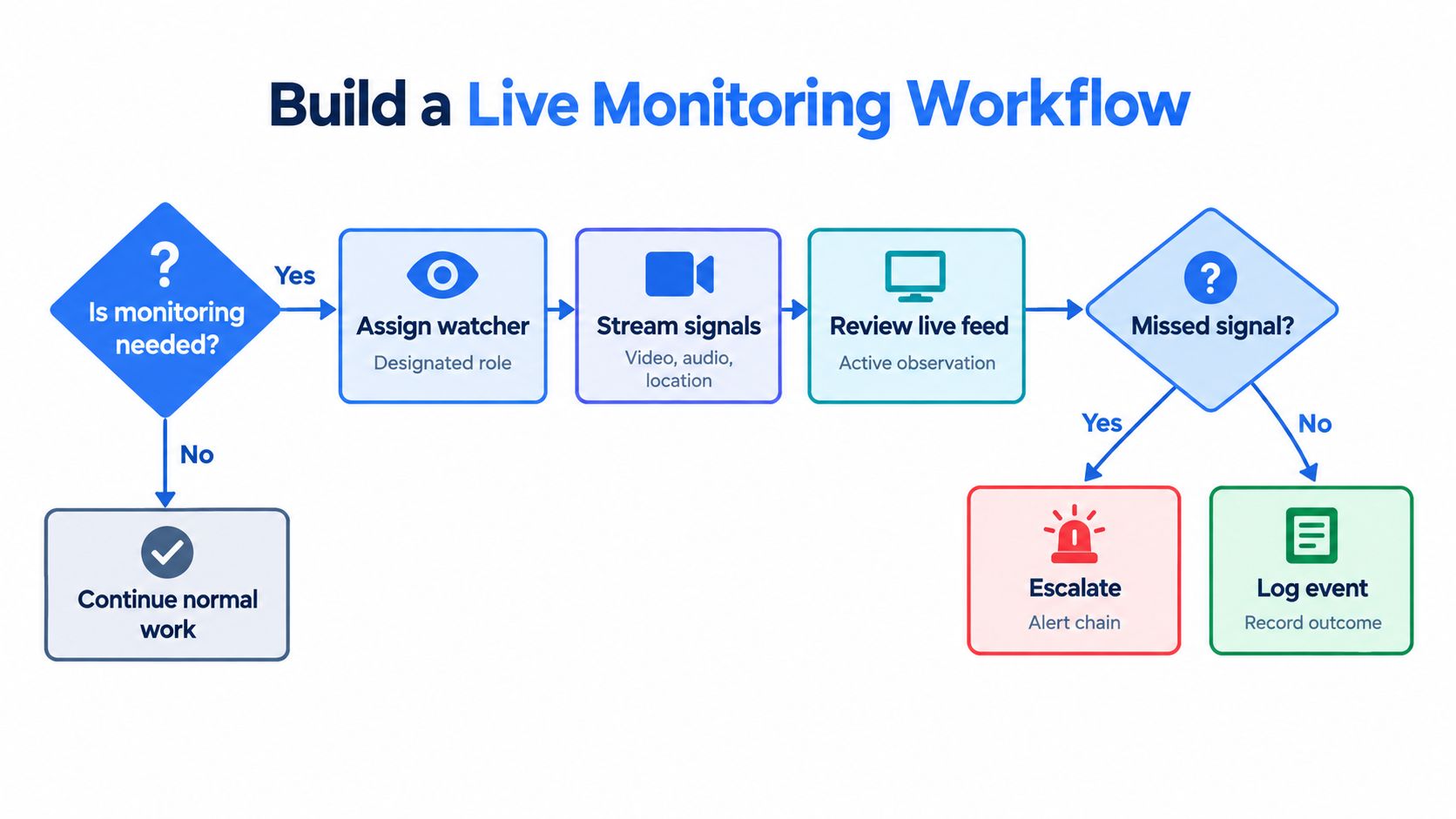
A safety app becomes a control only when an organization decides when to use it, who watches, and what happens when a signal is missed. Start with the task and its hazards, then choose the monitoring level and define who can take each action.
Set the plan before work starts
- Decide when monitoring is needed. Use the risk assessment to identify the work, travel, or shift conditions that call for live oversight. Decide who’s allowed to watch and what context they need, including the worker’s identity, task, route, and callback channel.
- Name the watcher and backup. A monitoring plan needs a person responsible for noticing concerns, not just a list of people who could receive alerts. Define who takes over if the primary watcher is unavailable.
- Set contact expectations. Choose scheduled check-ins based on task risk and specify what counts as a missed signal. UK government guidance recommends a documented risk-assessment process and notes that monitoring commonly relies on effective communication and regular contact. It also identifies automatic warnings when expected signals aren’t received as an appropriate control (UK lone-working guidance).
Move from signal to response
When the worker starts a session, selected contacts can receive the live route and video. A watcher may send a one-tap Nudge, such as a quick check-in, and record whether the worker responds. If a check-in is missed, the watcher follows the agreed contact and escalation steps within the defined time limits.
An SOS can connect the worker to a Safety Agent, who can assess the situation and, when appropriate, escalate to 911 through RapidSOS. Emergency for a Friend lets someone seek help on another person’s behalf. Neither feature makes the app a replacement for calling emergency services when immediate help is needed.
After an incident, recordings, transcripts, and AI summaries may support documentation and review. They don’t replace a supervisor’s assessment of what happened. Keep timestamps, attempted contacts, acknowledgements, and escalation decisions so the organization can confirm how the workflow operated and improve it after incidents or near misses.
Choose the Right Response for Each Scenario
The right level of monitoring depends on what’s uncertain and who can act if the plan goes off course. A short walk across a familiar campus doesn’t necessarily need the same setup as an isolated site visit or a late-night rideshare. More monitoring isn’t automatically better. The useful question is whether the chosen signals and responders fit the actual risk.
| Scenario | Main uncertainty | Useful signals | Human and escalation role |
|---|---|---|---|
| Late walk to a car or residence | Has the person reached the destination, and can they ask for help? | Short live session, route visibility, one-tap check-in | Trusted contact watches; Safety Agent support can be available if included in the plan |
| Rideshare trip | Is the journey progressing as expected, and what’s happening inside or around the vehicle? | Live route, front and rear camera views, audio | Selected watcher checks progress; Safety Agent can assess an SOS and escalate when appropriate |
| Isolated worksite task | Has the worker completed the task or missed a check-in? | Scheduled contact, location, automatic warning for a missed signal | Named supervisor attempts contact and follows the documented escalation path |
| Public-facing visit | Can the worker summon help if an interaction becomes threatening? | SOS, Critical Alerts, direct communication, location | Designated contact or Safety Agent assesses the signal and acts under the agreed protocol |
For campus and employer programs, centrally issued seats and pooled minutes can support different groups without requiring every worker to have an identical routine. Coverage might be assigned to late walks, night shifts, lone duties, or travel, with the workflow adjusted to each group’s needs. A worker doing routine office work after hours may need a different check-in plan than a person visiting clients alone.
A risk-based approach helps organizations match oversight to the task. The risk-based monitoring approach is useful context for setting that level without treating every worker or journey as equally risky. Whatever the setup, human authorization and working communications remain central. A route that looks unusual may call for a question, not an automatic emergency dispatch.
Protect Privacy While Maintaining Safety
More monitoring doesn’t automatically mean more safety. Live video and location can help people understand an incident, but they also create sensitive records and expose a worker’s movements. A system that workers don’t trust may go unused or may encourage them to avoid activating it when it matters.
Before rollout, answer the questions people will ask: Who can view a live stream? Are recordings or transcripts retained, and for how long? Can a worker withdraw consent? Does monitoring stop when the shift or journey ends? How are accounts protected if a device or login is compromised?
Make the rules visible
- Limit the purpose. Explain that monitoring supports safety during defined work or travel, not continuous productivity tracking.
- Assign access by role. A watcher may need live visibility during a session, while a manager reviewing an incident may need access only to specific records. Keep an access log.
- Set retention rules. Decide what is saved, who can retrieve it, and when it should be deleted. Keep only what the safety and documentation process requires.
- Make consent understandable. Tell workers when a stream starts, who can see it, how to end it, and how to raise concerns. Include worker input when setting the rules.
- Define off-duty boundaries. Don’t let duty-of-care access extend to personal time. Ghost mode can provide temporary visibility control, but it should be a clear part of the policy rather than a workaround for unclear access rules.
The balance matters because privacy concerns, employee resistance, and implementation cost have been identified as barriers to adopting lone-worker monitoring. A 2025 safety presentation also notes that injury rates for lone workers remain largely unknown, so organizations shouldn’t assume that more surveillance always produces proportionate safety gains (2025 lone-worker safety presentation). For a broader discussion of the trade-offs involved, employee monitoring software benefits and drawbacks provides useful context.
Trust depends on enforceable rules, not just reassuring language. The employee safety monitoring approach can be assessed against clear access controls, worker participation, and a defined boundary between safety oversight and performance management.
Deploy Live Monitoring Across Campuses and Worksites
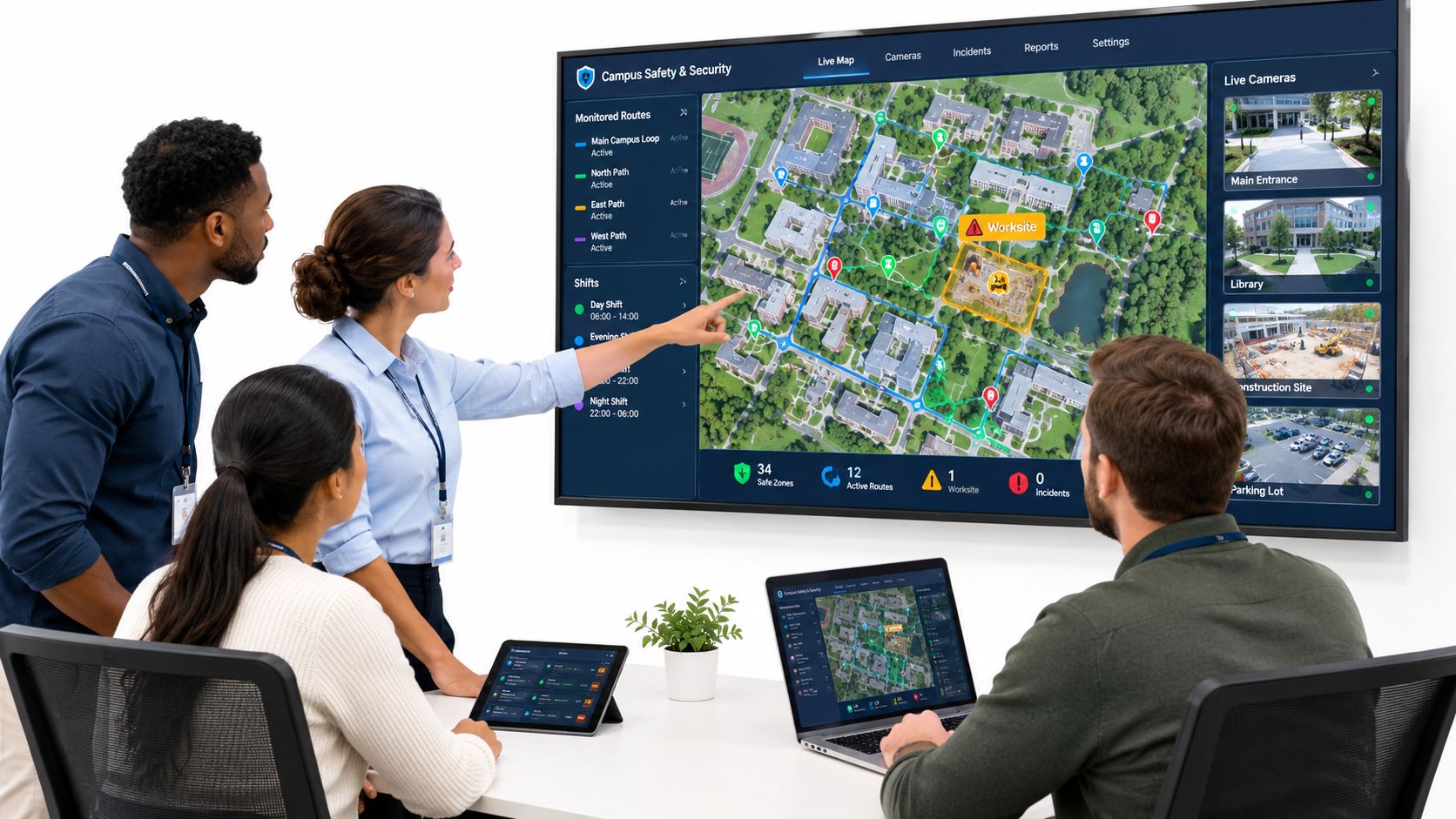
A campus or company rollout should begin with the work, not the app. A safety team can first map which roles, shifts, routes, and locations involve isolation or delayed access to help. That assessment helps determine who needs monitoring, which signals matter, and who should respond.
Roll out in stages
- Map tasks and hazards. Identify lone duties, late shifts, campus walks, client visits, and travel routes. Decide whether a task needs scheduled contact, live oversight, or a different control.
- Assign roles and authority. Name authorized watchers, backups, and Safety Agent procedures. Make clear who may contact the worker, who handles a missed signal, and who can request emergency assistance.
- Write the escalation plan. Set contact intervals and missed-contact rules. Include the worker’s identity, callback details, route context, and access instructions so responders aren’t left with a location pin and no way to find the right entrance.
- Test before relying on it. Check permissions, battery endurance, notification delivery, connectivity loss, watcher handoffs, and escalation under realistic conditions. A test should reveal what happens when a signal stops, not merely confirm that the app launches.
Make coverage workable
Centrally issued seats and pooled minutes can support campus and workplace groups with different schedules. Teams can tailor coverage for late walks, night shifts, lone work, and rideshares, then train workers and watchers on session start, check-ins, SOS, privacy settings, and handoffs. A campus safety app workflow can be considered alongside local procedures, emergency contacts, and the campus’s own response authority.
Deployment isn’t finished when the technology is issued. Review incidents and near misses with workers and supervisors, check whether the escalation path worked as intended, and update the risk assessment when routes, tasks, or staffing change. This keeps monitoring tied to real conditions rather than leaving a static setup in place after the work has changed.
Verify the System Before You Rely On It
A feature list can look reassuring without proving that a safety workflow will function during a real problem. Test the entire chain, from the worker’s first signal to the person authorized to act. If one handoff is unclear, the system may produce information without producing a useful response.
Use these questions as a practical acceptance check:
- Can the worker and watcher see the live route and video together? Confirm what each view does and what it can’t show.
- Can you identify the active watcher? The worker should know who’s monitoring, and the watcher should know what task or journey is underway.
- Can the worker communicate quickly? Try the one-tap options and SOS before a real trip or shift.
- Does a trained human receive and assess an alert? Confirm who handles concern, how they contact the worker, and what authorizes escalation.
- Can the workflow reach emergency dispatch when appropriate? Make clear that the app isn’t a substitute for calling emergency services if immediate help is required.
- Are failures visible? Test what happens when connectivity drops, a notification doesn’t arrive, or a watcher becomes unavailable.
- Are records and privacy rules clear? Check what gets recorded, who can access it, how long it’s kept, and how a worker controls visibility.
For an individual or family, run a test session before relying on monitoring during a journey, and confirm who can act if a check-in is missed. For organizations, include workers in testing and review near misses so procedures keep pace with the risks. Trustworthy live monitoring combines working technology, trained people, clear authority, and disciplined follow-up.
3rd-i offers an app that shares live video, audio, and location with selected contacts and trained Safety Agents, with emergency escalation to 911 through RapidSOS when appropriate. Explore how it could fit your lone-worker or personal-safety procedures by visiting 3rd-i for organizations.