
Live Remote Video Monitoring for Safety
A parent waits for a message that says “I’m home.” A student is walking from a late class to a rideshare pickup point. A lone worker leaves a building after the rest of the team has gone. In each situation, a location pin can show where someone is, but it can’t show whether the route is safe, whether the person is being followed, or whether a small problem is becoming an emergency.
Live remote video monitoring adds that missing context. Instead of relying only on a past recording or a delayed check-in, a person can share live video, audio, and location with trusted contacts or trained monitoring staff. The purpose isn’t to watch people unnecessarily. It’s to help someone understand what’s happening while it’s still possible to communicate, verify risk, and request appropriate assistance.
Table of Contents
- The Evolution of Personal Safety Monitoring
- How Live Streaming and Monitoring Systems Work
- Navigating Latency and Bandwidth Constraints
- Comparing Static Surveillance and Dynamic Oversight
- Balancing Privacy Controls with Emergency Response
- Overcoming Alert Fatigue with Human Verification
- Deploying Monitoring for Campuses and Lone Workers
The Evolution of Personal Safety Monitoring
For years, personal safety tools have focused on alerts, GPS, and messaging. Those tools remain useful, but each has a blind spot. A location service can show that someone has stopped moving. A check-in can confirm that a message was sent. Neither necessarily explains what caused the change.
Consider a student leaving a library late at night. Their parent sees the route on a map and notices that the phone has paused near a parking structure. The parent can send a message, but the student may not be able to answer while carrying equipment, crossing a road, or dealing with an uncomfortable interaction. A live view could reveal whether the student is waiting for a rideshare, has taken a wrong turn, or needs immediate help.
That distinction matters because safety incidents develop in context. A raised voice, a blocked exit, an unfamiliar person following at a distance, or a sudden change in direction may not trigger a conventional emergency alert. Human watchers who can see and hear the situation have more information than a map marker alone.
From location sharing to active oversight
Traditional surveillance usually protects a fixed place. A camera watches a doorway, corridor, parking lot, or reception desk. That coverage can help after an incident, but it may not follow someone beyond the camera’s field of view.
Personal monitoring moves the point of observation with the person. The route, live stream, and communication channel stay connected as the user travels between buildings, enters a vehicle, or crosses an area without installed cameras. This is the practical distinction described by real-time safety monitoring, where observation supports intervention rather than merely documenting events.
Practical rule: A safety system should answer two questions at once: “Where is the person?” and “What is happening around them?”
That doesn’t mean every trip requires continuous professional attention. A user might share a stream only during a late walk, a rideshare journey, or a shift in an isolated area. Selected contacts can watch when appropriate, while trained Safety Agents can support situations where family members or colleagues may not know how to assess the risk.
The strongest systems also reduce the need for complicated texting. A watcher can send a quick prompt, the user can respond with a tap, and an emergency workflow can escalate when the situation calls for it. This creates a bridge between a person who may be under pressure and people who can help, without asking the person to compose a detailed explanation at the worst possible moment.
How Live Streaming and Monitoring Systems Work
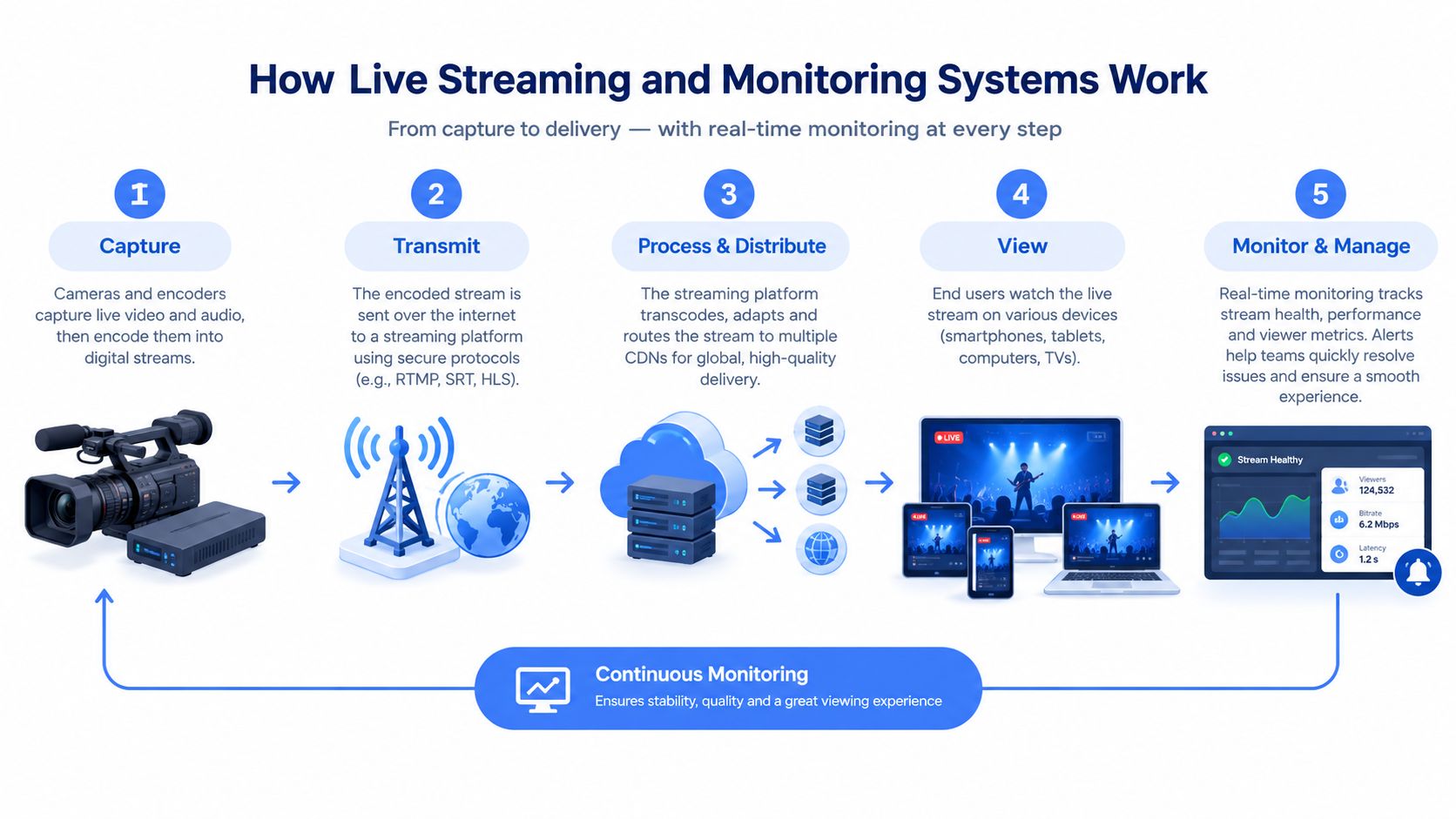
A live remote video monitoring system is easier to understand as a sequence of connected jobs. The phone or camera captures the environment, the network carries the stream, the platform distributes it to approved viewers, and a person or system interprets what appears on screen.
Stage one is capture
A mobile safety app can use the phone’s front and rear cameras, microphone, location services, and screen controls. Dual-camera streaming can provide a view of the person’s surroundings while preserving a view of their face or immediate interaction. Picture-in-picture helps watchers understand both perspectives without switching manually between feeds.
Audio adds another layer. A watcher may hear a concern before the camera shows it clearly, while the user may need to speak without stopping to type. Because sound can contain private information, the system should make sharing visible and require clear user control.
Stage two is secure transmission
The phone compresses the video and sends it through a cellular or Wi-Fi connection. The platform must keep the stream stable while also protecting access, because a live feed can contain faces, voices, addresses, travel patterns, and other sensitive details.
The user then chooses who can view the session. That may include family members, colleagues, campus personnel, or trained Safety Agents. A live route shown beside the video reduces ambiguity. A watcher doesn’t have to interpret a moving dot separately from a video feed and guess whether both refer to the same moment.
Stage three is distribution and interaction
Approved watchers can receive the stream in one shared view. Some systems support a visible watcher count, quick nudges such as “You good?” and request-to-speak controls. With approval, a watcher can join the audio rather than sending a message that the user may not see.
For people who need accessible communication, iScribe Live Transcribe captions can provide useful context about real-time speech. Captions don’t replace careful monitoring, but they can support watchers who have difficulty hearing audio or who need text alongside a live conversation.
Stage four is human interpretation
Automation can identify movement, route changes, or other configured signals. It can’t reliably understand every social and environmental situation by itself. A trained Safety Agent can compare the live picture with the route, speak with the user, contact a designated person, and follow an agreed escalation process.
This human-in-the-loop model is the central difference between a live stream and a recording system. The technology carries the information, but a person applies judgment when the situation is unclear.
A live video streaming app can therefore function as more than a camera utility. It becomes a communication and response layer, provided the user understands what is being shared, the watcher is available, and the escalation rules have been tested before an emergency occurs.
Navigating Latency and Bandwidth Constraints
Live video is useful only if it arrives while the event is still unfolding. A delayed feed may still help someone verify what happened, but it can weaken the chance of speaking to a person, warning them, or directing assistance in time.
Latency changes the meaning of “live”
End-to-end latency is the time between an event occurring in front of the camera and that event appearing for the watcher. It includes capture, encoding, network travel, processing, distribution, and playback. A stream that looks live on the user’s phone can still be delayed for the person watching remotely.
Technical guidance describes under 200 milliseconds as a target for local real-time viewing, while ultra-low latency under one second is preferred for high-security environments. The same overview reports average remote CCTV access latency of about 1.7 seconds over 4G, which can still qualify as near-real-time but may shift a watcher from immediate intervention toward delayed verification. These figures and the operational implications are discussed in remote video monitoring latency guidance.
The number that matters during procurement isn’t the best result in a quiet test. Campus and workplace teams should measure delay during peak network load, with the intended camera settings, devices, and viewer count. Jitter and processing queues can add unpredictable pauses even when the average delay seems acceptable.
Test the complete path, not just the connection speed. A stable route with predictable delay is more valuable for emergency communication than a fast connection that regularly buffers.
Upload capacity is a continuous requirement
Video creates a sustained upstream workload. It isn’t like loading a webpage, where data arrives in short bursts and then stops. A continuous 1080p stream typically needs a few Mbps of upload capacity, while a single 4K stream can consume roughly 12 to 15 Mbps continuously, according to remote camera bandwidth guidance.
At larger scale, the demand grows quickly. A 100-camera 4K deployment can require 1.2 to 1.5 Gbps before live viewing or playback is included. Edge processing and event-based transmission can reduce aggregate traffic to 50 to 150 Mbps in some architectures, because the network carries selected video and metadata rather than every full-resolution stream.
Insufficient upload headroom causes frame drops, buffering, and gaps in situational awareness. A practical design rule is to provide at least 20% headroom above expected per-stream needs, then test the result during realistic operating conditions. Teams can also move noncritical analytics to edge devices and reserve network capacity for actionable video.
For readers troubleshooting broader real-time communications, the guide on how to improve Teams call quality offers relevant context about latency, congestion, and connection stability. The same network principles apply to safety streams, but safety deployments require more deliberate testing and escalation planning.
A multiple-camera streaming setup also needs careful prioritization. More views can improve context, but unnecessary feeds can consume capacity and distract watchers. Select the views that help answer a safety question, then tune resolution and transmission rules around that purpose.
Comparing Static Surveillance and Dynamic Oversight
A fixed camera and a mobile safety stream serve different jobs. Static CCTV is tied to a location. Dynamic personal monitoring is tied to a person’s movement and immediate circumstances.
A camera above a campus entrance may show who entered the building. It won’t necessarily show what happens after the person crosses the quad. A mobile stream can continue through that route, but it depends on the user’s device, network connection, consent, and willingness to activate it.
| Feature | Static CCTV | Dynamic Personal Monitoring |
|---|---|---|
| Primary viewpoint | A fixed area such as a doorway or corridor | The user’s surroundings as they move |
| Coverage | Limited to camera placement and field of view | Travels with the person during an active session |
| Context | Shows activity near the camera | Combines video, audio, route, and communication |
| Typical review | Often reviewed after an incident | Can support verification while an event unfolds |
| Response model | May trigger an alarm or preserve footage | Can connect watchers, Safety Agents, and escalation workflows |
| Privacy control | Managed through camera placement and access rules | Activated and controlled by the person being monitored |
| Main limitation | Blind spots outside the camera view | Device, battery, connectivity, and user activation |
Where fixed cameras remain valuable
Static systems are well suited to entrances, restricted rooms, vehicle gates, and other places that need consistent observation. They can support access control, incident review, and environmental awareness across a property. They also don’t require a person to carry or activate a device.
An IP camera review, such as Monro Cloud’s assessment of a Reolink security camera, can help buyers compare fixed-camera capabilities. That type of equipment may be appropriate for a building perimeter, but it shouldn’t be treated as a substitute for mobile oversight when the risk follows a person beyond the property.
Evidence that observation can reduce incidents
Structured healthcare environments show why active observation can matter. In one multi-hospital study, inpatient falls declined from 8.83 to 5.53 per 1,000 admissions, a 37% reduction, while injurious falls declined from 2.52 to 0.55 per 1,000 admissions, a 78% reduction. The study also found that unplanned bed exits with the highest-risk unsafe-behavior indicator declined from 0.84 to 0.09 per day, an 89% decrease, in hospitals using mobile monitoring systems with real-time intervention. The findings are reported in the multi-hospital video monitoring study.
These outcomes don’t mean every campus or family will see the same result. They do show the broader principle: observation becomes more useful when people can act on what they see before a harmful event is complete.
A separate hospital reported a fall rate of 6.34 per 1,000 patient-days before implementation and 5.099 per 1,000 patient-days after a year of video monitoring. Another program monitored 448 patients over 20 months and recorded 7,037 adverse events avoided, equal to 1,198 adverse events avoided per 1,000 monitored patient-days. Those figures appear in the remote video monitoring market overview. They describe healthcare workflows, not personal safety guarantees, but they illustrate how live observation can operate at meaningful scale.
Balancing Privacy Controls with Emergency Response
Parents and campus leaders often ask a reasonable question: who can see the stream, and what happens to the footage afterward? A responsible deployment answers those questions before the first session begins, not after an incident has created pressure to share everything.
Privacy starts with purpose limitation. Decide whether the system supports a late walk, a lone-worker shift, a rideshare journey, or a defined emergency workflow. Avoid collecting more video, audio, location, or identity information than the purpose requires.
Controls should be visible to the user
The person being monitored should know when sharing starts, who can view it, and how to stop or pause it. A temporary privacy control such as Ghost mode can allow someone to go off the map when they don’t need location visibility, while preserving the ability to activate an emergency workflow when necessary.
Consent also needs to reflect the environment. A university may need different rules for students, staff, visitors, and contractors. An employer should explain monitoring expectations to lone workers and distinguish voluntary personal safety use from workplace requirements.
Retention is part of the safety design
A live feed can create sensitive records even when nobody intends to save them. Administrators should define:
- Who can access recordings: Limit viewing and downloading to named roles with a legitimate need.
- How long footage is retained: Set a documented period based on incident handling, legal obligations, and operational purpose.
- What happens to identities: Ask whether faces, names, transcripts, and locations enter the monitoring pipeline.
- How footage is protected: Require appropriate access controls, encryption, audit trails, and secure deletion.
- Where cameras point: Keep the frame focused on relevant surroundings and avoid private spaces.
Independent coverage of remote monitoring emphasizes asking providers what they retain, whether identity is part of the process, and how footage is secured. Broader security guidance also highlights camera placement, signage, encryption, privacy compliance, and retention policies as areas that buyers often underestimate. The useful lesson is simple: a safety stream needs a privacy policy as carefully as it needs a network plan.
Emergency access must remain deliberate. A system may deliver live context and location to emergency dispatch through an integration such as RapidSOS, but that path should be tested, documented, and presented as support for emergency services, not as a replacement for calling them. An Emergency Entry Pin can help responders identify the closest entrance without requiring a distressed person to explain the entire site layout.
Privacy and emergency response aren’t opposing goals. Clear consent, limited retention, and deliberate escalation rules make both more credible.
Overcoming Alert Fatigue with Human Verification
A safety platform that sends every uncertain movement to a parent, campus officer, or emergency dispatcher can create its own risk. People begin ignoring notifications, operators spend time on harmless activity, and genuinely urgent alerts compete with noise.
The scale of the false-alarm problem explains why verification matters. Industry reporting estimates that 94% to 99% of alarm activations are false and that false alarms consume approximately $1.8 billion each year in emergency-response resources. These figures are presented in security alarm and video monitoring coverage. Any deployment that promises instant escalation should explain how it filters uncertainty before notifying emergency services.
Verification adds judgment
A trained Safety Agent can review the live image, listen to available audio, compare the stream with location and route information, and attempt to communicate with the user. If the user confirms danger, fails to respond in a concerning situation, or the visual evidence indicates an immediate threat, the agent can follow the predefined escalation process.
That workflow is more useful than an automated alarm that treats every movement as equivalent. A person dropping a phone, entering a dark area, stopping to speak with a friend, and being physically threatened may all produce unusual movement. Context determines the response.
Human verification also supports the people receiving alerts. A parent may be worried but unsure whether to call campus security or emergency services. A Safety Agent can gather relevant information, communicate with the user, and pass clearer context to responders.
Documentation should support recovery
The response doesn’t end when the immediate danger passes. Automatic recording, transcription, and AI-generated summaries can help preserve an account of the event for follow-up, provided the organization applies appropriate access and retention controls.
A transcript can make a difficult conversation searchable. A summary can help a campus team record when a session began, what escalation occurred, and which contacts were notified. These tools should assist trained reviewers, not create unsupported conclusions or replace the original recording.
The strongest operating model is therefore layered:
- Detection identifies a possible concern.
- A human verifies the available context.
- The agent communicates with the user or designated contact.
- The response follows documented escalation rules.
- The organization preserves only the records it legitimately needs.
That sequence turns raw video into actionable information without treating every alert as an emergency.
Deploying Monitoring for Campuses and Lone Workers
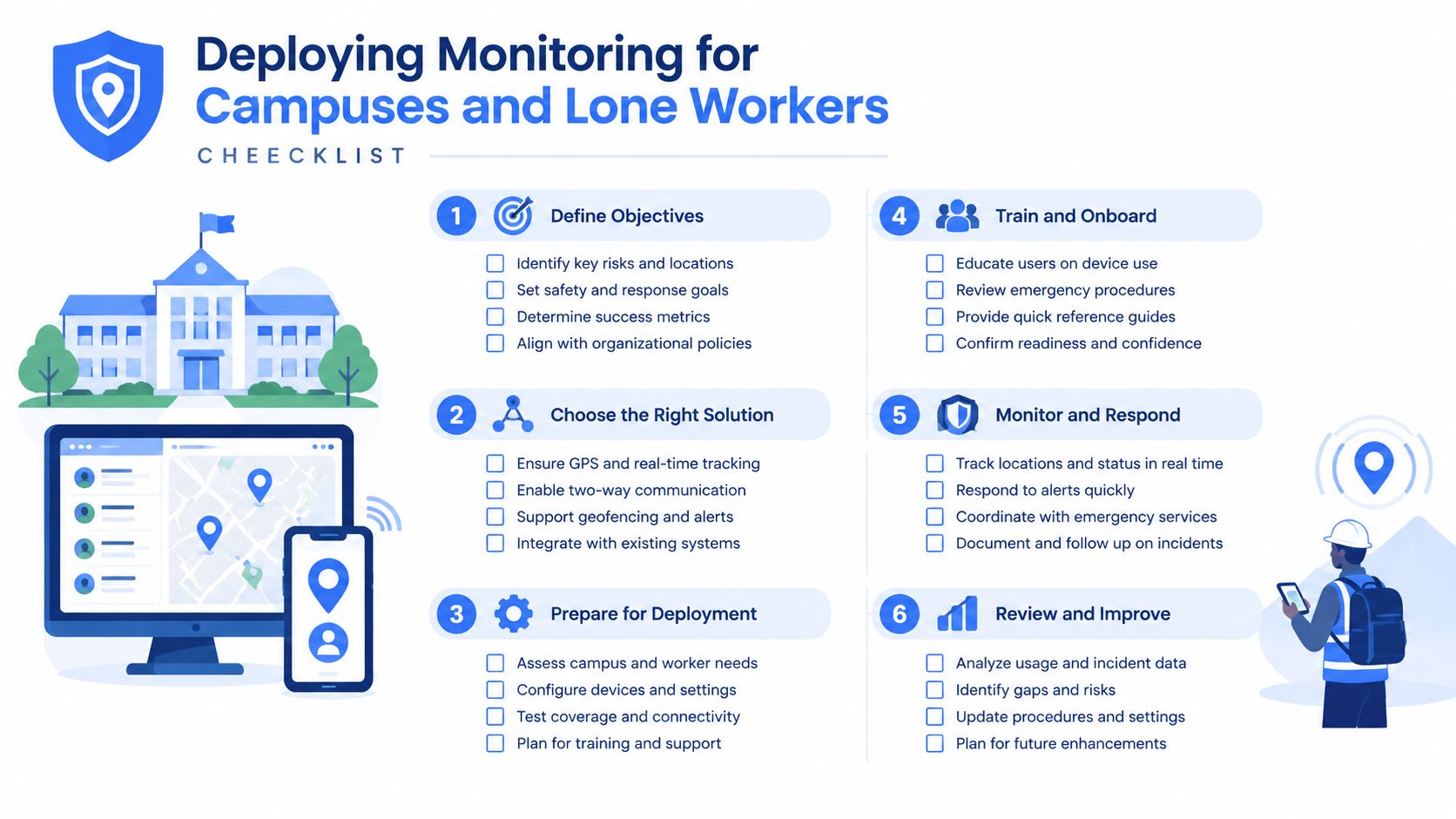
A practical deployment begins with the risk, not the feature list. Ask where people become unobserved, when check-ins fail, and which situations require a faster response than a text message can provide.
Define the use case
For a family, the use case may be a late walk, a rideshare, or a teenager traveling between activities. For a campus, it may be movement between residence halls, libraries, parking areas, and transit points. For an employer, it may involve night shifts, field service, isolated work, or travel between sites.
Set the response path
Identify who receives a live session first, who can contact the user, and when a Safety Agent or emergency dispatcher becomes involved. Include an Emergency for a Friend workflow if someone needs to request help for another person.
Test communication controls
Movement detection prompts can support missed check-ins. Critical Alerts can reach designated contacts through Do Not Disturb when the situation requires it. One-tap nudges and responses reduce the need for typing while walking or working.
Protect privacy by design
Explain activation, watcher permissions, Ghost mode, recording, transcription, retention, and deletion before enrollment. Staff and students should know how to pause ordinary sharing and how emergency access works.
Validate the network and devices
Test battery life, cellular coverage, camera positioning, audio quality, latency, and escalation from the actual areas where people will use the service. A plan that works in an office may fail in a parking structure or rural work zone.
Review performance with people
Run drills, collect feedback from users and watchers, tune prompts, and update contact lists. Monitoring is an operational practice, not a one-time software installation.
For organizations comparing options, 3rd-i offers an application that streams live video, audio, and location to selected contacts and trained Safety Agents, with features for personal, family, campus, company, late-walk, rideshare, and lone-worker use. Visit 3rd-i for organizations to evaluate how its live monitoring and emergency escalation workflows could fit your safety plan.