
Live Video Streaming App: A Practical Guide for Safety
You’re walking to a car at night, or riding with someone you don’t know well, and the problem isn’t dramatic. It’s uncertainty. A live video streaming app for safety turns that uncertainty into something a trusted contact or dispatcher can see, hear, and act on while the situation is still unfolding.
That’s the standard I care about. Not “Can it capture a clip?” The question is whether it can create a live safety layer with video, audio, location, and escalation fast enough to matter when you can’t stop and type.
Table of Contents
- What a Live Video Streaming App Actually Does
- Core Features That Matter for Safety Use Cases
- Where Live Video Streaming Apps Make a Real Difference
- Privacy, Safety, and Trust Considerations
- A Practical Checklist for Evaluating Any App
- Choosing the Right Setup for Families, Campuses, and Companies
- How Live Streams Connect to Emergency Response
- When Live Streaming Is Worth It and When It Is Not
What a Live Video Streaming App Actually Does
A safety-focused live video streaming app is a mobile tool that continuously captures and transmits video, audio, location, and sometimes sensor data from a phone to a defined group of viewers in real time. In practice, that means a rider can open the app before getting into an unfamiliar car, a student can start a session while crossing a dark lot, or a lone worker can go live before a visit, and designated contacts can watch the situation unfold without waiting for a recap.
The difference from social streaming is simple. Entertainment apps are built for public audience growth. Safety apps are built for private, on-demand or trigger-based sessions, where the stream goes only to invited contacts, a dispatcher, or a monitoring team. That privacy boundary is the whole point. If the wrong people can see the feed, you’ve built a liability, not protection.
Latency is the other dividing line. Latency is the delay between what happens on the ground and when someone else sees it. In safety use, a few seconds matters. Minutes don’t. If the stream arrives too late, it becomes evidence after the fact instead of a tool for intervention.
Practical rule: if the app can’t start fast, stay private, and reach the right people immediately, it’s not a safety app. It’s just video capture with a live label.
The best systems also keep the recording attached to the live event so there’s a record if the incident turns into a report, complaint, or investigation. That matters because memory gets fuzzy under stress. Video doesn’t.
A useful app should make the core functions obvious from the first tap, live streaming, location sharing, escalation, and recording. If those controls are buried, the app will fail when people are nervous, moving, or trying to help someone else.
Core Features That Matter for Safety Use Cases
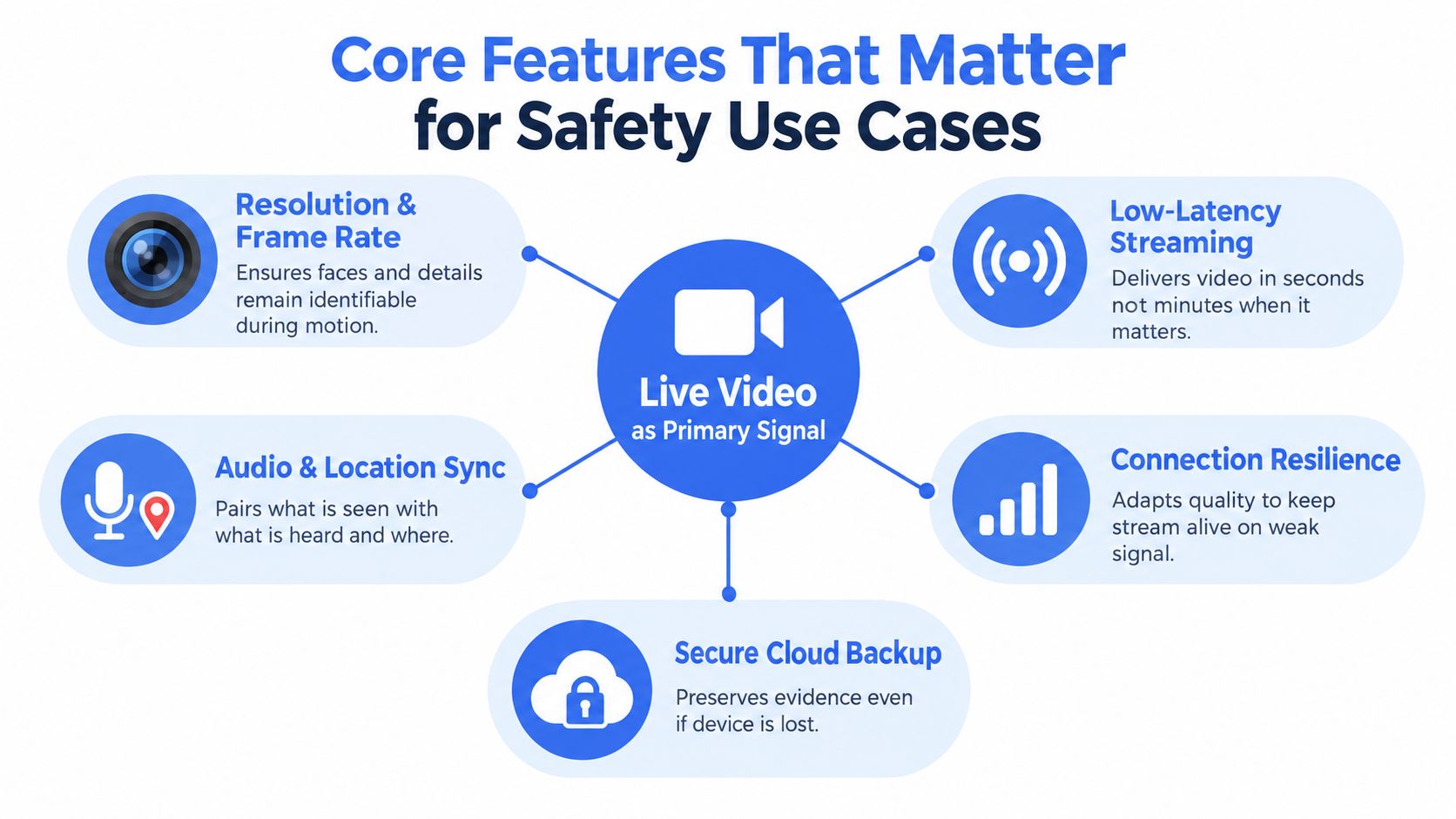
Live video has to stay usable under stress
The live feed is the primary signal, so it has to stay readable when the phone shakes, the user walks, or the network gets ugly. Resolution and frame rate matter because the watcher needs to identify faces, vehicles, entrances, and movement, not just vague motion blur. Adaptive bitrate is not a nice-to-have on cellular networks, it’s what keeps the stream alive when signal quality changes.
Audio matters just as much. A dispatcher or trusted contact needs to hear tone, background noise, voices, and context. That’s why one-way listening and two-way talk both have a place, depending on whether the user should stay quiet or can safely respond.
Location adds the second layer of meaning. A breadcrumb trail or geofence trigger turns a live clip into an incident timeline, which is far more useful than a single pinned point. If someone enters or leaves a defined area, the app should be able to react without waiting for manual input. For teams evaluating vendors, a platform like 3rd-i’s real-time safety monitoring is an example of how live video, audio, and location can be combined into one operational view.
The unglamorous features decide whether the app works
Dual-camera support is a serious safety feature, not a gimmick. Front-facing video shows the person and their condition. Rear-facing video shows the space around them, which is often where the actual risk sits. When a driver, building entrance, or bystander becomes relevant, that second lens can change the response.
Cloud recording and transcription turn a stressful live event into something searchable later. Recording preserves the evidence, while transcription makes it easier to find the key moment without scrubbing through the whole stream. That’s useful for follow-up, reporting, and accountability.
A live stream that drops on weak LTE, drains the battery in minutes, or lags too far behind the moment isn’t operationally reliable. It might still be pretty. It won’t be dependable.
The app should also keep the session alive through interruptions, because real incidents don’t pause for perfect signal. If the system can’t adapt on mobile networks, it won’t hold up in a parking lot, on a campus edge, or in a rural work zone.
Where Live Video Streaming Apps Make a Real Difference
A student walking home at night does not need a polished interface. They need a watcher who sees the route, sees the stranger approaching, and has enough context to speak up or escalate without guessing. The difference here is not abstract. Live visibility shortens the gap between “something feels off” and “I can help.”
Rideshares are another clear case. A rider who starts a stream on entry creates a live record of the driver, the plate, and the inside of the car. That changes behavior because everyone knows there’s an active witness, and if a dispute happens later, the evidence is already time-stamped and preserved.
Campus monitoring works when the operations center can intervene before a problem turns into a report. Shuttle buses, dorm lobbies, and after-hours study spaces all create moments where staff need current context, not footage from yesterday. A live stream lets security staff decide whether to call a patrol, check a door, or stay hands-off because the situation is already under control.
Lone-worker programs are where the category gets serious. Utility crews, home-health nurses, and after-hours security staff often work without a nearby colleague, which means a missed check-in should trigger more than another reminder. It should escalate to someone who can hear what’s happening, see the scene, and decide whether to keep coaching the worker or call emergency services.
The common thread
Each of these use cases depends on the same cause and effect. Live video reduces ambiguity, audio adds immediate context, and location tells responders where to focus. Without all three, you’re left with a partial story and slower decisions.
For campus and field operations, that’s why live streaming is less about content and more about situational awareness. The app earns its keep when it helps someone else act before the window closes.
Privacy, Safety, and Trust Considerations
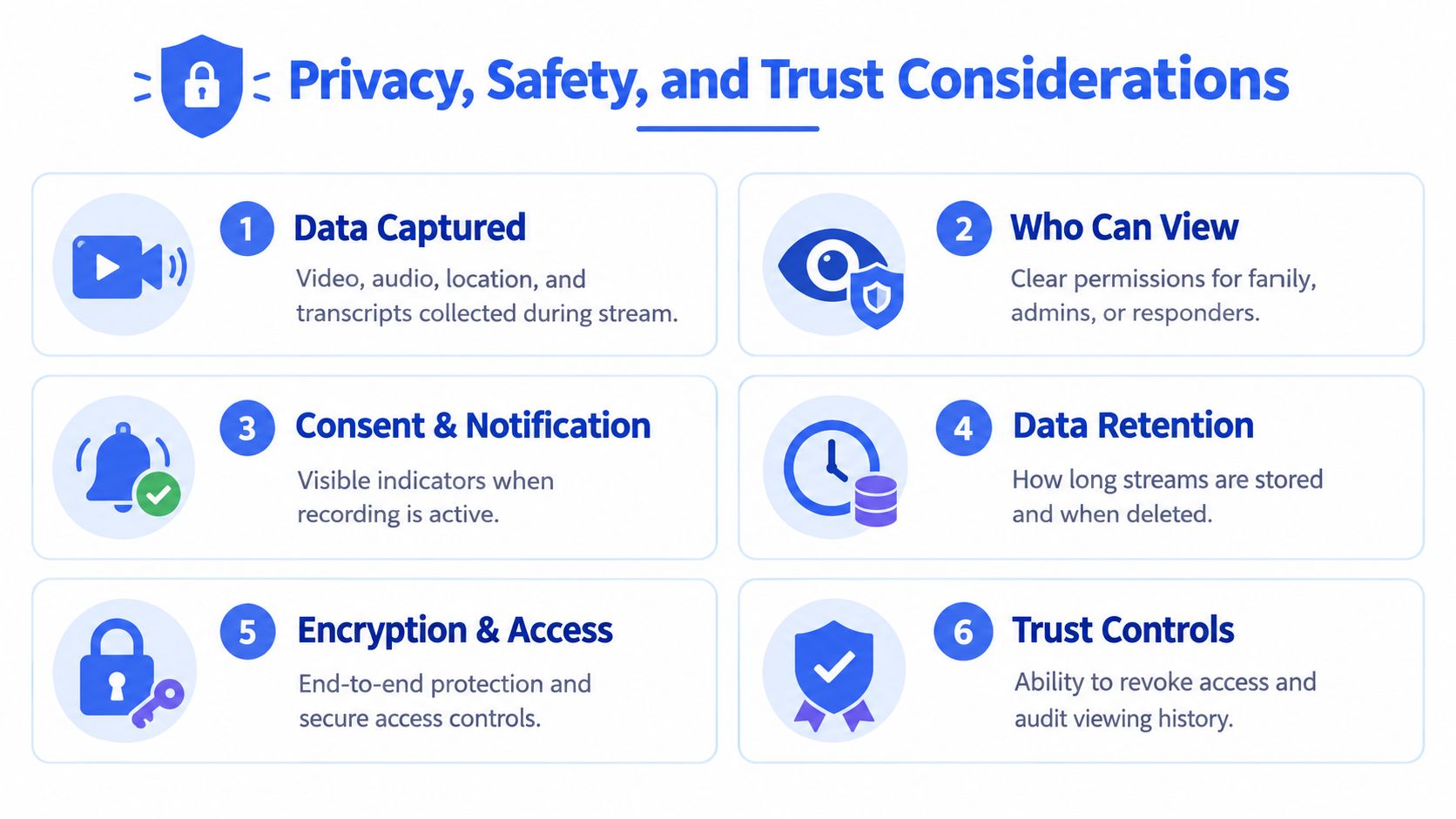
Start with data scope. A safety app may capture video, audio, location, transcripts, and viewing history, and each one needs a clear purpose. If the app cannot explain that in plain language, do not trust it in an incident.
Access control comes next. Family members, campus admins, dispatchers, and safety agents should have separate permissions, not a shared login that blurs responsibility. If too many people can view a stream by default, the app is exposing people instead of protecting them.
Consent signals matter because live streaming often happens in public or semi-public spaces. The app should make recording obvious on-device, use audible tones where appropriate, and show visible indicators that a stream is active. Hidden capture is a bad operational choice and a worse legal one.
Retention is where vendors like to hide risk. Ask how long streams are stored, whether the user can delete them, and whether session controls can stop a stream cleanly. Check how live location is shared and controlled, as explained in the guide to live share location, and verify who can view the stream in real time. A safety tool should preserve evidence when needed, but it should not keep data forever without a reason.
Encryption needs a plain-English check. End-to-end encryption means only intended viewers can read the stream content. Server-side encryption means the data is protected while stored or processed by the provider, but the provider may still be able to access it while routing the session. If you are sending a stream to a trusted contact, that difference matters. If you are sending it to a monitoring team, access control and audit trails matter even more.
For verification-heavy workflows, the same trust rules show up elsewhere. A service like safe online dating verification shows why identity checks only work when the process is clear and the controls are visible. Live safety apps need that same discipline.
Regulatory exposure also depends on where you operate. Two-party consent rules, FERPA for campus environments, and GDPR-style data minimization all shape what you can capture and how long you can keep it. The better apps do not bury those settings. They surface them early, in plain language, so users can confirm what is on before they rely on the app in a real incident.
A Practical Checklist for Evaluating Any App
Use the same checklist whether you’re buying for yourself, a family, a campus, or a company. The buyer changes. The operational questions don’t.
| Criterion | Individuals | Families | Campuses | Companies |
|---|---|---|---|---|
| Streaming latency | Needs fast startup and little delay so a trusted contact can react while the user is still moving. | Needs enough speed for parent or guardian oversight during commutes and late returns. | Needs low delay for security staff who may need to intervene in real time. | Needs reliable performance on mixed networks so lone workers aren’t left with laggy feeds. |
| Dual-camera support | Front and rear views help when the user wants both self-view and environment context. | Helpful for teens or older adults when caregivers need the full scene. | Useful in patrol, transport, or night-shift scenarios where surroundings matter. | Valuable for inspections and solo visits where the environment is as important as the worker. |
| Transcription accuracy | Useful for reviewing what happened without replaying the whole clip. | Helps families search incidents later and share context clearly. | Makes reporting and handoff to campus teams easier. | Supports documentation and follow-up after an incident. |
| Location refresh rate | Needs live route awareness, not stale pins. | Helps parents see whether someone is still on track. | Supports dispatch and patrol decisions. | Helps operations track moving staff without constant check-ins. |
| On-demand activation | One tap is non-negotiable. | Should be simple enough for children, teens, or older adults to use under stress. | Should work fast during escalations and after-hours events. | Must be easy enough that field staff actually use it. |
| Admin console | Usually not needed unless a trusted contact manages settings. | Useful for shared circles and permission control. | Required for role-based oversight and response coordination. | Required for policy enforcement and team management. |
| Retention controls | Personal users need clear delete and export options. | Families need shared expectations about what stays recorded. | Campuses need policy-driven retention tied to incidents. | Companies need retention aligned with legal and HR requirements. |
| Single sign-on | Rarely a deciding factor. | Usually not relevant. | Important for staff access and account control. | Often essential for secure enterprise rollout. |
| Audit logs | Nice to have if the user wants visibility into who watched a session. | Helps families see access history. | Important for accountability and internal review. | Critical for compliance and incident review. |
The table isn’t about scoring vendors. It’s about forcing each buyer to ask the right questions before the demo starts. A rider cares most about one-tap activation and visible indicators. A campus cares about role-based access and dispatch integration. A company cares about policy enforcement, audit logs, and whether the app fits real operating rules.
Choosing the Right Setup for Families, Campuses, and Companies
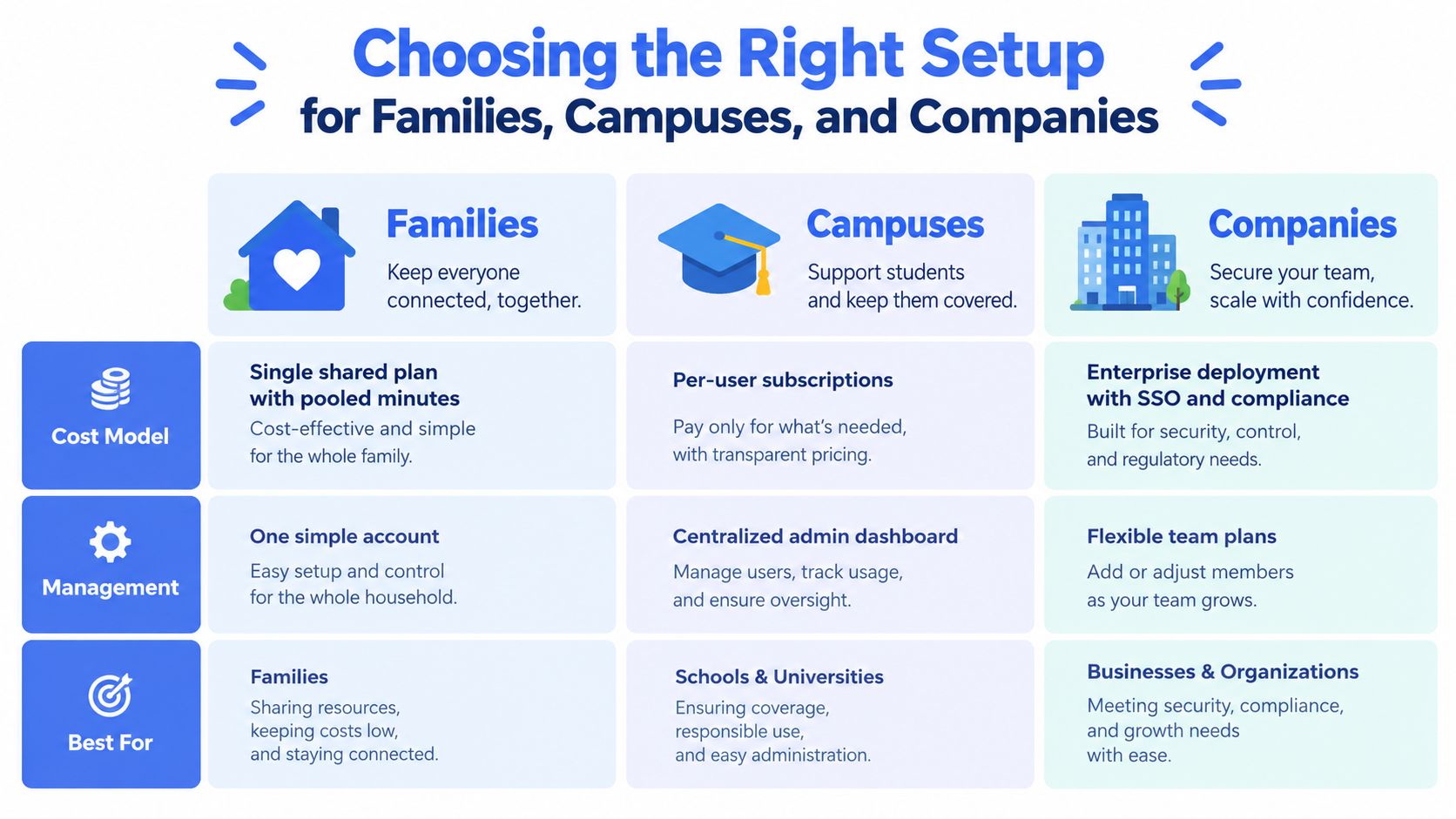
Families usually start with a trust circle, not a control room. That means one shared plan with pooled minutes can make more sense than separate subscriptions, especially when parents, teens, and grandparents all need different levels of oversight. The trade-off is simple, shared access is easier to manage, but you need strong permission boundaries so the right people can watch without turning the app into a free-for-all.
Campuses need a different posture. A student-led app may work for voluntary check-ins, but a security operation needs centralized oversight, clear roles, and a way to hand live context to dispatch or a campus safety desk. The finance trap is seat licensing. If you don’t map who needs access, the rollout gets expensive and people start bypassing the system.
Companies sit between those two worlds. Lone-worker compliance, night-shift coverage, and traveling staff all push toward pooled minute plans or enterprise tiers, but the decision is whether policy controls are strong enough for field use. If managers can’t enforce who gets access, when streams start, and what happens after an escalation, adoption will stay shallow.
What to match to your environment
- Families: look for pooled minutes, shared circles, and simple invite management.
- Campuses: look for a central dashboard, role-based access, and dispatch integration.
- Companies: look for SSO, audit logs, and policy enforcement that field teams won’t ignore.
A platform such as 3rd-i combines live video, audio, and location sharing with monitored escalation for individuals, families, campuses, and companies, so it fits this deployment discussion without pretending every use case is the same. The point isn’t to buy the fanciest package. It’s to match the operating model to the people who have to respond.
How Live Streams Connect to Emergency Response
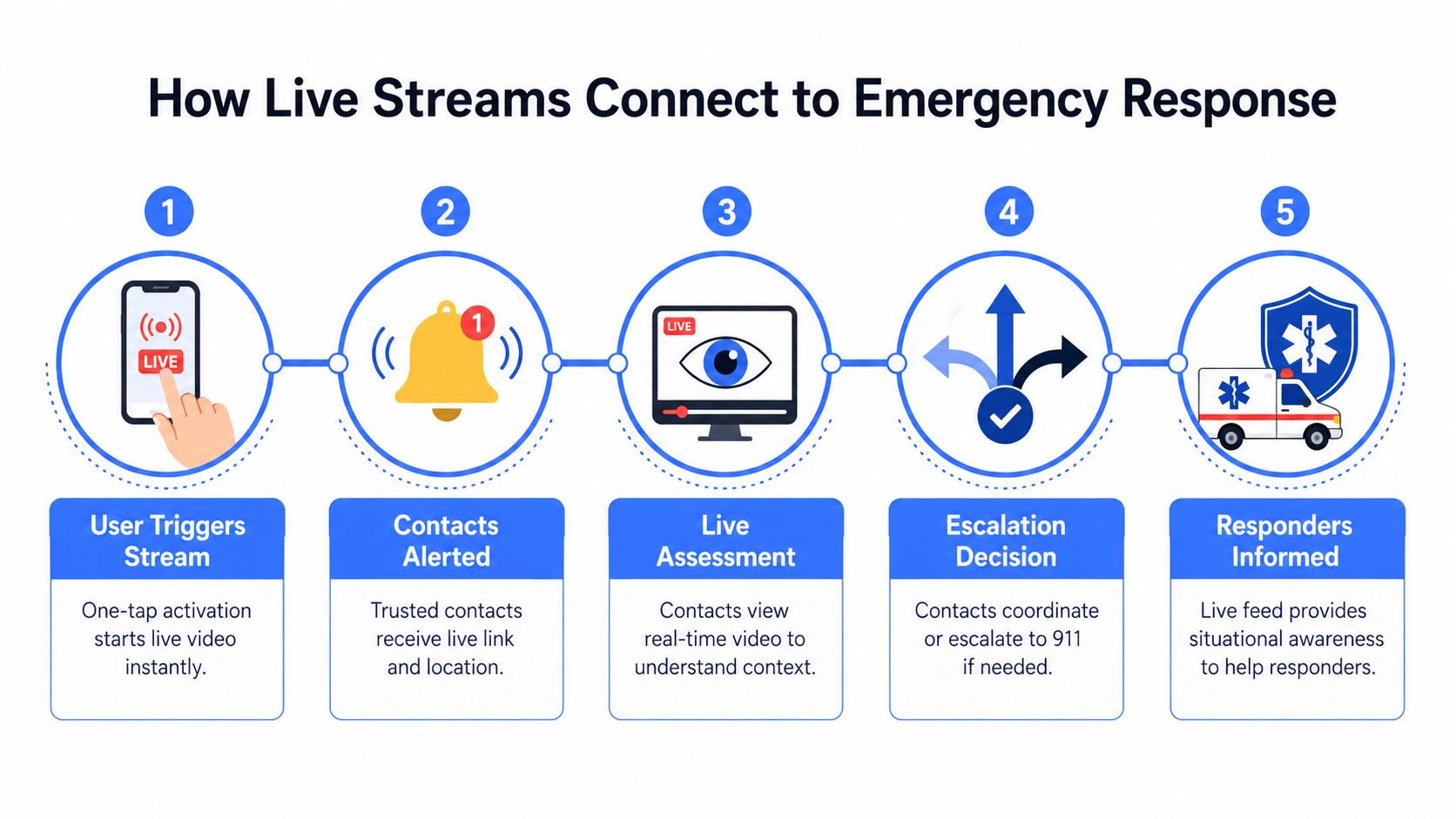
A live safety stream should sit inside an escalation path, not replace it. The user triggers the stream, trusted contacts or a monitoring team receive the live feed and location, and someone decides whether the situation can be managed remotely or needs a handoff to emergency services. That handoff should be explicit. If no one owns the decision, nobody makes it fast enough.
Low latency and location pings are what make the chain usable. Two-way audio matters because a dispatcher or safety agent may need to coach the user, ask for confirmation, or tell them to move somewhere safer. If the app only records and doesn’t support live communication, it’s not helping in the moment.
The right question is not “Can it capture an emergency?” The right question is “Can it help someone respond while the emergency is still active?”
Don’t lean on a single contact and call that a safety plan. People sleep, lose signal, ignore notifications, or miss the one moment that matters. A serious setup needs a backup path, a clear escalation timer, and a named rule for who contacts 911 or the local equivalent.
The strongest example is a system that routes live context to a responder who can decide what happens next. The article’s earlier sections on privacy and deployment matter here because emergency response fails if access is messy or if the app can’t hand off the right data cleanly. For a related workflow, active 911 calls show why live context is so much more useful than a delayed incident note.
Emergency services still do the core response. Live streaming just gives them better situational awareness, faster.
When Live Streaming Is Worth It and When It Is Not
Use a live video streaming app when the cost of being unseen is high. Late-night commutes, rideshares in unfamiliar areas, lone field work, campus patrols, and family safety check-ins are the obvious fits. If nobody needs to react in the moment, you probably don’t need live streaming.
It’s also a poor fit when the user won’t carry a phone reliably, the organization already has dedicated two-way radios, or the setup burden is heavier than the safety gain. If your team won’t practice with it, it won’t help under pressure. Tools that look powerful in a demo often fail because the people using them are busy, rushed, or tired.
Use three filters before you deploy
- Risk profile: ask whether an unobserved incident would cause harm.
- Response readiness: confirm who receives the stream and who escalates.
- Operational overhead: test whether the app is simple enough to use consistently.
Run one full end-to-end test before rollout. Verify latency on real networks, confirm exactly who sees the stream, check the escalation path, and review retention settings. If any of those fail in testing, they’ll fail at the worst possible time.
If you need a live safety setup that combines streaming, monitoring, and escalation, 3rd-i is built around exactly that use case. It supports live video, audio, and location sharing for individuals, families, campuses, and companies, then routes real incidents toward monitored response instead of leaving them as passive recordings.