
Active 911 Calls: What They Mean and Why They Matter
In the United States, 45 states delivered 213,652,929 total 911 calls to primary Public Safety Answering Points in 2021 according to the National 911 Program’s 2021 profile database report. That figure covers only reporting states, so the true national total was likely higher. The scale matters because it changes how you should think about active 911 calls. They aren’t rare, dramatic moments floating alone in the system. They’re part of a massive, nonstop intake line where speed, clarity, and verified information shape what happens next.
Most explainers stop at the label. They treat an active call like a static badge on a dashboard. The more useful question is narrower and more human: how long does it take for a live emergency report to become something a dispatcher can act on? That gap between intake and human response is where confusion, delay, and modern safety technology all collide.
Table of Contents
- What Active 911 Calls Actually Mean
- How Computer-Aided Dispatch Tracks a Call
- Why Answer Speed Defines an Active Call
- How Modern Safety Apps Reach Dispatch Faster
- What Bystanders and Watchers Can Realistically Do
- When an Active Call Does Not Lead to a Response
- Evaluating a Personal Safety Tool That Connects to 911
- Common Questions About Active 911 Calls
What Active 911 Calls Actually Mean
An active 911 call is best understood as a live emergency event that hasn’t been closed out yet.
That sounds simple, but people often mix up two different ideas. A 911 call is the event itself. An active 911 call is the event while it’s still open inside the emergency system. “Active” describes status, not importance.
Active does not always mean severe
A caller reporting a minor crash can still be part of an active call if the incident is open and being handled. A more dangerous event could also be active, of course, but the word doesn’t tell you how serious the situation is by itself. It tells you the incident is still moving through the workflow.
An open customer-service ticket, except the stakes are much higher and the timeline is much shorter. Until the incident is resolved, transferred, or otherwise cleared, it remains active in operational terms.
What people usually get wrong
Many readers assume “active” means someone is already talking to a dispatcher right now. Sometimes that’s true. Sometimes it isn’t.
An emergency event may already be in the system while it waits for the next human step. In practical terms, active 911 calls can include incidents that started from a phone, from connected vehicle systems, or from a personal safety platform that passes information into emergency workflows.
Practical rule: “Active” tells you the incident is still open. It does not tell you whether a caller has reached a person, whether units were sent, or whether responders have arrived.
A simple example
Take two situations.
- Fender-bender on a busy road: The caller dials 911, enters the queue, and waits for a telecommunicator. That event is active while it’s being processed.
- Automatic alarm transfer: A fire alarm or other machine-generated signal may route data quickly and trigger action with limited live conversation. The incident may move fast operationally, but the public idea of an “active call” doesn’t always map neatly to that path.
That difference is why the phrase can be misleading. The story isn’t the label. It’s the path the incident takes once it enters the system.
How Computer-Aided Dispatch Tracks a Call
Emergency centers don’t manage incidents with sticky notes and memory. They use computer-aided dispatch, usually called CAD. If you want to understand active 911 calls under the hood, CAD is the place to look.
Think of CAD like a relay race. The baton is the incident record. It moves from stage to stage until the event is finished and archived.
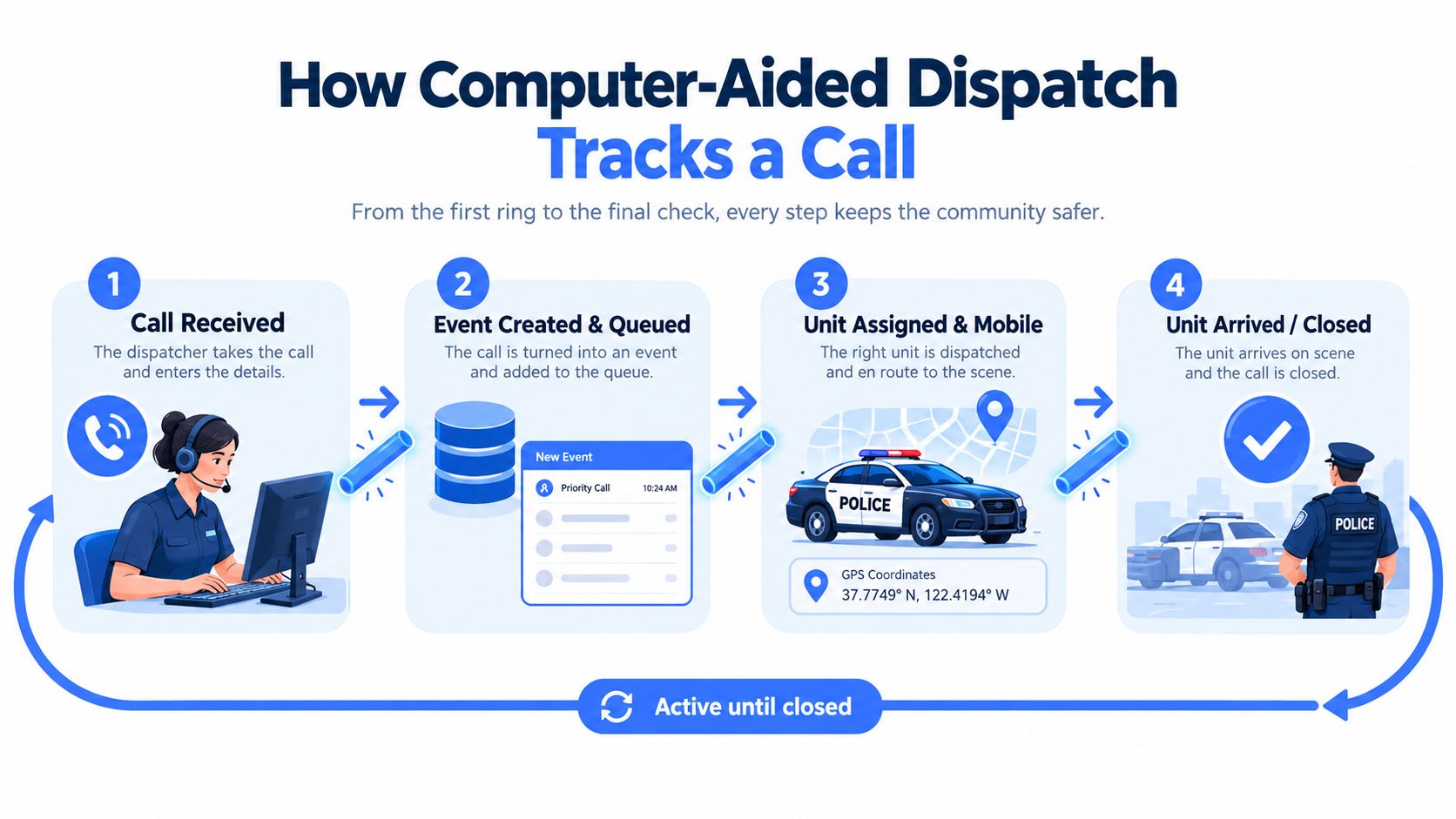
The core status flow
A technical definition of active 911 calls is that they are live incidents still being processed in a CAD system, where the record moves through status states such as received, assigned, en route, on-scene, and cleared, as described in this CAD workflow reference on active 911 calls.
Here’s the plain-English version:
-
Received
The event hits the system and gets a timestamp. This is the digital moment the baton enters the race. -
Queued or pending
The record exists, but someone or something is still waiting on the next action. That could mean waiting for a call-taker, waiting for more detail, or waiting for an available unit. -
Dispatched or assigned
A responder or unit gets attached to the event. This is the point where help becomes operational, not just requested. -
En route and on scene
Units travel, arrive, and begin handling the incident in the field. -
Cleared or closed
The event is resolved enough to leave the active workflow and move into the recordkeeping side of the system.
Why labels vary but the logic doesn’t
One agency may use “open,” another may use “pending,” and another may use “closed.” The names shift. The pattern usually doesn’t.
A live incident starts with intake and ends with clearance. That received-to-cleared path is the meaning behind active status.
Here’s a quick visual summary.
| Call stage | What it means in plain language | Why it matters |
|---|---|---|
| Received | The incident has entered the system | The clock starts here |
| Queued | It’s waiting for the next human or system action | Delays can build here |
| Dispatched | A unit has been assigned | Action becomes concrete |
| On scene | Responders have arrived | Field handling begins |
| Cleared | The incident is closed out | The call is no longer active |
Later in the process, CAD records may also hold details like address, caller information, incident notes, and linked data from integrated safety platforms.
A short explainer helps make the workflow easier to picture:
Why Answer Speed Defines an Active Call
The most important part of an active call often happens before the conversation really begins.
Massachusetts 911 performance guidance cites NENA Standard STA-020.1-2020 and NFPA 1221 (2019), which say 90% of 911 calls should be answered within 15 seconds and 95% within 20 seconds, and the same document notes an internal target of less than 2 minutes 25 seconds average call handling time including gathering information and transfer, as summarized in this report discussing 911 answer performance benchmarks. Those benchmarks exist for a reason. A live emergency can change in seconds.
What answer speed actually measures
Answer speed is not travel time. It’s not how fast police, fire, or EMS arrive.
It measures the gap between when the call enters the system and when a trained telecommunicator picks up. During that window, the caller may be frightened, injured, whispering, moving, or unable to explain where they are.
Before pickup, the incident may be active in the system, but the caller is still effectively alone with the emergency.
That’s why this part of the timeline deserves more attention than public dashboards usually give it.
Why the intake window matters so much
Dispatch performance is highly sensitive to latency at both the answer and processing stages. San Francisco’s published benchmark targets 90% of 911 calls answered within 15 seconds, while NFPA 1225 sets a 90% target for urgent calls to be processed from answer to resource alert within 60 seconds, according to San Francisco’s 911 call volume and response benchmark page.
That same source also cites a reported study showing average processing time near 7 minutes in PSAPs without a standard versus 1 minute 18 seconds in PSAPs that followed the standard. The point isn’t just that standards look good on paper. It’s that the early seconds shape whether responders get usable information quickly enough to act.
| Target Window | NENA Benchmark | What the Caller Experiences |
|---|---|---|
| 15 seconds | 90% answered within this window | A fast handoff to a human voice |
| 20 seconds | 95% answered within this window | A short delay, but still near-immediate contact |
| 60 seconds | Not the answer benchmark, but often the outer edge of what feels operationally acceptable to the public | Anxiety rises, scene details may change, and critical information may never get spoken clearly |
How Modern Safety Apps Reach Dispatch Faster
A plain voice call asks the caller to do almost everything. They have to speak clearly, know their location, describe what’s happening, stay on the line, and answer follow-up questions while stressed. That works. It’s also fragile.
Modern safety apps try to shorten that weak point by sending verified context alongside the emergency report.
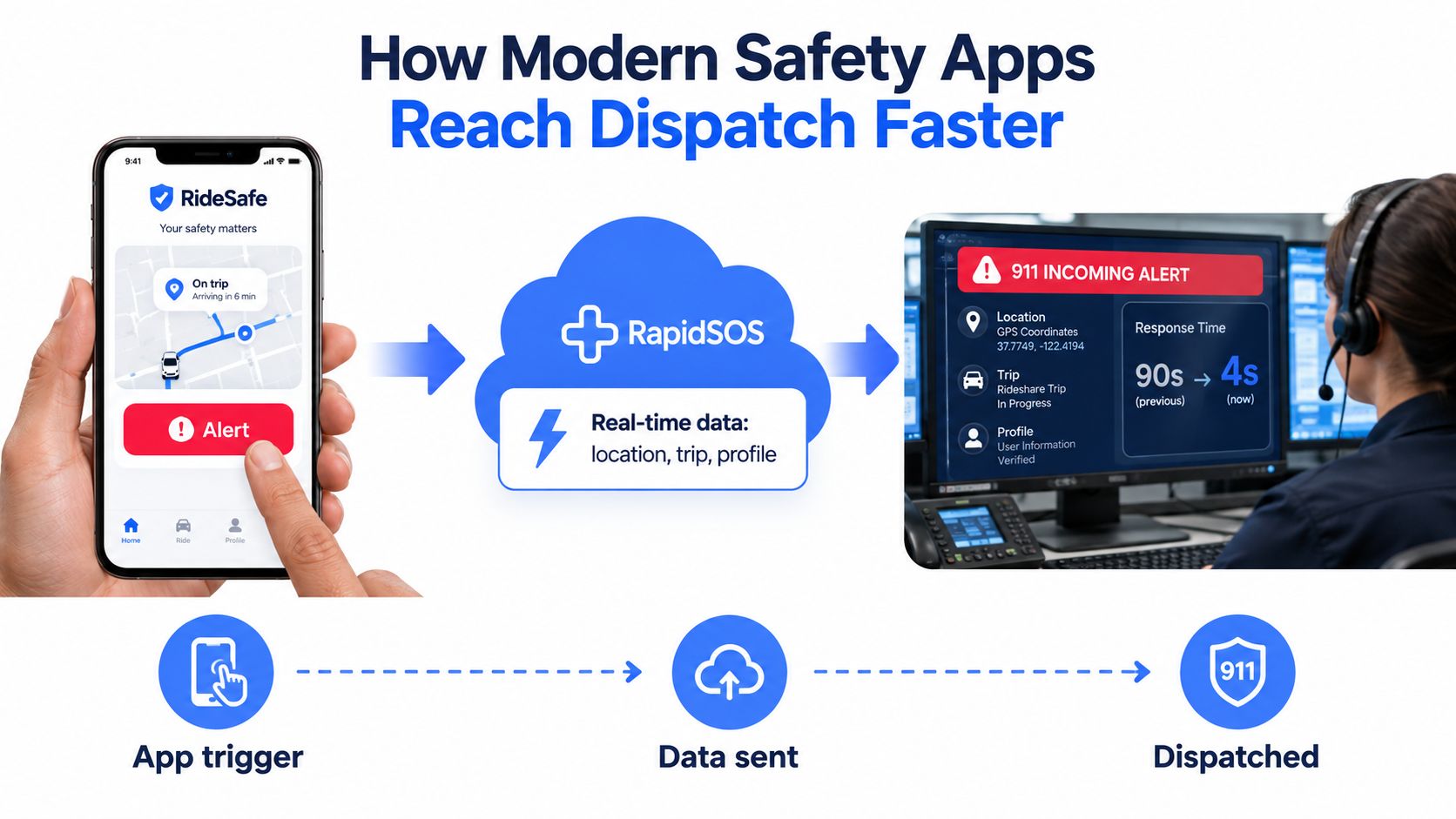
A rideshare example
Say someone is in a rideshare and feels unsafe. In the old model, they call 911 and start building the incident from scratch: “I’m in a car, I think we’re near, hold on, I’m not sure of the cross street, the driver is heading the wrong way.”
In an app-based model, the user may trigger an emergency flow that sends location and profile information through a verified channel before or while a voice interaction begins. That doesn’t eliminate the dispatcher. It gives the dispatcher a head start.
What can be sent automatically
Depending on the platform and local integration, a modern safety tool may pass along:
- Device location so dispatch starts with a map point instead of guesswork
- User profile details such as name or pre-entered emergency information
- Incident context like whether this was a rideshare concern, late walk, or lone-worker emergency
- Linked monitoring notes if trained staff or watchers have already observed relevant details
A service like 3rd-i’s 24-hour-a-day app is built around that kind of emergency support flow, combining live monitoring with escalation to 911 through RapidSOS when needed. The practical value isn’t that an app “calls faster.” It’s that the call arriving at dispatch can be richer, clearer, and less dependent on a frightened person reciting details in order.
What still requires a human
No app replaces the call-taker’s judgment. Dispatch still has to verify, triage, code, and route the incident according to local policy.
Data can reach the screen quickly. Decisions still belong to the emergency center.
That’s an important limit. App-based emergency features can shorten the path to useful information, but only in jurisdictions and workflows that support the integration.
What Bystanders and Watchers Can Realistically Do
A late-night commute is a good example because it exposes the gap between what witnesses see and what dispatch receives.
A bystander on a street corner may notice body language, hear a frightened tone, see someone pulling away from a curb, and recognize the nearest business sign. The dispatcher doesn’t see any of that. The dispatcher starts with audio, partial answers, and a need for a verified location.
What helps in the first minute
If you’re the bystander, call 911 right away. Don’t wait to “see how it plays out” if there’s a real safety concern. Timing matters most before the scene scatters and details get fuzzy.
Then answer the telecommunicator’s questions directly. People often think they should tell the whole story in one rush. That usually slows things down because dispatchers need structured facts first.
Useful habits include:
- Start with location if you know it. Street address beats description.
- State what you’re seeing now rather than what you assume happened.
- Stay available in case the telecommunicator needs clarification.
- Avoid repeated calls unless the situation changes or you’re told to call back.
What watchers can and can’t do
Friends watching through neighborhood apps, text threads, or shared maps may know something is off. That doesn’t mean their information automatically enters an active 911 call.
A watcher can be extremely useful if they can provide location, identifying details, or a callback number. But emergency centers work from verified intake channels, not from every app someone happens to be using socially.
If you’re helping from a distance, the most valuable thing you can add is verified context, not a stream of guesses.
Staying on scene matters
If it’s safe, remain nearby so responders can spot you or so you can flag down the correct location. A lot of confusion in emergencies comes from simple mismatch. The caller means one entrance, the responders approach another.
That’s why direct, calm, location-first reporting still matters even in a world full of smart devices.
When an Active Call Does Not Lead to a Response
Many people hear “active” and assume help is already on the way. That assumption doesn’t hold up.
A recent independent report found that 911 systems in New York City handled almost 3.7 million calls for NYPD response in 2025, but only 52% received an emergency response, according to Mother Jones reporting on 911 dispatch delays and response gaps. That doesn’t mean the system ignored every other caller. It means many calls were triaged, rerouted, downgraded, or otherwise did not become an emergency unit response.
Four different meanings people blur together
Readers often combine several stages into one mental picture. They shouldn’t.
| Call Status | What It Confirms | What It Does Not Confirm |
|---|---|---|
| Answered | A telecommunicator has made contact | That a unit has been assigned |
| Dispatched | The incident has been routed to responders | That responders have arrived |
| En route | A unit is traveling | That the scene has been found or stabilized |
| On scene | Responders reached the reported location | That the incident is resolved |
An active call may sit in one of those states without progressing immediately to the next.
Why a call may not produce an immediate unit response
There are several common reasons.
- Priority triage: Dispatchers sort calls by urgency. Some incidents wait while life-threatening ones move ahead.
- Resource scarcity: Units may already be tied up.
- Coding decisions: The reported event may be treated as lower priority after questioning.
- Location uncertainty: If the center can’t pin down where help is needed, the event may stall or shift into callback efforts.
This is why active status is a weak promise. It tells you contact happened. It does not guarantee arrival.
What callers should do if the incident remains open
Stay reachable. Keep your phone available for callback. Follow instructions exactly.
If your circumstances change, say so clearly. A reprioritized call can move faster when dispatch gets updated facts instead of repeated panic.
Evaluating a Personal Safety Tool That Connects to 911
A personal safety app only matters if it shortens the gap between an incident and verified information on a dispatcher’s screen. If it only opens your phone dialer, it may still help, but it isn’t solving the hardest part of the process.
That’s the lens to use when comparing tools.
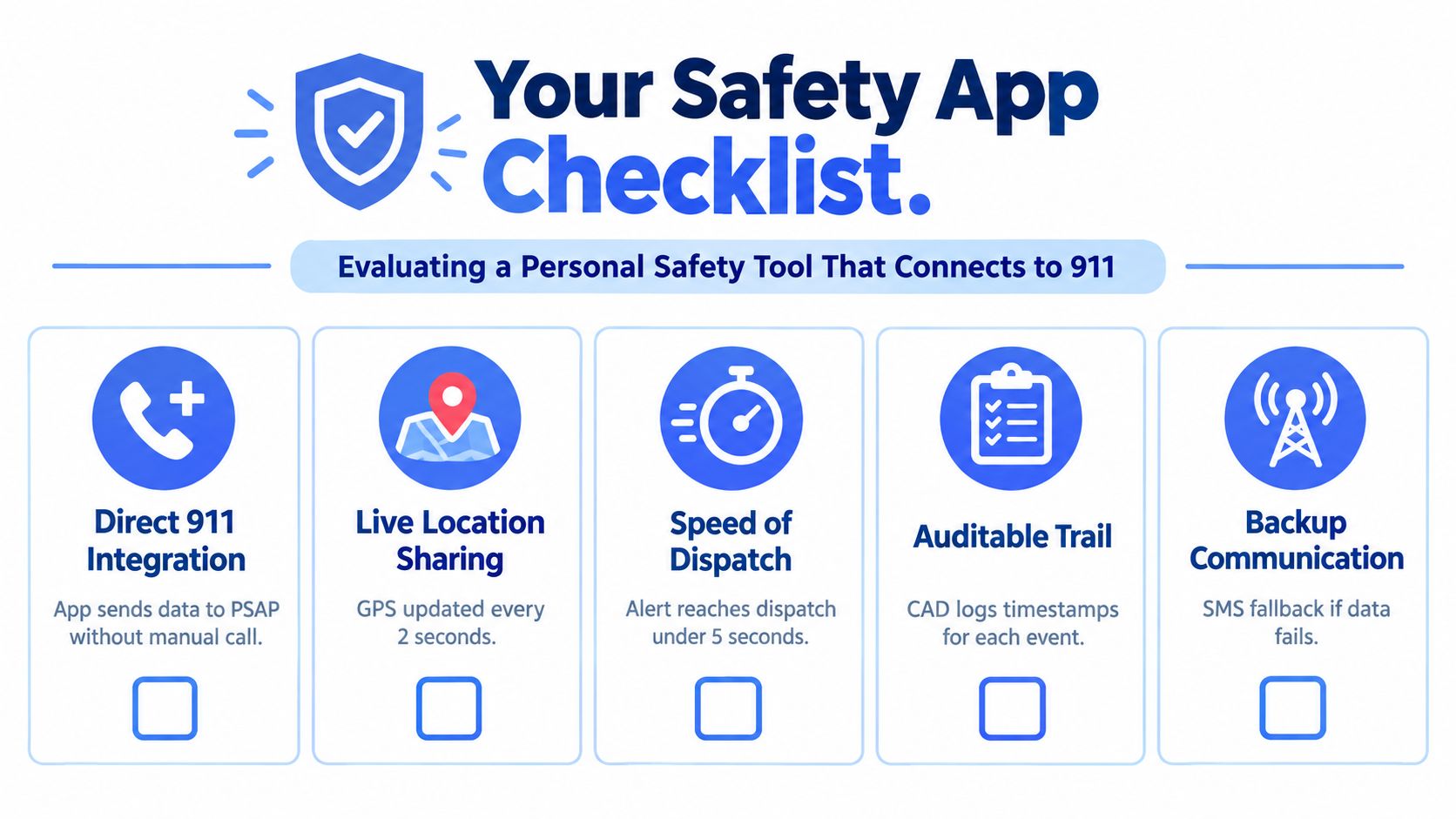
The checklist that matters
Look for these six points.
- Direct dispatch integration: Can the tool pass data into emergency workflows, or does it only trigger a phone call?
- Location method: Does it rely on live device location, and can that location keep updating if the user is moving?
- Automatic context: Can it attach profile details, incident type, or trip information without forcing the user to say everything aloud?
- Locked-phone usability: Can a person trigger help when the phone is in a pocket, bag, or lock screen state?
- Coverage clarity: Does the provider explain where its emergency escalation features are operational and where they depend on local support?
- Live handoff: What happens after the alert. Is there a trained person, monitoring team, or direct emergency transfer path?
A rideshare test
A rideshare scenario is a good stress test. If the rider feels unsafe, the stronger tool is usually the one that can move verified trip, location, and profile context into the emergency chain before a chaotic call has to do all the work.
That’s also why some readers who care about field staff, night shifts, and solo travel may find broader guidance on 2026 lone worker safety strategies useful. The best practices overlap even when the setting changes.
One example in this category is 3rd-i real-time safety monitoring, which combines live video, audio, and location sharing with Safety Agent escalation to 911 through RapidSOS. The relevant question isn’t whether a tool sounds advanced. It’s whether it reduces ambiguity before dispatch has to act.
The best safety apps don’t bypass 911. They make the 911 event clearer, faster, and easier to verify.
Common Questions About Active 911 Calls
Are active 911 calls visible to the public
Usually not in their full operational form. CAD screens are restricted tools used inside emergency communication centers. Some jurisdictions publish delayed or sanitized incident lists, but those public feeds are not the same thing as a live internal record.
How long does a call stay active
It depends on the incident. A duplicate report may be active only briefly before it merges into another event or gets closed. A complex incident can remain active for a long period while units work the scene and supervisors update the record.
Can bystanders listen in to an active call
In most places, no. A 911 call is not a public audio channel that nearby people can monitor just because they are physically close to the scene. The emergency center controls the communications path.
What happens if the call drops before the address is confirmed
The telecommunicator will usually try to call back and continue building the incident from whatever information is already available. Whether location can be refined depends on the network path, local systems, and what data the center receives.
Can an app cancel an active call
Not in the simple consumer sense people often imagine. Once an incident is inside emergency workflow, the status belongs to the center handling it. The caller can provide updated information, and the dispatcher can revise or clear the event based on policy and facts.
Where does text-to-911 fit
Text-to-911 can enter the same broader emergency handling process, but the exchange tends to be slower and less efficient for complex back-and-forth communication. It can still be important when speaking aloud would be unsafe or impossible.
If I want a tool for this, what should I focus on
Focus on whether the tool improves location certainty, context delivery, and speed to verified human action. If you’re comparing options, 3rd-i’s emergency SOS app is one example of a product built around that problem, but the same checklist applies to any platform you review.
3rd-i offers a personal safety app that streams live video, audio, and location to trusted contacts and trained Safety Agents, with escalation to 911 through RapidSOS when needed. In the context of active 911 calls, that means the goal isn’t replacing emergency services. It’s helping verified context reach dispatch faster and with less ambiguity. If you want to see how that works in practice, visit 3rd-i.