
Real-Time Safety Monitoring: How It Works and Why It Matters
At 10:47 p.m., a rideshare passenger notices that the route has drifted away from the main road. The phone battery reads 38 percent. The detour might be harmless, but the passenger can’t tell whether it’s a shortcut, a navigation error, or a warning sign. Calling someone would mean explaining the location while watching the road, and sending a series of messages wouldn’t give anyone a live view of what was happening.
That moment captures the central problem with ordinary safety tools. A location pin can show where someone is, but not what they can see. A phone call can carry a voice, but it may not provide reliable coordinates, visual context, or a clear way to verify an alarm. A missed check-in can indicate trouble, but it can’t explain whether the person is delayed, distracted, or unable to respond.
Real-time safety monitoring connects those missing pieces. It captures live signals, places them in front of a trained reviewer, verifies what may be happening, and passes useful context to emergency responders when escalation is necessary. The technology matters, but so do the human decisions and privacy controls surrounding it.
Table of Contents
- A Late Walk Home and the Question This Guide Answers
- What Real-Time Safety Monitoring Actually Means
- The Live Data Streams That Power Continuous Oversight
- Why a Human in the Loop Changes Everything
- From App Alert to 911 Through RapidSOS
- Privacy Controls That Decide Whether People Keep It On
- Where Real-Time Monitoring Fits Individuals Campuses and Employers
- Choosing a Real-Time Safety Monitoring Solution With Confidence
A Late Walk Home and the Question This Guide Answers
The passenger lowers the phone and looks through the rear window. The driver hasn’t said anything alarming. The map still shows a moving vehicle. Yet the route now feels different from the journey that was expected, and the passenger has only fragments of information available.
A friend might receive a message saying, “The route changed.” That friend could worry, call back, and ask questions. But unless the passenger shares a live view, the friend can’t see the street, hear the conversation, or confirm whether the car is approaching a safe stopping point. If the passenger stops responding, the friend may have even less to work with.
Real-time safety monitoring differs from a contact list, a location-sharing feature, or a traditional emergency call. The system is designed to preserve context while an event is unfolding. Video can show the surroundings, audio can reveal tone and background sounds, and location can anchor the incident to a specific place. A trained operator can then decide whether the signal represents an emergency, a request for contact, or an ordinary disruption.
Practical rule: A safety signal is useful only when someone can interpret it and act on it.
The rest of the question is operational. What captures the first signal? Who reviews it? How does the reviewer verify the situation? What information reaches the emergency communication center? And how can the person being monitored control the stream rather than feeling watched all the time?
Those questions matter for a late commuter, but they also apply to a student walking across campus, a field technician working alone, a rideshare driver, or a family member who wants a discreet way to request help. The pipeline stays recognizable across these situations, although the person who triggers the alert, the person who monitors it, and the definition of “resolved” can change.
What Real-Time Safety Monitoring Actually Means
Start with a simple comparison. Imagine a friend staying on a phone call while you walk home. Your friend can hear what you hear, look at a street view you choose to show, and follow your position on a map. If something seems wrong, that friend can ask a question, keep listening, or contact emergency services with a clearer explanation.
Real-time safety monitoring extends that relationship into a coordinated system. Sensors and apps capture events as they happen. A monitoring center reviews the information while it remains current. A human reviewer verifies the concern and chooses the next response. The purpose isn’t to collect an endless archive of activity. The purpose is to shorten the distance between a warning sign and a well-informed action.
Continuous oversight
Continuous oversight means the system can receive live information during an active monitoring session. Depending on the deployment, that information may include video, audio, location, movement signals, or a combination of these streams. The operator’s console brings those signals together instead of forcing the reviewer to reconstruct the event from separate notifications.
The word “continuous” needs care. It may describe an always-on workplace program, a scheduled lone-worker window, or a short personal safety session activated for a walk or ride. Buyers should ask when monitoring starts, when it stops, and what happens if the user loses connectivity.
Live escalation
Live escalation begins when a person presses an SOS control, an automated detection creates an alert, or an operator identifies a developing concern. The system should preserve the current context rather than producing a bare notification that someone must investigate from scratch.
An operator may call or speak through the app, ask the user to confirm their condition, or continue observing without interrupting them. That conversation can clarify whether the person needs immediate assistance, a check-in, or no intervention.
Verified dispatch
Verified dispatch is the handoff from monitoring to emergency response after a trained person has assessed the available evidence. Verification doesn’t mean delaying a clear emergency. It means giving the receiving dispatcher useful context, reducing avoidable false alarms, and identifying the correct response path.
This model works because each component has a different job. Sensors notice or capture. Software organizes. A human interprets. Emergency services receive the information needed to act.
The Live Data Streams That Power Continuous Oversight
A data stream matters only if it reduces uncertainty during a decision. Real-time video, audio, location, and movement signals each answer a different operational question.
Video shows the surrounding situation
Live video gives an operator visual context. A front-facing camera may show the user’s expression or interaction, while a rear-facing camera can show the vehicle interior, sidewalk, doorway, or people approaching from behind. Dual-camera streaming can be useful because a single view often leaves out the detail that determines whether an incident is serious.
Video may help an operator identify exits, obstacles, nearby people, lighting conditions, or a vehicle’s surroundings. It won’t automatically explain intent, and poor positioning or low visibility can limit its value. The operator still needs to interpret what appears on screen.
Audio carries what video misses
Audio can reveal raised voices, distress, a request for help, or background sounds outside the camera frame. It also lets a Safety Agent speak with the user when a text exchange would be too slow or difficult.
Audio isn’t a substitute for visual information. A quiet feed may reflect a calm situation, a muted device, or a person who can’t speak. That’s why audio becomes more useful when the console places it alongside location, video, and the alert history.
Location anchors the response
GPS can show the device’s outdoor position, while indoor location and altitude information may help identify a floor, entrance, or level. That distinction matters in a large building, a campus structure, a parking garage, or a transit setting where an exterior map point may not be enough.
Some systems also support an emergency entry detail, such as the closest usable entrance. That information can help responders approach the right part of a building rather than searching the entire address.
Movement flags events a person may not report
Accelerometers and gyroscopes can identify patterns associated with a fall, impact, sudden movement, or unexpected stillness. Automated detection is valuable when a worker or user can’t manually press an SOS control, but movement data alone rarely establishes the severity of an event.
The operator’s console combines the streams into one incident view. A possible fall becomes easier to interpret when the reviewer can check the person’s location, listen for a response, and view the surrounding scene.
| Data Stream | What It Captures | What It Tells the Operator |
|---|---|---|
| Video | Surroundings, people, movement, exits, and visible hazards | Whether the scene appears threatening, confusing, or ordinary |
| Audio | Speech, tone, volume, distress sounds, and background noise | Whether the user is responding and whether the environment sounds unsafe |
| Location | Outdoor position, indoor context, altitude, and route | Where assistance should be directed |
| Movement | Falls, impacts, abrupt changes, and stillness | Whether an event may have occurred without a manual alert |
For an example of how live video, audio, and location can be presented together, review 3rd-i’s 24-hour app monitoring approach. The important design question isn’t how many streams a product collects. It’s whether each stream helps a person make a faster, more accurate decision.
Why a Human in the Loop Changes Everything
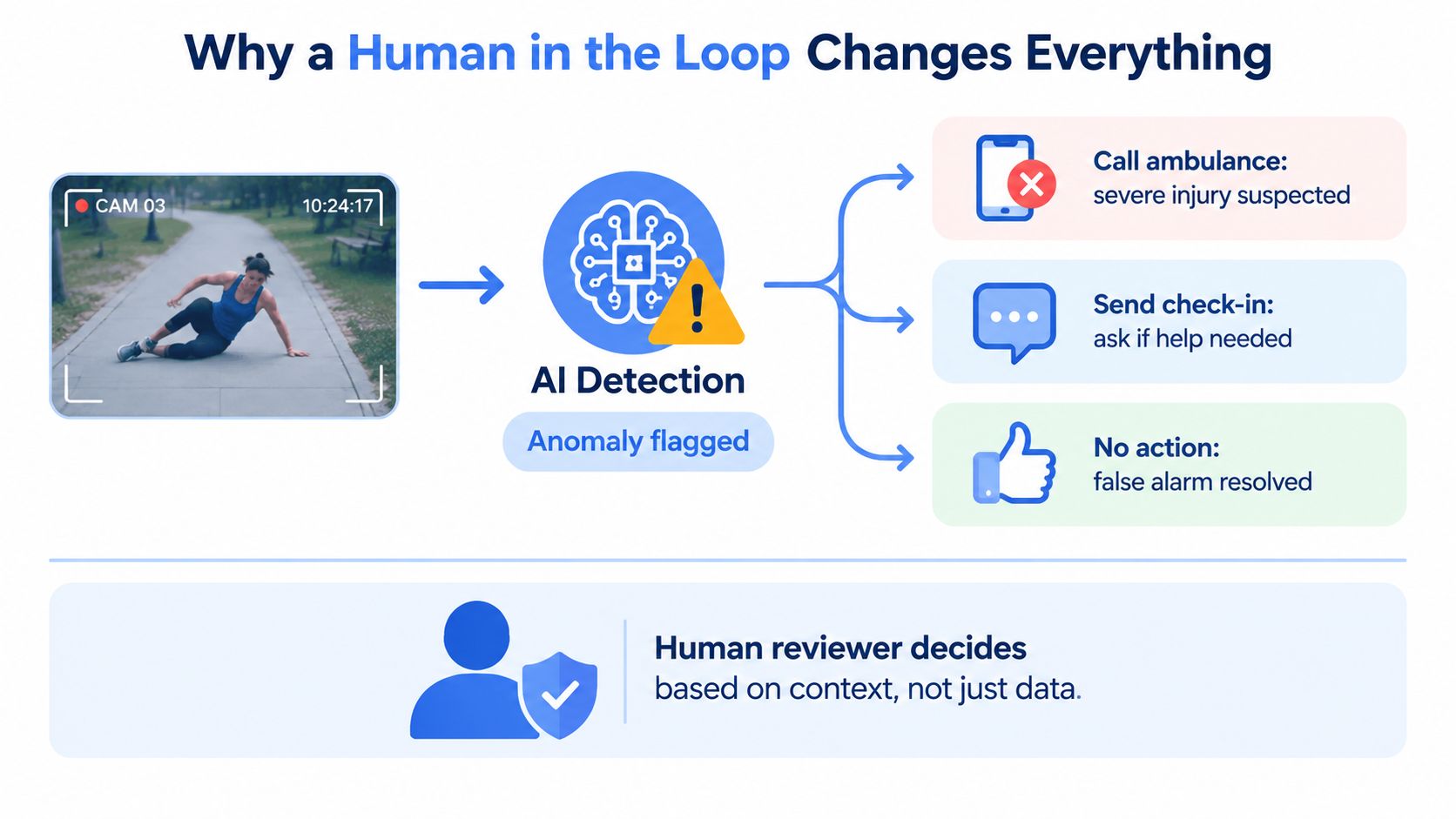
An algorithm can flag an unusual movement. It can’t reliably determine whether a jogger who tripped has a serious injury, wants someone to check in, or stood up and continued running. That judgment requires context, communication, and a person who can take responsibility for the next step.
Human review also protects against the opposite problem. A system may miss an event that doesn’t match a predefined pattern, while a trained operator can notice body language, a change in tone, a hidden person entering the frame, or an unanswered prompt. The software helps prioritize attention, but the reviewer turns raw signals into an incident assessment.
Fast attention still needs careful verification
Independent lone-worker monitoring data covering 20,433 monitored duress activations in FY26 records that every activation was answered by a trained operator. The median time from alarm to operator attention was 7 seconds, with 71.6% answered inside 10 seconds and 94.2% inside 30 seconds. These figures are reported in the FirstWatch monitoring dataset.
The same dataset recorded 815 confirmed emergencies in one year, about one every 10.7 hours, and found that 34% occurred after hours, even though after-hours activations represented 22% of all activations. It also found that 17.7% of activations were raised automatically, including fall detection and missed check-ins. Those numbers show why response speed and automated detection must operate together, rather than treating either one as sufficient.
Verification may involve listening, viewing the live scene, contacting the user, or checking whether an alert is consistent with the surrounding evidence. RapidSOS describes a human-in-the-loop process in which monitoring staff verify alerts, contact the person when needed, and escalate with enriched information such as location, incident context, and user profile through its emergency escalation model.
A reviewer may speak calmly to someone facing a threat, ask a worker to confirm their condition, or stay connected while responders are being contacted. That intervention can help clarify the situation and may reduce confusion before dispatch receives the alert.
For a deeper look at how monitoring can prioritize changing levels of risk, see risk-based monitoring for safety operations. The central principle is simple. Human review isn’t an accessory to the software. It is the decision layer that prevents raw alerts from becoming either dangerous silence or constant noise.
From App Alert to 911 Through RapidSOS
The handoff to emergency services should preserve the information that made the alert meaningful. If a monitoring center confirms a threat but the dispatcher receives only a vague voice message, the system has lost much of its value.
A typical flow has several linked stages:
- The user or system triggers an alert. The person may press SOS, request help for someone else, or generate an alert through movement detection or a missed check-in.
- The monitoring service receives the live context. Depending on the product and permissions, that context may include the current location, live audio, video, route information, and profile details.
- A trained operator verifies the event. The operator may speak with the user, review the scene, and determine whether emergency escalation is appropriate.
- The alert moves toward the relevant emergency communication center. The handoff needs to account for the device’s current jurisdiction, not merely the user’s home address.
- The dispatcher receives enriched incident information. Instead of starting with an empty voice call, the dispatcher can receive a clearer description of what occurred and where assistance is needed.
What RapidSOS does
RapidSOS functions as a data bridge to public safety answering points and emergency communication centers, not as a replacement for every monitoring or dispatch role. Its purpose is to route digital emergency information to the appropriate public-safety workflow, including real-time location and incident context where supported.
That distinction prevents a common misunderstanding. An app may detect an event, a monitoring center may verify it, and RapidSOS may transmit the relevant data to emergency dispatch. Each part has a separate responsibility.
The technical prototype described in a peer-reviewed smart-city emergency-response study reported sub-450 millisecond alert latency, over 95% detection accuracy, 99.1% alert-delivery success, 99.8% uptime, and support for more than 12,000 concurrent devices. Those are prototype results, not a promise that every deployment will achieve the same performance. They do illustrate why edge processing, resilient services, and dependable routing matter when an incident changes quickly.
| Data Element | Traditional 911 Call | RapidSOS-Enabled Alert |
|---|---|---|
| Location | Spoken or automatically supplied location, depending on the call path | Digital location and available incident context can travel with the alert |
| Situation details | Dispatcher gathers information through questions | Monitoring staff can provide verified context before or during the handoff |
| Audio and video | Usually dependent on what the caller can describe or transmit | Available streams may support review when the user has granted access |
| User profile | Caller explains relevant details under stress | Authorized profile information can accompany the emergency data |
| Jurisdiction | Call routing determines the receiving center | Digital routing is designed to direct information toward the relevant public-safety workflow |
The quality of this process depends on integration. Independent reporting on RapidSOS’s 2025 emergency-response findings says 20% of teams struggle to coordinate with first responders because of delays in awareness, 13% report limited coverage in rural or understaffed locations, and 16% struggle to prioritize high-stakes incidents because of alert overload, as described in the RapidSOS State of Emergency Response report. A live stream helps only when the receiving team can use it.
Privacy Controls That Decide Whether People Keep It On
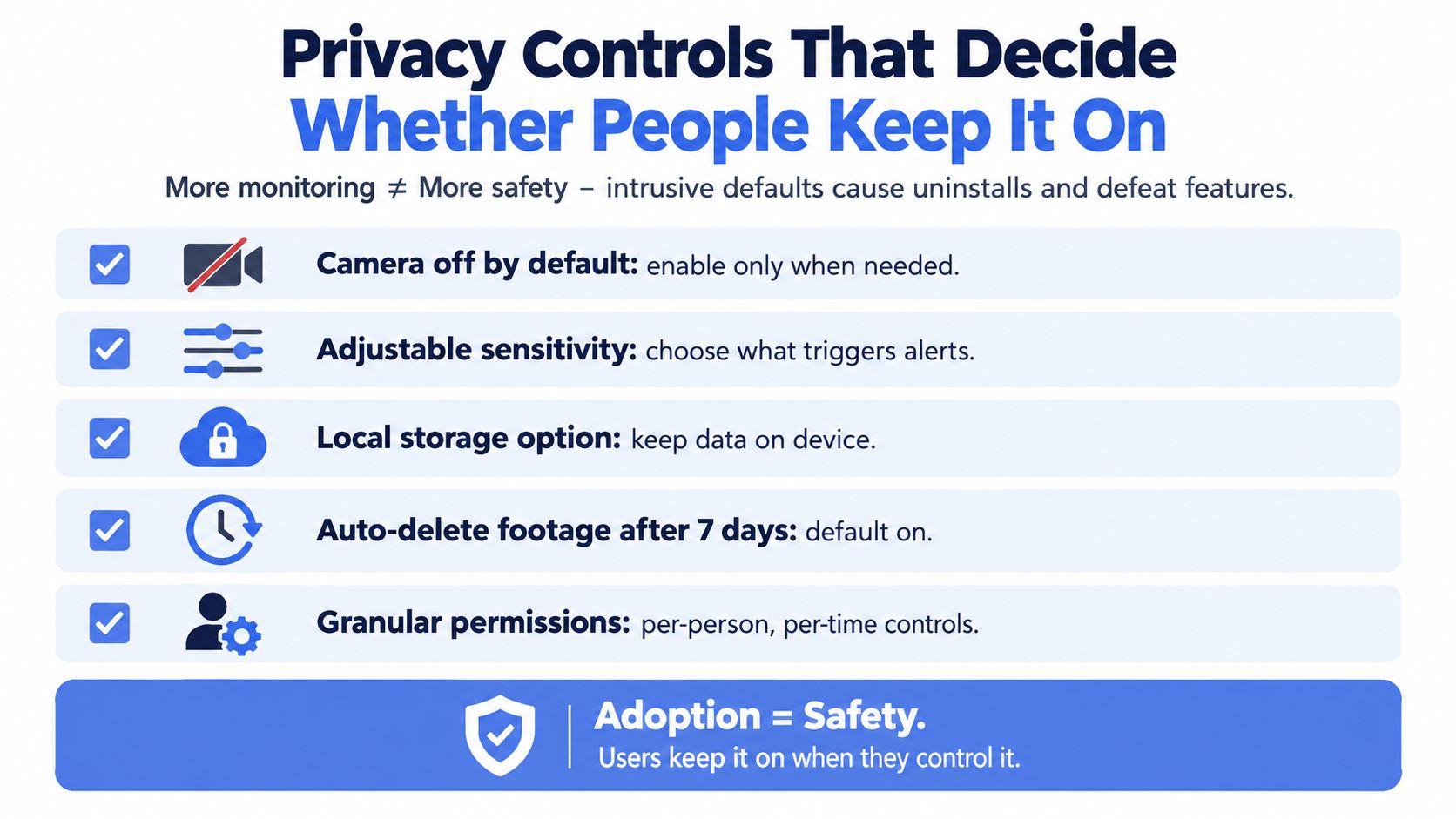
More monitoring doesn’t automatically produce more safety. If users feel watched, can’t disable unnecessary streams, or don’t understand where recordings go, they may stop using the service or defeat the feature that was supposed to protect them.
Privacy controls should be treated as adoption features. A user who can choose when to go live is more likely to activate monitoring during a vulnerable journey. An employee who knows that audio and video permissions are separate can participate without accepting a broader level of observation than the job requires.
Controls worth checking
- Opt-in activation: Confirm whether the user starts a live session deliberately or whether monitoring runs by default.
- Separate permissions: Check whether audio, video, location, movement detection, and recording can be controlled independently.
- Clear visibility: Users should know who is watching, whether recording is active, and when a watcher joins audio.
- Automatic shutoff: Scheduled sessions and idle timeouts can prevent an accidental open stream.
- Retention settings: Ask how recordings, transcriptions, summaries, and location history are stored and deleted.
- Access restrictions: Look for role-based access, strong authentication, encryption, and an audit trail showing who viewed an incident.
- Emergency exceptions: Understand whether critical alerts can bypass device settings such as Do Not Disturb, and who controls that behavior.
Privacy also intersects with false-alarm fatigue. Research on AI-powered safety platforms identifies isolated systems, data silos, limited real-time analysis, and excessive false alarms as obstacles to effective response. A 2025 construction-safety study identifies financial constraints, integration with existing systems, and data privacy concerns as major adoption barriers.
Match monitoring intensity to the situation
An enterprise may need scheduled coverage for lone workers during defined shifts. A family may prefer short, voluntary sessions for a late walk. A campus may combine on-demand personal monitoring with fixed emergency infrastructure. Treating all three situations as if they require constant observation creates unnecessary friction.
Adoption principle: People keep safety features active when they understand the boundaries and can control the ordinary use of their data.
Ask vendors what happens when a user cancels, loses signal, changes permissions, or ends a session. A privacy policy matters, but the operational behavior of the app matters more to the person carrying it.
Where Real-Time Monitoring Fits Individuals Campuses and Employers
The same technical pipeline can serve different groups, but the safety problem changes with the setting. Individuals want a discreet lifeline during a particular journey. Campuses manage safety across a defined geography and many independent users. Employers must protect people whose work may take them away from colleagues, supervisors, and predictable facilities.
Individuals and families
For a solo commuter or rideshare passenger, short-burst activation is usually more relevant than continuous tracking. The user starts a session before a late walk, shares the route with selected contacts, and can request a trained reviewer if concern develops.
Families may use a combination of live viewing, one-tap check-ins, movement prompts, or an emergency request made on behalf of another person. The success question is whether the user can activate help without stopping to write a detailed explanation.
An older parent may value a discreet lifeline that doesn’t require navigating a complex menu. In that setting, clear controls, accessible alerts, and trusted contacts can matter as much as the sensor technology.
Campuses
A campus safety lead has a different operating challenge. The team must coordinate student-initiated alerts, fixed emergency points, campus police, residence staff, and local emergency services across a shared environment. The unit of work is often not one journey, but the pattern of incidents around routes, buildings, entrances, and late-night activity.
The monitoring model may include scheduled walks, blue-light integration, live location, and a defined escalation policy. “Resolved” could mean the student reached a safe destination, a campus responder made contact, or emergency services accepted the handoff.
Employers
Employers focus on duty of care, risk assessments, lone-worker procedures, and the response expectations attached to specific roles. A field technician may need scheduled check-ins and automatic fall detection. A night-shift worker may require coverage during a defined window. A rideshare or delivery workforce may need a quick way to share live context while moving between locations. Our comparison of lone worker safety apps shows which vendors cover each of those needs.
For a practical example of this deployment category, review 3rd-i’s employee safety monitoring service. The product fit should still be tested against the employer’s own policies, workforce consent requirements, and emergency procedures.
| Reader Role | Typical User | Who Monitors | Dispatch Path | Primary Success Metric |
|---|---|---|---|---|
| Individual or family | Commuter, student, older parent | Selected contacts or trained monitoring staff | Contact escalation, monitoring review, and emergency services when verified | User can request help quickly with usable context |
| Campus safety team | Student, visitor, residence staff member | Campus personnel, trained agents, or both | Campus response followed by local emergency dispatch when needed | Coordinated coverage across campus routes and buildings |
| Employer | Lone worker, technician, driver, or night-shift employee | Safety team, supervisor, or trained monitoring staff | Internal escalation and emergency dispatch under company policy | Reliable response during the worker’s defined risk window |
The capture, review, verification, and dispatch stages remain consistent. The trigger, monitoring authority, and closure criteria must be designed for the people and environment involved.
Choosing a Real-Time Safety Monitoring Solution With Confidence
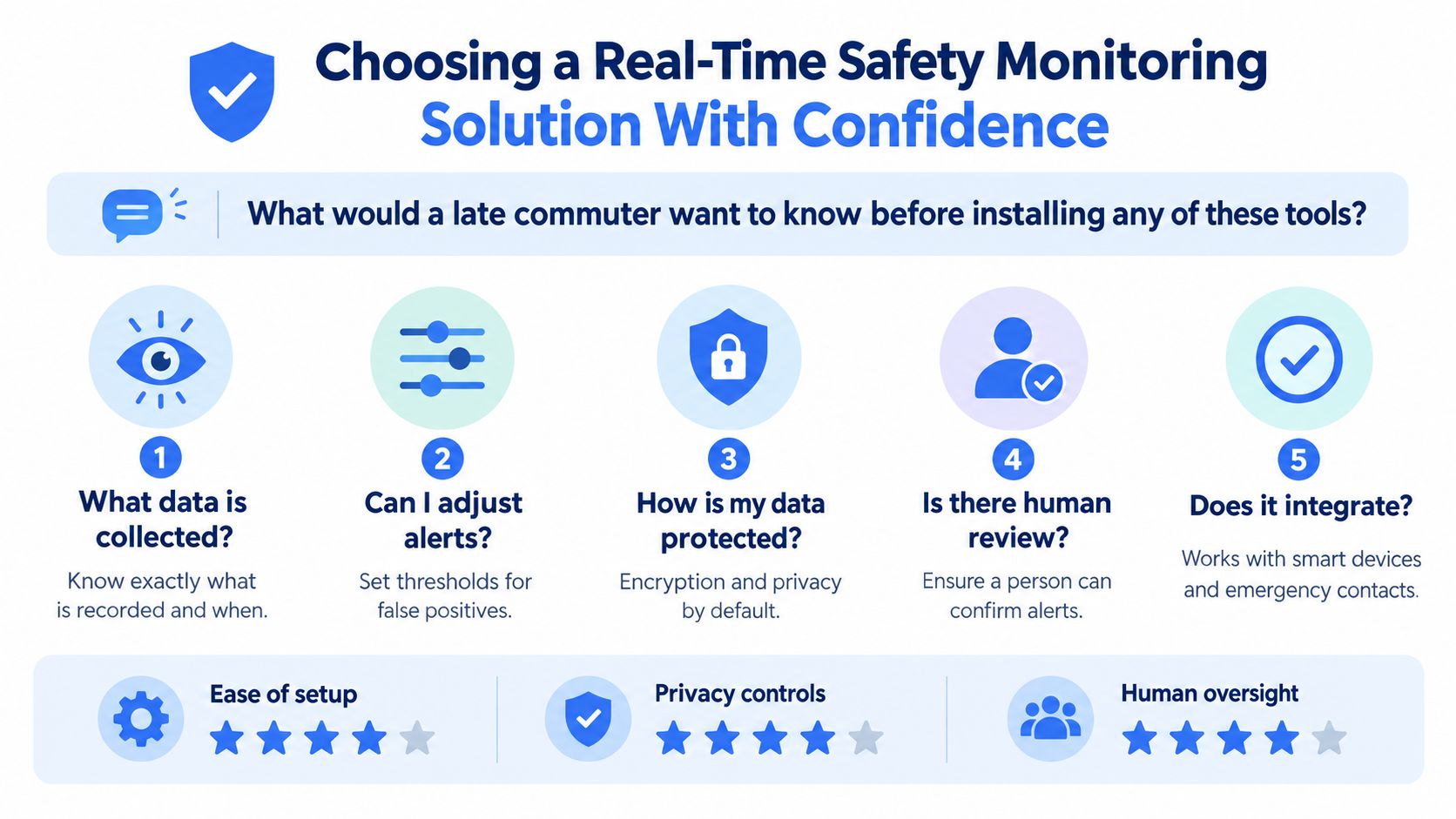
Return to the passenger watching the route drift away from the main road. Before installing a safety tool, that person needs answers to practical questions, not a longer feature list.
Ask for evidence about response
Don’t accept “fast response” as a complete answer. Ask for the provider’s operator-attention data, how it defines the starting point, and whether the measurement covers human review or only software detection. The independent lone-worker dataset cited earlier is useful because it separates alarm activation from operator attention.
Then trace the next stage:
- Trigger to review: Who receives the alert, and what does the operator see first?
- Review to verification: How does the reviewer contact the user, assess the scene, and classify the event?
- Verification to dispatch: Does the service connect directly to local emergency communication centers, or does it pass through another call center?
- Dispatch context: Which details travel with the alert, including location, profile information, audio, video, and incident description?
- Failure handling: What happens if the user loses connectivity, cancels the alert, or can’t answer?
Examine the data boundary
Ask when audio and video begin, whether recording is automatic, where the files are stored, who can view them, and how deletion works. The answer should distinguish live access from retained evidence. It should also explain whether transcriptions and AI-generated summaries remain after the underlying recording is deleted.
Check whether the system offers Ghost mode or another way to limit routine location visibility without disabling emergency functionality. Confirm whether permissions can be adjusted separately and whether users can see when a contact or operator is watching.
Test the operational fit
A reliable solution must work in the actual setting. For a campus, test the handoff with campus police and local emergency contacts. For an employer, test scheduled coverage, supervisor escalation, and the process for a lone worker who misses a check-in. For a family, test activation while the user is walking, carrying bags, or dealing with a weak connection.
Ask whether the service operates 24/7, during scheduled windows, or only when a user manually starts a session. Confirm the emergency disclaimer, the supported devices, the expected battery impact, and the procedure for ending a session safely.
The market trajectory supports treating monitoring as an ongoing safety function rather than a one-time tracking purchase. The category is projected to grow from USD 1,103.11 million in 2018 to USD 1,808.79 million in 2024, with forecasts reaching USD 3,562.10 million by 2032 at a CAGR of 8.23%, according to Intenseye’s real-time safety monitoring market insights. Growth alone doesn’t prove that a particular product will perform well. It does show why buyers should evaluate the full operating model, including people, integrations, privacy, and response accountability.
The right question for the late commuter isn’t just, “Does this app track me?” It’s, “If something feels wrong, can the system capture enough context, put a trained person on it, verify what is happening, and reach the right emergency team without taking control away from me?”
3rd-i offers live video, audio, and location sharing with selected contacts and trained Safety Agents, plus SOS escalation to emergency dispatch through RapidSOS. If you’re evaluating real-time safety monitoring for late commutes, families, campuses, or lone-working teams, visit 3rd-i to review how the service fits your response and privacy requirements.