
Smart Safety App: What It Is and Why It Matters
You’re leaving a late meeting, walking toward a parking garage, and checking whether your ride has arrived. Nothing has happened, but you’d feel better if someone knew where you were and could help without waiting for you to explain everything. Sending your location to a friend is a start. Knowing whether that friend is watching, what they can see, and what happens if you stop responding is a different question.
A smart safety app addresses that gap by connecting information with people who can act. The useful question isn’t how many features it has. It’s whether the person using it, their trusted contacts, a human monitoring service, and emergency dispatch can work together when circumstances become confusing.
Table of Contents
- What a Smart Safety App Actually Does
- The Four Feature Pillars That Matter
- Individual, Family, Campus, and Employer Deployments Compared
- Six Real-World Moments the App Is Designed For
- Privacy, Consent, and Coercive-Control Risks
- How a 911 Handoff Actually Works
- Choosing the Right Smart Safety App
What a Smart Safety App Actually Does
You step out of the elevator into the garage. Instead of texting someone to check on you later, you start a monitored session. Your selected contacts can follow your movement, see the surroundings you choose to stream, and communicate with you without requiring a long exchange of messages.
That’s the basic idea behind a smart safety app: a communication and response system, rather than just a location tracker. Some tools focus on check-in timers or map sharing. A more connected service combines live audio and video, route awareness, trusted watchers, and access to a trained Safety Agent who can speak with the user and escalate an emergency.
A map pin doesn’t explain the situation
Suppose your position stops moving near the garage exit. A map alone can’t tell your friend whether you’re waiting for the car, struggling with a locked gate, or unable to respond. Video, audio, and a conversation can add context, although none guarantees that a watcher will understand everything correctly.
The infographic outlines familiar safety functions. A human-monitored service adds another question to each: who takes responsibility when an alert needs action?
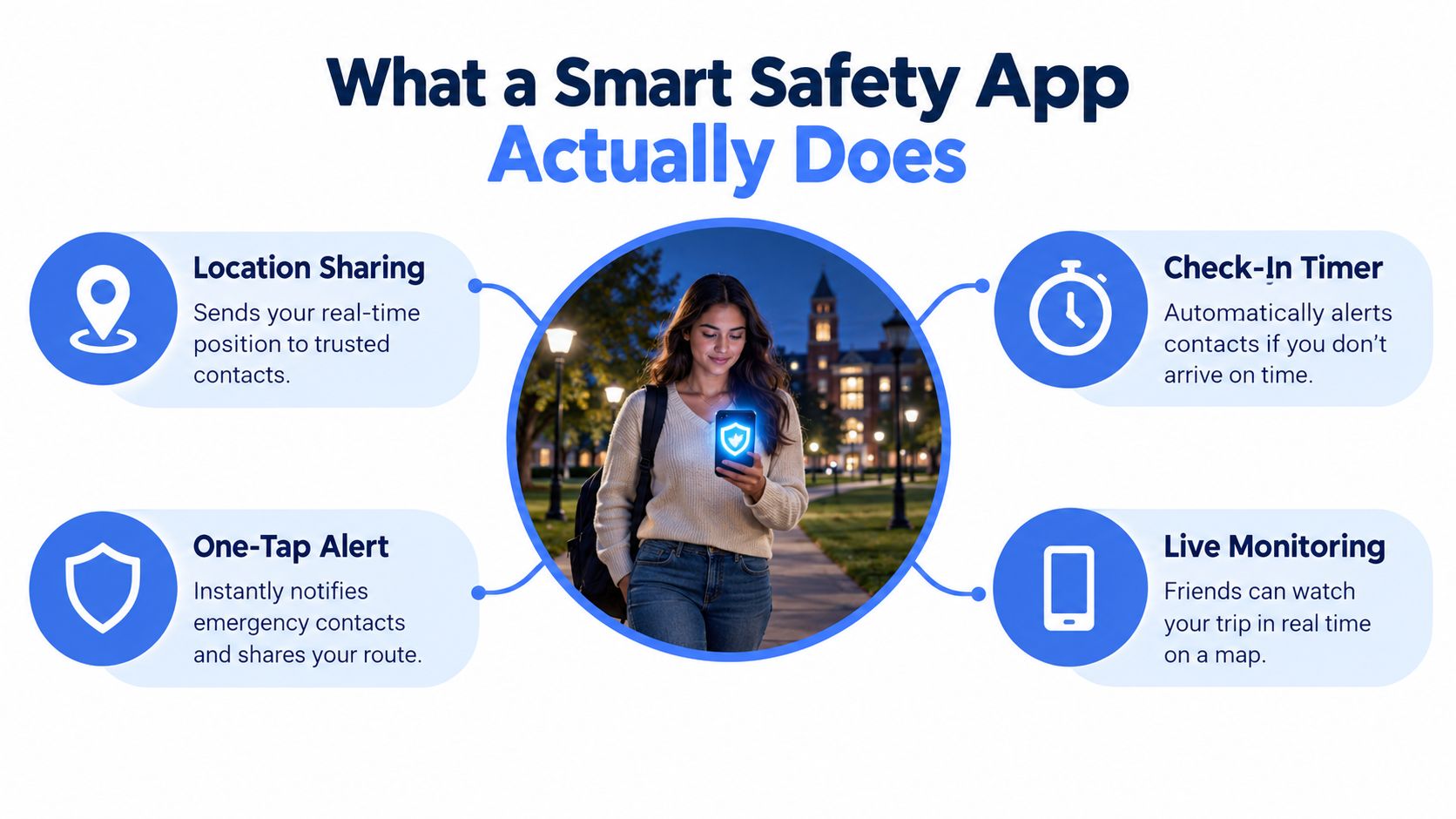
Think of the participants as having different jobs:
- The user chooses when to share and communicates what help they need.
- Trusted watchers provide familiarity and notice when something seems unusual.
- The Safety Agent provides a designated human escalation role, rather than leaving friends to improvise.
- Emergency dispatch determines the public-safety response from the information it receives.
The underlying need is serious. In its global assessment, the World Health Organization estimated that approximately 736 million women had experienced physical and/or sexual violence by an intimate partner, sexual violence by a non-partner, or both since age 15. That finding establishes the scale of violence, not proof that an app prevents it.
Connection isn’t protection by itself
A useful service makes it clear whether someone has joined, whether communication is working, and who will respond to an SOS. Merely opening the app shouldn’t leave you assuming a person is watching.
The app is a layer in a safety plan, not a replacement for emergency services. If you need immediate emergency assistance and can call directly, don’t delay that call to configure a stream.
The Four Feature Pillars That Matter
A feature earns its place when it solves a recognizable problem under stress. A camera button isn’t enough if the watcher can’t understand the route. An alert isn’t enough if nobody has responsibility for answering it.
Streaming and monitoring serve different jobs
Live streaming supplies context. Front and rear cameras can show the person and their surroundings, while audio captures information outside the camera’s view. Presenting route and video together helps a watcher interpret movement without switching between disconnected screens.
Consider the watcher, too. Picture-in-Picture lets them keep a stream visible while using another app, but it doesn’t prove they’re paying attention. Lock Screen widgets reduce the steps needed to access Go Live or SOS; they don’t eliminate the need to test permissions and access before relying on them.
Real-time monitoring supplies participation. In a Squad view, visible watcher counts help the user distinguish an active audience from a list of people who were merely invited. One-tap Nudges and replies reduce the need to type while moving.
A Request to Speak feature gives a watcher a way to join the audio with the user’s approval. That distinction matters: being allowed to watch shouldn’t automatically mean being allowed to interrupt or listen through every available channel.
The real-time safety monitoring overview describes these connected functions. When evaluating any service, ask how the interface distinguishes a contact’s presence from a Safety Agent’s involvement.
Practical rule: An invitation sent, a watcher connected, and an agent responding are different states. The app should make each visible.
Escalation and controls complete the system
The SOS pillar connects concern to a response workflow. An SOS can bring a Safety Agent into the situation, while Emergency for a Friend allows someone else to request help. Neither should leave the user wondering whether they’ve contacted a friend, a monitoring service, or emergency dispatch.
The control pillar determines how much access people receive. Ghost mode addresses temporary map visibility. An Emergency Entry Pin supplies responder-oriented entrance information, which belongs to emergency preparation rather than being a privacy guarantee.
Some controls affect notifications or documentation instead:
- Critical Alerts can reach contacts through Do Not Disturb, but users should verify the necessary settings and permissions.
- Automatic recording preserves the session for follow-up, subject to the service’s storage and access rules.
- Transcription and AI summaries make recordings easier to review, but should be checked against the original material rather than treated as authoritative accounts.
These functions work together, but their availability and behavior vary. Evaluate the complete workflow, not the presence of familiar feature names.
Individual, Family, Campus, and Employer Deployments Compared
The person paying for an app isn’t necessarily the person whose movements it records. That difference becomes important when a household, university, or employer administers the service.
Smart Safety App Deployment Models
| Model | Who Pays | Who Watches | Primary Use Cases |
|---|---|---|---|
| Individual | The user | Selected friends or family, with agent access according to the plan | Personal commutes, late walks, rideshares |
| Family | A household subscriber | Approved household contacts and Safety Agents according to the plan | Shared check-ins and household travel |
| Campus | The institution | Authorized contacts, designated staff, and monitoring personnel as configured | Travel between buildings and after-hours journeys |
| Employer | The company | Approved supervisors or monitoring personnel, with defined agent coverage | Lone work, night shifts, travel between sites |
Household coordination versus institutional administration
An individual subscription leaves the user responsible for selecting contacts, understanding coverage, and checking usage limits. In the consumer offering described here, streaming and recording minutes are the billing meter. A family arrangement pools minutes across members and includes Safety Agent monitoring across its tiers, but buyers should still establish what happens when their allowance is exhausted.
Sharing a subscription shouldn’t require sharing every journey. Adults in the same household may reasonably want different watchers and separate access to their recordings.
Families also need more than a digital monitoring plan. For a separate health-safety concern, ProMed Certifications’ resource on protecting your family from Covid offers relevant context for healthcare households. Infection prevention and monitored travel address different risks; neither substitutes for the other.
Institutional deployments shift administration to someone else. Centrally issued seats and pooled minutes can support access, but the institution must explain enrollment, account removal, and responsibility outside ordinary operating hours. A campus safety app deployment should be evaluated against the university’s actual travel patterns and emergency arrangements.
Recording rules need a separate decision
The table identifies who participates, not who owns every record. A recording may exist whenever a monitored session is captured, but payer status shouldn’t determine viewing rights.
Before deployment, put the governance rules in writing:
- Individual and family access: Specify which contacts can view live sessions and whether they can access stored material.
- Campus access: Identify authorized offices, permitted purposes, and the process for requesting incident records.
- Employer access: Separate emergency monitoring from routine productivity or attendance supervision.
- Retention and departure: Define deletion, account closure, and access after a student leaves or a worker changes jobs.
Employers carry an additional responsibility: matching the tool to the hazards. The U.S. Bureau of Labor Statistics recorded 5,070 fatal occupational injuries in 2024, including 1,937 transportation-related deaths. Those figures describe fatalities, not app effectiveness, and support treating monitored travel as part of a wider workplace safety program.
Six Real-World Moments the App Is Designed For
These are illustrative situations, not accounts of documented rescues. The relevant feature combination changes with the circumstances, and emergency escalation should follow the situation rather than occur automatically whenever someone starts streaming.
Travel where context matters
A late walk from a transit stop. You tap Go Live before leaving the station and a sibling joins the Squad view. If you become concerned, you request a Safety Agent rather than stopping to compose a detailed message. If emergency help is needed, the agent can coordinate available incident and location information for dispatch.
An unfamiliar rideshare pickup. You start the session while waiting and a friend joins. Before entering, you still verify the vehicle and driver through the ride service; a live stream doesn’t perform that check for you. If something seems wrong, an agent can help assess the situation and escalate relevant pickup, route, and incident context when necessary.
A student moving between campus buildings. You Go Live before leaving the study area and an approved contact follows the trip. If a locked passage forces a detour, you can communicate that change rather than leaving someone to interpret it as trouble. If you need assistance, an agent can use your available campus and entrance information during escalation.
Concern when someone can’t answer
A missed family check-in. A family member who expected your arrival sends a Nudge. No reply is a reason to check, not proof of an emergency: the phone may be unavailable or you may be occupied. If you already have a live session, watchers can review its status; if not, they shouldn’t assume they can activate your camera remotely.
Helping a friend across town. Your friend’s message or active stream gives you reason to worry, and you use Emergency for a Friend. Tell the Safety Agent what you directly observed and what you’re inferring. If escalation is warranted, the agent needs the friend’s location and incident context, not merely your own phone’s position.
A lone worker between job sites. Before departure, the worker starts a session with the designated monitor. If a concerning incident occurs, the worker requests an agent, who can escalate with available journey and site information. A missed session or lost connection must also trigger the employer’s agreed contingency procedure.
No response is information to investigate, not a diagnosis. The next action should depend on the available context and the agreed safety plan.
For lone workers, the app can’t address every important concern. A survey of 2,097 workers found that mental health and fatigue were leading concerns among lone workers, cited by 48%. Staffing, rest, training, and a private way to report concerns remain essential alongside monitored sessions.
Privacy, Consent, and Coercive-Control Risks
A controlling partner asks to become your watcher, framing it as concern. Later, they question every stop and demand an explanation whenever you aren’t visible. The same access intended to support you can become a tool for restricting your freedom.
That isn’t a reason to reject all location sharing. It’s a reason to distinguish consensual support from compulsory visibility. Research discussing location-sharing practices reports an Australian survey in which nearly one in five young adults believed tracking a partner’s location was expected in a relationship. Expectations around monitoring deserve scrutiny, even when someone calls them protective.
Evaluate access before sharing
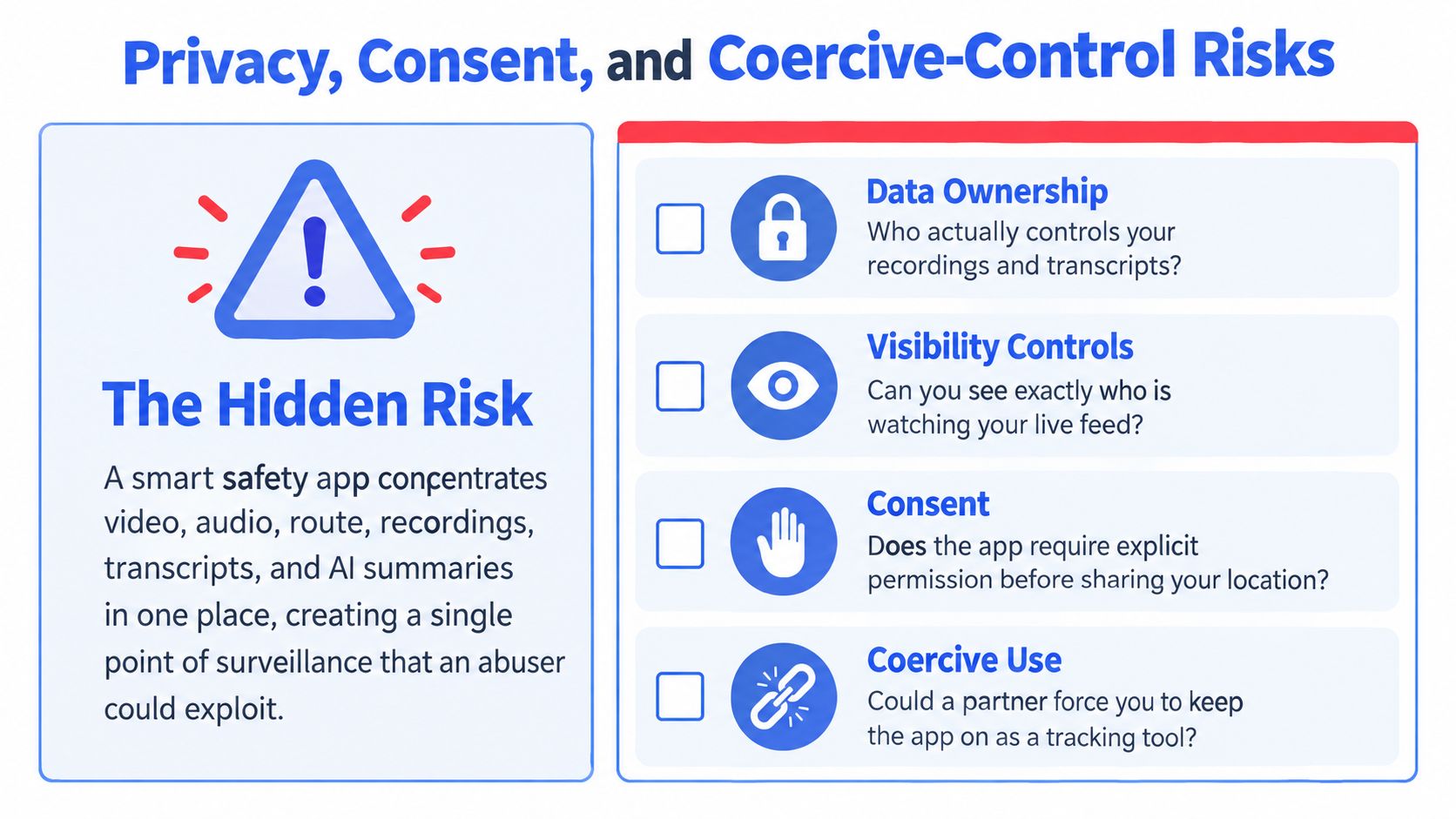
A connected service can collect video, audio, route history, recordings, transcripts, and summaries. Ask about each separately. Permission to see a live map shouldn’t automatically grant access to stored conversations.
Look for safeguards you can verify:
- Least-privilege sharing: Each watcher receives only the access needed for their role.
- Watcher removal: The user can revoke access without navigating an obscure support process.
- Audit visibility: The user can see who accessed sensitive information and when.
- Retention limits: The service explains deletion schedules, backups, exports, and institutional access.
- Safe recovery: Account recovery doesn’t depend solely on an email address or phone controlled by an unsafe person.
Ghost mode needs a threat-aware explanation
“Off the map” is not a complete privacy specification. Ask whether Ghost mode hides current location, an active stream, session status, or only the map marker. Find out whether watchers receive a notification or can infer that the mode has been enabled.
Don’t assume Ghost mode conceals you from every participant, including Safety Agents. A person may need to hide from a threatening watcher while keeping professional help available. The vendor should explain whether those permissions can be separated.
Revoking access can also create interpersonal risk if an unsafe watcher notices. Someone facing coercive control may need specialist safety-planning support before changing settings or accounts.
More visibility can help a responder and harm a user. A responsible safety assessment considers both outcomes.
Privacy controls are part of emergency design, not optional extras. The user needs meaningful choices about who watches, who records, and who can recover access.
How a 911 Handoff Actually Works
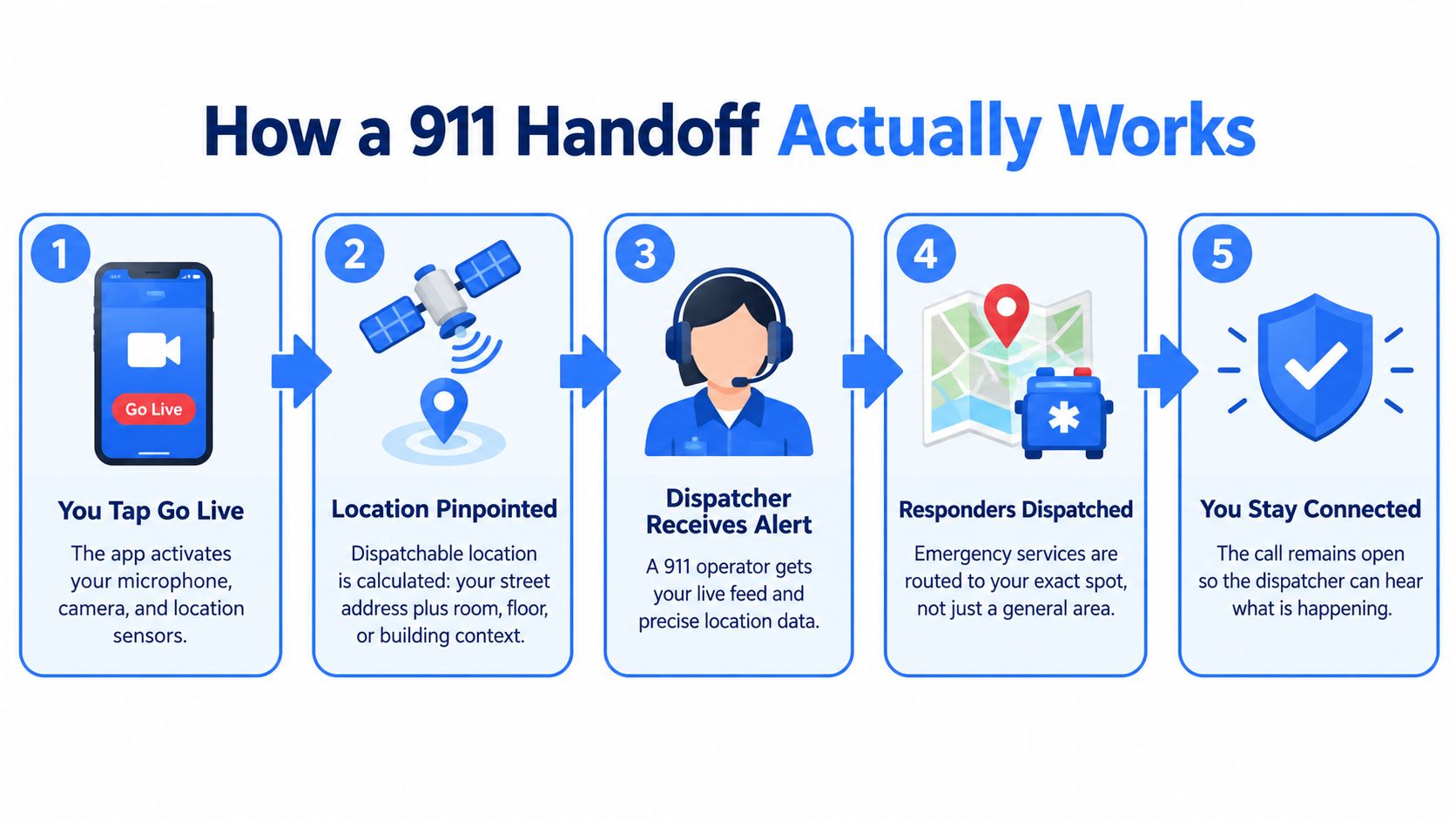
A coordinate isn’t necessarily enough to find someone inside a building. FCC guidance defines dispatchable location as a street address plus additional information, such as room or floor, needed to locate the caller adequately. An Emergency Entry Pin supplements that information by identifying a useful entrance; it doesn’t guarantee an exact indoor position.
The illustration shows a simplified intended pathway. Starting Go Live doesn’t itself mean a dispatcher receives an alert, and receiving a stream or precise location depends on connectivity, integration, and the receiving system’s capabilities.
Accuracy needs an uncertainty label
App-derived GPS and carrier-provided emergency location are different inputs. FCC wireless E911 rules include horizontal-location benchmarks within 50 meters and a qualifying vertical-location target of plus or minus 3 meters for 80% of calls. Those carrier requirements aren’t a promise about an app’s accuracy.
In a parking structure, tower, or basement, operators should see the timestamp, uncertainty, floor information when available, and source of each location update.
Build a fallback, not an assumption
A dependable handoff should:
- Attempt structured delivery: Send current location, entrance context, callback identity, route direction, participant status, and available incident material through the supported RapidSOS-style integration.
- Fall back transparently: Provide the last reliable fix with its age and uncertainty if fresh data stops arriving.
- Keep a human available: Maintain agent communication for clarification and flag failed or stale deliveries.
The 911 dispatch app overview provides product context for this pathway. Peak Transport’s middle-mile dispatch coordination tips are a separate logistics resource, not emergency-response guidance; they may interest operations teams reviewing their broader communication procedures.
Choosing the Right Smart Safety App
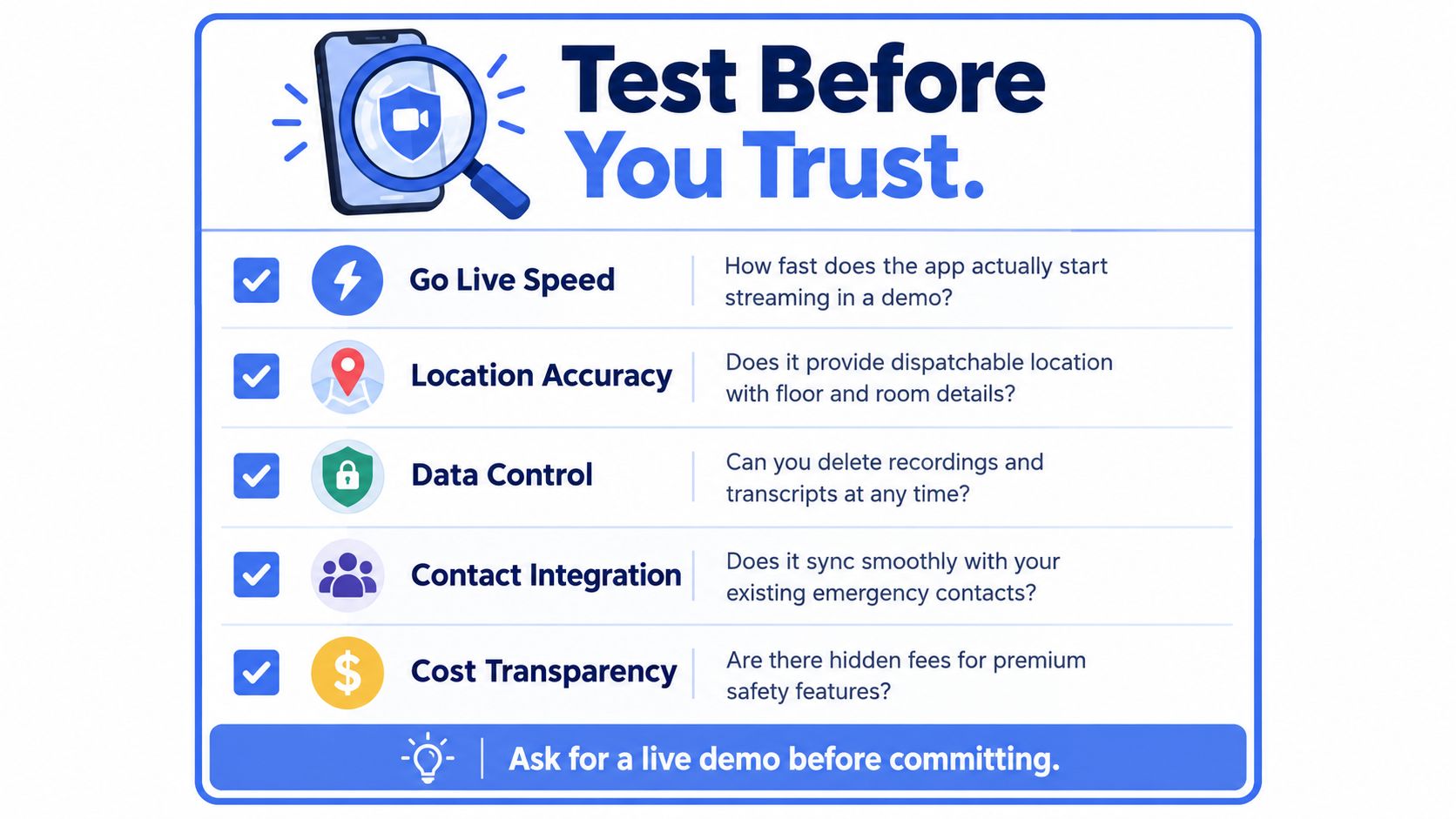
Choose a service you can test, not a workflow you have to imagine. Use a demonstration or trial in ordinary conditions before relying on it during a stressful journey.
Test the user-facing promises
Start Go Live from the access point you’d use. Have a trusted contact join and verify that the displayed session status matches what they receive.
- Response path: Test SOS through the vendor’s approved demonstration process, never by creating a false emergency.
- Location preparation: Check that you can enter useful building and entrance details.
- Access changes: Confirm what Ghost mode and watcher removal conceal.
- Documentation control: Find out how to review, export, and request deletion of stored material.
- Billing clarity: Ask what happens when streaming allowances run out.
Ask about the parts you can’t see
Who monitors after hours? What happens when connectivity fails? Can you privately request help, and how are false alarms handled? Ask the vendor to explain its escalation integration and distinguish attempted delivery from confirmed receipt.
Walk away from vague answers about access, coverage, retention, or emergency routing. A polished interface isn’t evidence that the operational process works.
Decision summary: A smart safety app belongs inside a safety plan. Judge it by who watches, who responds, what they know, and what gets recorded, not by the length of its feature list.
3rd-i offers an iPhone personal safety app that streams live video, audio, and location to selected contacts and trained Safety Agents, with emergency escalation through RapidSOS. Visit to explore its individual, family, campus, and company options, and ask for a demonstration of monitoring, privacy controls, and the emergency handoff before choosing a plan.