
Live Video Streaming Chat for Real-Time Safety
You’re walking home after a late shift, watching the blue dot on a map move along the route. A trusted contact can see where you are, but they can’t see that the car behind you has slowed twice, hear the change in your breathing, or know whether you’ve reached the entrance you selected. A text asking “Are you okay?” may arrive at the wrong moment, and typing a reply while moving can create its own risk.
Live video streaming chat changes that safety model. It combines live video, audio, location, route information, and two-way messaging so a watcher can understand what’s happening rather than interpret a static location or delayed check-in. The technical details matter because emergency response depends on what the watcher sees and hears, how quickly they receive it, and whether a trained person can make a sound judgment when the situation is ambiguous.
Table of Contents
- Moving Beyond Passive Location Sharing
- Engineering Sub-Second Latency for Emergencies
- Managing Dual Cameras and Picture-in-Picture Views
- Why Human-in-the-Loop Monitoring Beats Automation
- Balancing Visibility with Privacy and Consent
- Deployment Models for Families and Organizations
- Best Practices for Reliable Real-Time Protection
Moving Beyond Passive Location Sharing
A location pin answers one question, where someone is. It doesn’t answer the questions that matter during a developing incident: Who is nearby? Is the person being followed? Has the route changed unexpectedly? Can the user speak freely, or are they trying to signal distress without attracting attention?
Consider a student leaving a library after dark. A family member might receive a route and periodic location updates, but the information remains abstract. With a live stream, that watcher can see the path ahead, hear traffic and nearby voices, and notice when the user stops responding normally. A trained Safety Agent can assess the same context when the user has activated professional monitoring, while the user keeps moving instead of composing a detailed explanation.
The difference isn’t just that video provides more information. It gives multiple people a shared, current view of an unfolding situation. A watcher can send a short nudge, request to speak when appropriate, or ask the user to move toward a visible entrance. The user can respond with a tap instead of writing a message, which reduces friction during a stressful walk, rideshare, or lone-working task.
Practical rule: Treat location as a routing signal, not as a complete safety assessment.
Context turns a check-in into oversight
A route can look normal while the surrounding circumstances change. A user may take a wrong turn, enter a poorly lit area, or encounter someone who remains just outside the camera frame. Front and rear camera views, ambient audio, and watcher communication help close those gaps. They also let a watcher distinguish an ordinary delay from a situation that deserves escalation.
The interaction model has to work for people who can’t type. One-tap prompts such as “You good?” and short responses are more useful than an open-ended chat box when the user is walking, carrying equipment, or trying not to draw attention. An SOS path should also connect the user with a Safety Agent who can call or chat, gather context, and escalate to emergency services when necessary.
Real-time presence has a wider role
The case for interactive streaming extends beyond individual commutes. A parent may monitor a child’s journey with defined consent. A campus team may support students during late walks. An employer may provide a monitored workflow for lone workers who need help without making a routine check-in feel like a disciplinary process.
This model also has limits. A live stream doesn’t guarantee that a watcher understands what they’re seeing, and more visibility can create privacy risks if access, recording, and consent aren’t controlled. The architecture must therefore join fast media delivery, clear escalation rules, human judgment, and user-managed privacy. Remove any one of those elements and the live feed can become either unreliable or intrusive.
Engineering Sub-Second Latency for Emergencies
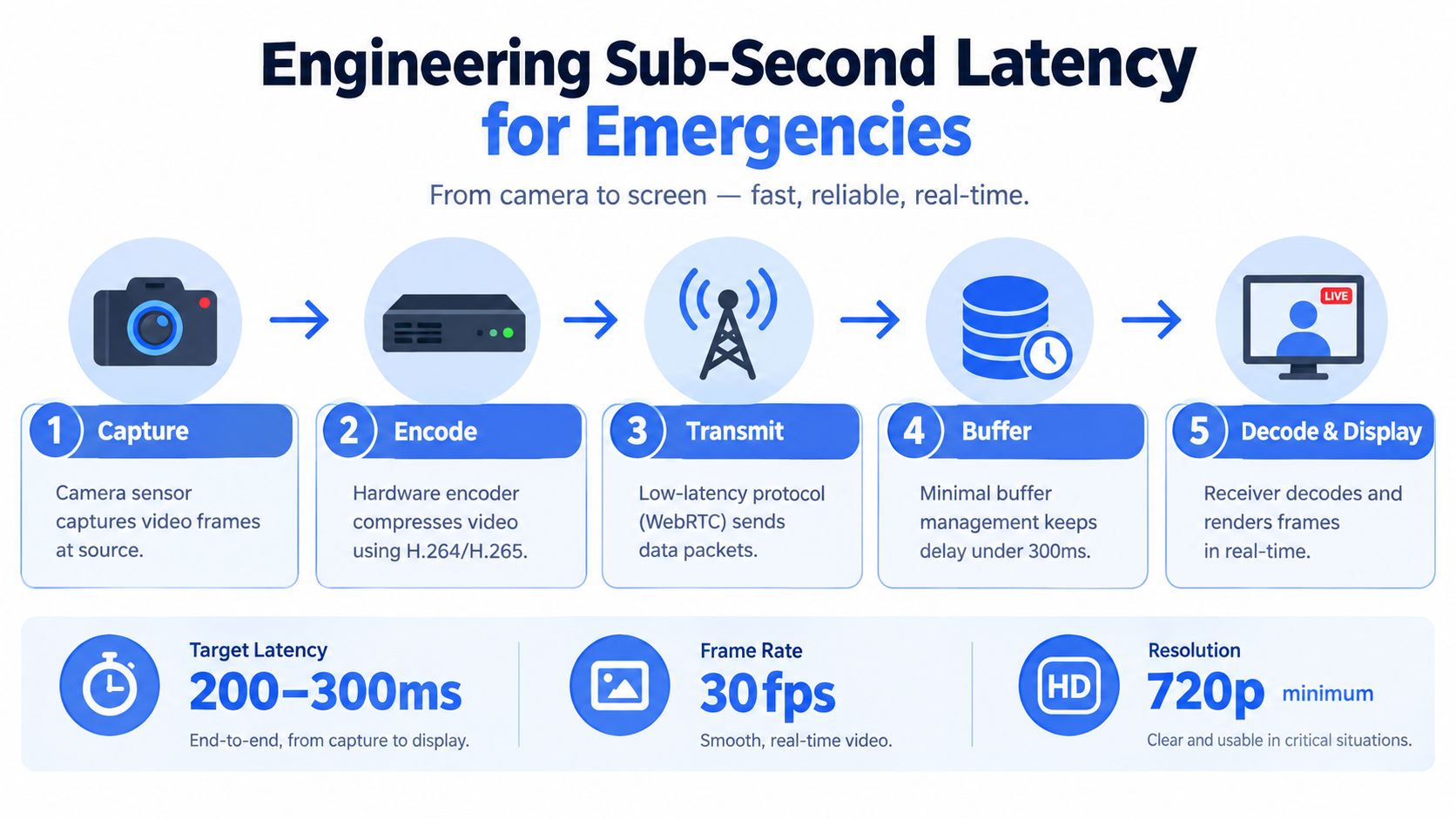
A watcher can’t guide a person around a hazard if the video arrives several seconds after the event. Interactive safety workflows need a conversational response time, not the buffering pattern used for ordinary broadcast playback. The IETF requirements for interactive real-time media describe continuous delivery within a very limited window, no more than hundreds of milliseconds, as a defining requirement.
That requirement points the architecture toward WebRTC-style real-time transport rather than conventional segment-based HLS for two-way safety communication. HLS can work for delayed viewing, but a safety workflow involving speech, watcher prompts, control messages, or rapid escalation needs the shortest practical path from capture to display.
Measure delay instead of guessing at quality
A safety streaming service should continuously observe round-trip time, jitter, packet loss, one-way delay, and queueing delay. Dropped frames are visible, but growing queues can warn of a more serious problem before the viewer sees a stall. If the encoder or network stack accumulates stale frames, the stream may remain technically connected while showing events that are no longer useful for conversation.
The publisher should cap encoder buffers and adapt resolution or frame rate as conditions change. When a cellular link becomes congested, lowering video quality is preferable to allowing latency to grow. Congestion control should favor the lowest practical transit delay while preserving enough bandwidth for useful media and control signals.
The priority order should be explicit:
- Emergency audio first: Preserve intelligible speech when video quality falls.
- Control signaling next: Keep SOS events, watcher prompts, and emergency commands moving.
- Primary video after that: Maintain the view that carries the most operational context.
- Secondary feeds and high-resolution recording last: Downgrade or pause them when capacity is constrained.
The IETF guidance on congestion control for interactive media is especially relevant here. RTP doesn’t provide congestion control by itself, so the application needs an external mechanism and circuit-breaker behavior. Retransmitting obsolete video can make the experience look cleaner while making the conversation less current. A system should prefer timely frames and preserve audio over replaying video that has lost its emergency value.
The same logic applies to chat. WebRTC data channels are required to use congestion control, individually, collectively, or alongside SRTP media flows, so emergency commands and chat messages should share a deliberately managed real-time path rather than compete blindly with bulk traffic.
For engineers mapping the complete product architecture, the live video transmission system pattern is a useful reference point. Media capture, transport, chat, location, authentication, monitoring, and escalation need to be designed as one operational workflow.
Real-time audio deserves equal attention. A concise explanation of how real time audio works helps teams reason about capture, processing, and delivery without treating voice as an optional add-on.
Managing Dual Cameras and Picture-in-Picture Views
A forward-facing camera shows where the user is looking. It may not show the person approaching from behind, a blocked exit, or a vehicle pulling alongside. Dual-camera streaming reduces that blind spot by sending front and rear perspectives into the same monitoring session, often with a Picture-in-Picture layout that keeps one view dominant while preserving the other as a smaller operational window.
The layout should reflect the watcher’s job. The primary view might show the user’s path, while the secondary view monitors what’s behind them. A Safety Agent should be able to enlarge either feed without losing the audio channel, route, chat, or emergency controls. The interface shouldn’t force the watcher to hunt across separate screens during a fast-moving event.

Design the fallback before the network fails
Two camera feeds can consume substantially more bandwidth than one. Sending both at full resolution during a weak cellular connection may damage the entire session, including audio, chat, and location telemetry. The right approach is graceful degradation, not an all-or-nothing connection.
Use a traffic policy with clear operational priorities:
- Protect emergency audio and control messages. A watcher must still hear the user and receive an SOS or escalation command.
- Keep the primary camera usable. Preserve the view most likely to support immediate judgment.
- Reduce the secondary feed first. Lower its resolution or frame rate, switch it to intermittent updates, or pause it temporarily.
- Restore the secondary view gradually. Don’t jump back to full quality as soon as bandwidth improves, because the connection may be unstable.
The same rule applies to recording. High-resolution archival video can wait when a live conversation is underway. Stale or overloaded media doesn’t help a watcher make a timely decision, even if the eventual recording looks complete.
Make PiP meaningful, not decorative
Picture-in-Picture should provide a persistent situational cue, not just a visual effect. Show the camera identity clearly, indicate when a feed has degraded, and keep the last known route or location state visible without implying that an unavailable feed is current. If the rear camera pauses, the watcher should see that state rather than assume the image remains live.
Camera permissions and orientation also need careful handling. The user should know which camera is active, when a watcher can request to speak, and whether switching views creates a momentary gap. Product teams building adjacent media features can review guidance on how to build a short-video app fast, but safety applications need stricter priorities than entertainment products. Engagement features should never displace audio continuity, consent controls, or emergency signaling.
For a deeper implementation reference, see the multiple camera streaming setup. The important design decision isn’t merely whether a device supports two cameras. It’s whether the system can preserve the most valuable signals when the network can’t carry everything at once.
Why Human-in-the-Loop Monitoring Beats Automation
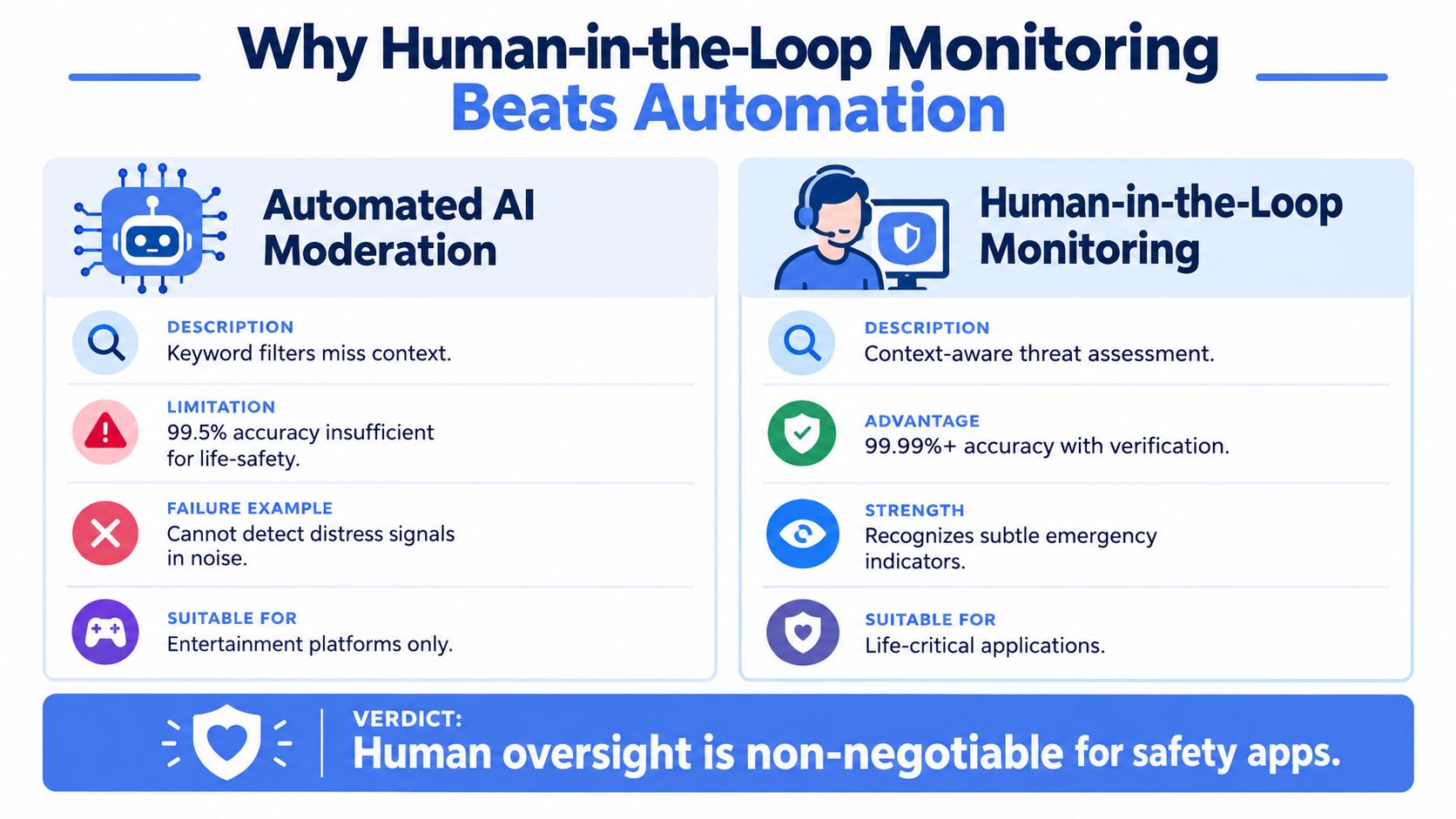
Keyword moderation isn’t emergency assessment. A filter may detect a word associated with danger, yet miss a calm sentence that signals coercion, surveillance, or a coded request for help. It may also flag harmless language because it lacks the surrounding visual, audio, and relationship context.
Research auditing Twitch automated moderation tested more than 107,000 comments, and in some datasets up to 94% of hateful messages bypassed automated detection. Adding contextual language raised removal rates to 100%, while as many as 89.5% of benign examples containing sensitive words were incorrectly blocked, as reported in the ACL Anthology study of contextual moderation. Those findings expose two separate risks: automation can miss harmful content, and it can interrupt legitimate communication.
A separate study of 778 TikTok moderation decisions found that nearly all takedowns were initially flagged automatically, while final decisions were confirmed manually, reinforcing the need for a hybrid process in real-time safety. The useful lesson isn’t that AI has no role. It’s that AI should help prioritize signals, while trained people make decisions that can affect someone’s immediate safety.
Give Safety Agents the full picture
A Safety Agent can compare the message with the live video, audio, route, watcher count, and recent interaction. “I’m fine” may carry a different meaning if the user appears unable to speak freely, the route has changed, or another person is controlling the conversation. The agent can use a one-tap nudge, initiate approved audio contact, ask a direct question, or escalate without requiring the user to keep typing.
A practical escalation policy should define what happens when:
- The user sends an SOS: The agent confirms the active session, location, and available context, then follows the emergency escalation workflow.
- The stream shows a possible threat: The agent can contact the user, observe whether the risk changes, and escalate according to defined thresholds.
- Chat is ambiguous: The agent considers tone, timing, camera views, audio, route deviation, and the user’s ability to respond.
- The user goes silent: Silence becomes a signal to investigate, not automatic proof of an emergency.
- A bystander appears: The agent protects privacy while determining whether the person is relevant to the incident.
Human review also helps with multilingual communication, coded language, sarcasm, background noise, and silent distress signals. Automation can surface unusual patterns, but a trained observer decides whether the pattern is a technical issue, an ordinary event, or a situation requiring intervention.
Escalation needs operational context
Emergency dispatchers need more than a generic alert. A useful escalation workflow can pass the live context, location, and critical information through an integration such as RapidSOS, while the Safety Agent remains accountable for verifying what is known and what remains uncertain. The application itself isn’t a substitute for calling emergency services, and its interface should make that boundary clear.
Teams evaluating real-time safety monitoring should ask how an agent receives alerts, what evidence is visible, how false alarms are handled, and how the handoff to emergency services is documented. A moderation queue built for creator comments isn’t enough. Life-safety monitoring requires trained judgment, defined escalation thresholds, and a technical path that keeps human decisions connected to current media and location.
Balancing Visibility with Privacy and Consent
Live sharing can reassure a family, help a campus team support a student, or protect a lone worker. It can also expose bystanders, create unwanted records, and give a trusted watcher too much control. More visibility doesn’t automatically mean more safety. The user needs clear authority over who can watch, who can speak, how long access lasts, and what happens to recorded material.
Young users face particular risks. A 2025 study that observed 4,260 livestreams and 443,420 chat messages found that underage personas encountered mature content and toxic messages at levels comparable to adult personas, while geographic location wasn’t considered effectively in age-rating enforcement, according to the study on livestream safety and age protections. Safety design must therefore account for exposure and access, not just the reassuring presence of a camera.
Consent has to survive changing circumstances
A user may consent to a parent watching a route but not to every member of a family group viewing it. A student may accept support during a late walk but not continuous observation across campus. An employee may need monitored lone-worker coverage without accepting indefinite surveillance outside working hours.
Useful controls include:
- Access revocation: Let the streamer remove an individual watcher immediately.
- Role separation: Distinguish people who can view, speak, send nudges, trigger assistance, or escalate.
- Ghost mode: Provide a deliberate way to stop displaying the user’s location when circumstances make sharing unsafe, while clearly explaining what emergency functions remain available.
- Bystander protection: Avoid treating every person captured by the camera as part of the user’s safety record.
- Retention controls: Define when recordings, transcriptions, and AI summaries are created, who can access them, and when they are deleted.
- Visible state indicators: Show whether streaming, recording, transcription, and watcher access are active.
Organizations should also avoid using a safety stream as a proxy for employee productivity or student discipline. The purpose, retention period, access policy, and escalation process should be documented before deployment, with jurisdiction-specific privacy and safeguarding requirements reviewed by the responsible team. A reliable system gives people a safety net without turning every journey into permanent observation.
Deployment Models for Families and Organizations
The same live video streaming chat capability supports very different operating models. An individual usually needs a quick start path, a small trusted audience, and an uncomplicated SOS workflow. A family needs shared access with boundaries, pooled usage, and a way to help one member without exposing every route to everyone. A campus or company needs centrally managed seats, trained monitors, defined coverage, and an audit trail for incidents.
The wrong deployment model creates predictable failure. A family may give too many people access because the system has no clear roles. An organization may issue an app without staffing the monitoring function. A campus may offer live sharing but fail to define who handles a silent user, a missed response, or an emergency dispatch handoff.
| User Group | Primary Use Case | Key Features Leveraged |
|---|---|---|
| Individual | Late walks, rideshares, solo travel, and personal check-ins | Go Live, trusted watchers, one-tap responses, SOS, Ghost mode |
| Family | Coordinated journeys and support for a family member | Pooled minutes, Squad viewing, watcher controls, Emergency for a Friend |
| Campus | Late walks and student travel | Centrally issued seats, Safety Agent coverage, movement prompts, Critical Alerts |
| Company | Lone work, night shifts, and traveling staff | Central administration, pooled minutes, monitoring workflows, incident records |
Consumer access should reduce decision fatigue
A consumer workflow works best when the user can begin streaming from the lock screen or a simple app control, select a defined audience, and see who is watching. The watcher should receive the route and live media in one view rather than assembling context from separate tools. Emergency for a Friend is valuable when someone else is in distress and cannot reliably operate their own phone, but the escalation path must still verify the situation and location.
Family plans should make pooling practical without making consent vague. Each member needs to know who can view, whether a Safety Agent is involved, and how to revoke access. Minutes and recording policies should be visible so users understand what the meter represents.
Organizations need a service, not only an app
Campus and corporate programs need operating procedures alongside software. Managers should define which journeys qualify for monitored coverage, how users start and stop sessions, when an agent contacts the person, and how emergency services receive information. Training should cover false alarms, silent distress, poor connectivity, and privacy complaints.
Central seats make account and role management easier, but they don’t solve staffing by themselves. A deployment is incomplete until the organization has assigned responsibility for alerts, tested escalation, reviewed retention, and rehearsed the handoff to emergency dispatch.
Best Practices for Reliable Real-Time Protection
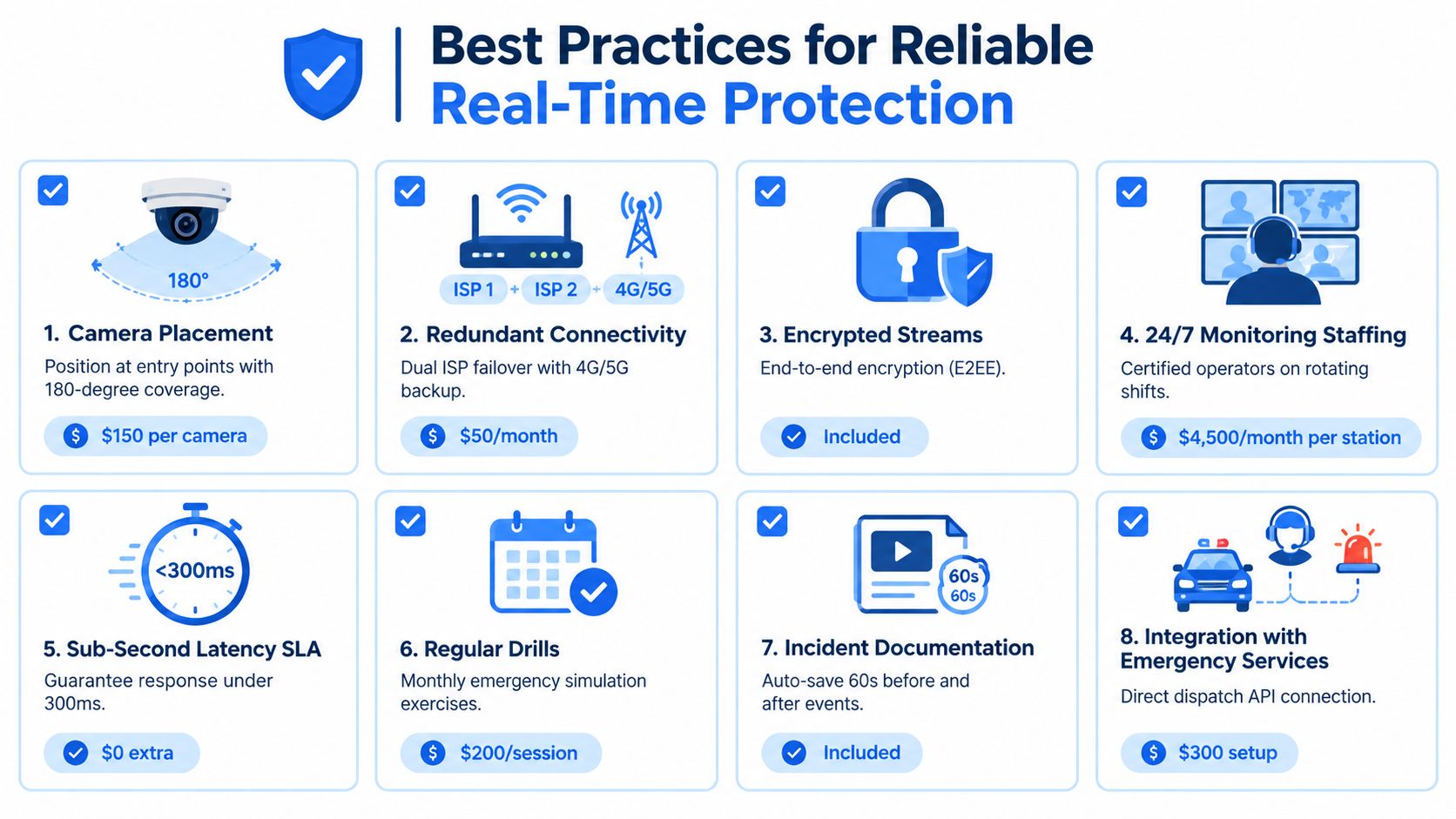
Reliable protection starts before the user presses Go Live. The device needs enough battery, the camera and microphone need to work, the watcher group needs to be correct, and everyone involved needs to understand what an SOS does. A live stream is an operational process, not a button that can compensate for missing procedures.
Use a pre-stream routine
Before a higher-risk journey or shift, complete a short check:
- Test the camera and microphone: Confirm that the intended front or rear view is active and that speech is intelligible.
- Check the watcher list: Remove anyone who shouldn’t have access and confirm that the intended watcher can receive alerts.
- Confirm the route and endpoint: Share the expected destination, entry point, or meeting location.
- Review emergency controls: Know the difference between a nudge, a request to speak, Ghost mode, and SOS.
- Check connectivity behavior: Understand what the app does when video quality drops and whether audio remains available.
- Set an escalation threshold: Tell the watcher or Safety Agent what should trigger a call, a welfare check, or emergency escalation.
- Protect the phone: Keep the device accessible without forcing the user to look down or type while moving.
- Practice once: A short drill reveals confusing prompts, missing permissions, and watcher delays before a real incident.
Operational insight: The best emergency workflow is the one the user can activate without explaining it first.
Keep the stream useful under pressure
The publisher should prioritize audio and control signaling over secondary video when cellular conditions deteriorate. The watcher interface should show degraded feeds clearly, preserve the last known state without presenting it as live, and surface route or location changes where they matter.
Watchers need their own discipline. They shouldn’t flood the user with messages, assume silence proves danger, or wait for perfect certainty before following the escalation policy. One concise prompt may reveal more than a chain of anxious questions.
Privacy is part of reliability. A user who can’t safely stop sharing, revoke a watcher, or enter Ghost mode may avoid the system when they need it most. Teams reviewing safety products should include embedding security into design reviews so privacy, access control, recording, and failure behavior are evaluated before launch rather than after an incident.
Teams should also run periodic tests with realistic cellular degradation, camera obstruction, silent distress, false alarms, and emergency handoffs. Review the outcome with the user, watcher, Safety Agent, and technical owner. The goal isn’t a perfect stream under every condition. It’s a system that preserves the signals people need, makes uncertainty visible, and gives a trained human a dependable path to act.
3rd-i offers live video, audio, and location streaming to selected contacts and trained Safety Agents, with chat, dual-camera views, one-tap interactions, SOS workflows, and RapidSOS escalation. If you’re designing real-time safety coverage for late walks, families, campuses, or lone workers, visit 3rd-i to evaluate how its monitoring and privacy controls fit your operating model.