
Campus Emergency Notification Systems: How They Work
In 2024, 52% of surveyed campus-safety organizations used email for emergency notifications weekly, several times per week, or daily, according to the Campus Safety Emergency Notification Survey. That figure is the reframe. A campus alert isn’t a once-a-decade siren. It’s routine traffic, and most of that traffic rides the slowest channel in the building.
So the useful question isn’t which vendor you buy. It’s who receives the message. An email that lands in an unread inbox, a text sent to a number nobody confirmed, a siren heard by everyone except the person in the basement lab: each one is a notification that exists on paper and doesn’t exist in the building where someone is standing.
What follows is how these systems are built, what each channel can and can’t do, and where the gaps sit. The audits near the end are the ones worth running before you sign anything.
Table of Contents
- What a Campus Emergency Notification System Does
- Channels Compared by Reach and Failure Points
- Speed Targets and Resilience Standards to Specify
- Where Alerts Miss People on Campus
- Alert Fatigue, Location Data and Consent Rules
- Check Compliance and Gaps Before You Choose a System
What a Campus Emergency Notification System Does
A campus emergency notification system is a building fire alarm scaled up to a few square miles. One control point makes the decision, and a large set of devices carries the signal: some indoors, some outdoors, some in people’s pockets. Once you picture it that way, vendor brochures get easier to read, because you can point at any feature and ask which part of the chain it serves.
The five parts, in the order the signal travels.
- Trigger. Someone with authority starts the alert: campus police, emergency management, a duty officer on a 24-hour line. The detail that matters is coverage. Who holds the trigger at 3 a.m. on a holiday, and how do they get into the system from a phone in a parking lot?
- Message. What happened, who is affected, what to do, when the next update arrives. Four clauses in that order. A message missing the fourth sends people back to social media to guess.
- Targeting. Everyone, one building, or one role such as residents, lab staff or a night shift. Targeting is what separates a warning from noise.
- Delivery. SMS, email, outdoor sirens, indoor public address, digital signage, desktop pop-ups, voice calls and the campus app.
- The log. Time sent, time received, channel, recipient count. The log answers the only question that matters afterward: who got it?
Walk a chemical leak in a single lab building through all five. The operator selects that building’s zone rather than the whole campus, writes a short shelter-in-place text, pushes a matching message to the signage at the entrance, sounds an outdoor siren for people approaching, then opens the log to check delivery by channel. Nobody in the library three buildings away gets startled for no reason, and next week, when an alert says “library,” they’ll believe it.
That’s why targeting earns its own paragraph. A system that blankets the whole campus for every incident teaches people that alerts are background noise, and the cost of that training shows up months later when the one alert that mattered gets ignored.
The same five stages, drawn as one flow:
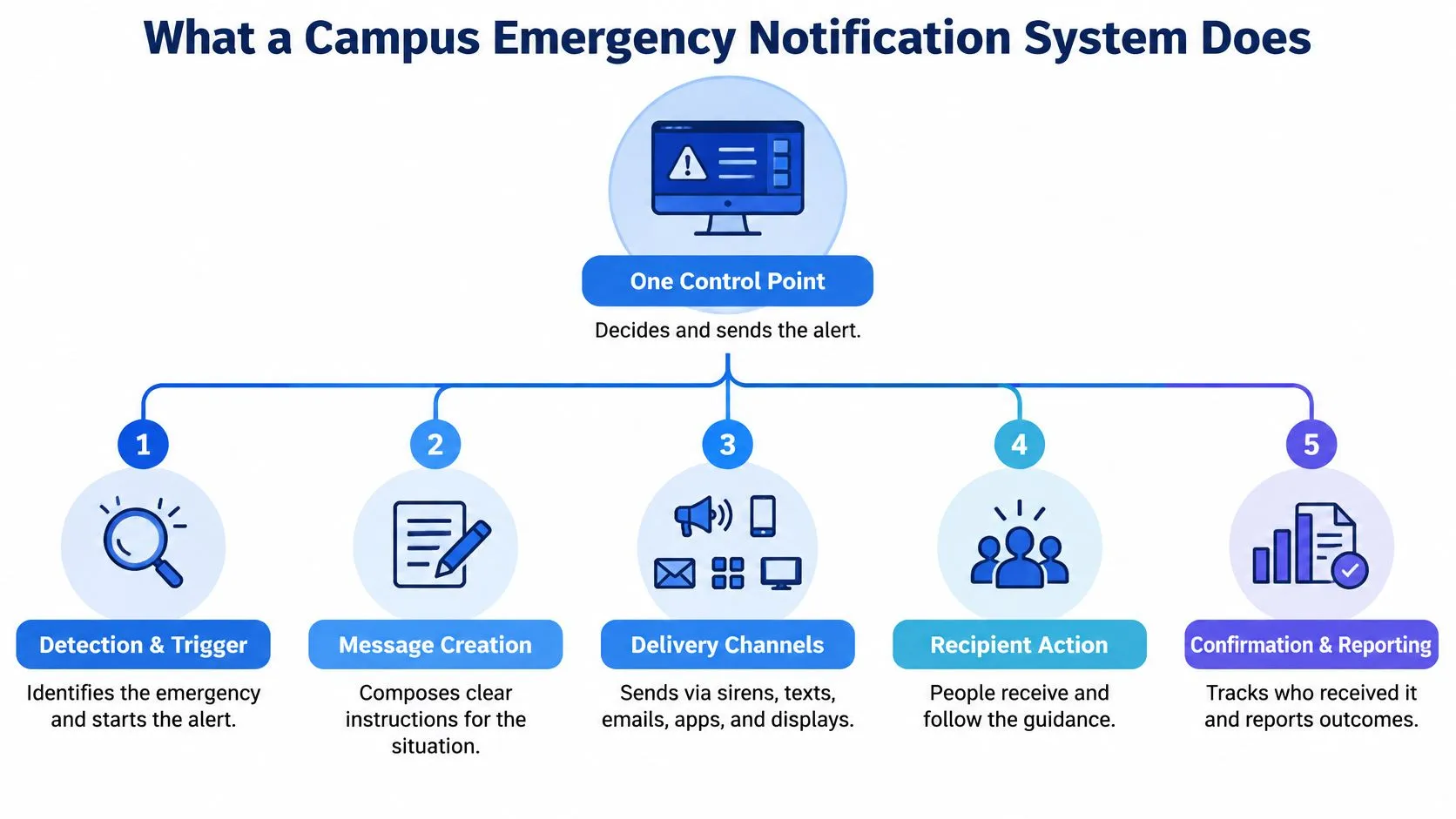
The three-question test. Before comparing quotes, ask any system three things: who is authorized to send, which channels actually fire from a single send, and how the institution learns that a message arrived rather than merely left.
Channels Compared by Reach and Failure Points
An alert only counts if it reaches a person who can act on it, so read this table as an audit of who each channel misses. Coverage describes the list. The last two columns describe who is left out when that channel is the only one that fires.
| Channel | Reported coverage | Fails when | Reaches without a phone |
|---|---|---|---|
| 100% of students (BJS survey) | Inbox isn’t checked; campus network is down | Partly, on a shared or public computer | |
| Text message (SMS) | 99% of students (BJS survey) | Number isn’t opted in; carrier delivery is delayed | No |
| Campus website | 98% of students (BJS survey) | Visitors don’t open the page during the event | Partly, on any connected browser |
| Voice calls | Varies with phone-number enrollment; not standardized across campuses | Phone is silenced, off or unanswered | No |
| Outdoor sirens | Not standardized; set by siren placement, outdoor areas only | Speech isn’t intelligible; indoor occupants can’t hear it | Outdoors only |
| Indoor public address | Not standardized; only buildings wired with speaker zones | Background noise masks the message | Yes, inside wired speaker zones |
| Digital signage | Not standardized; only spaces with powered screens | Outside sight lines; screen has no power | Yes, for people looking at the screen |
| Desktop pop-up | Not standardized; managed computers in use at the time | Computer is off or not in use | Partly |
Read the first three rows as a warning about platform counts. A U.S. Bureau of Justice Statistics survey found that nearly all campuses had a mass-notification system, with email covering 100% of students, text messages 99% and campus websites 98% (BJS report on campus safety and security). Those are coverage figures, not reach figures. Coverage counts who is on the list. Reach counts who got the message and knew what to do.
Campus-level records show the distance between the two. Published figures from individual universities range from near-universal text-alert enrollment at some schools down to a small minority of students at others, even where the same platforms were in place. Same technology category, very different penetration. The variable is enrollment and confirmation, not hardware.
Each channel’s failure mode
- Email is the widest channel and the easiest to miss. It fails when nobody checks the inbox, when a mail rule files it away, and when the campus network is the thing that’s down.
- Text messages are the fastest channel most campuses own, and they fail at enrollment: a number never opted in, a student who changed phones, a contractor with no account at all.
- Voice calls fail when the phone is silenced or answered by someone who isn’t the owner, which is common for shared landlines in offices.
- Outdoor sirens carry tone better than speech, and they’re an outdoor instrument. If your plan assumes people will understand spoken words from a siren through a wall, test that on a windy day.
- Indoor public address works well inside the zones you wired, and only when the message beats the room’s background noise.
- Signage and desktop pop-ups reach people who are looking at the screen, which is a smaller group than the coverage number implies.
Notice the pattern in the misses. Every opt-in channel leaves out the people who never enrolled, and every fixed channel leaves out the people outside its zone. The audit question for your own campus is which group sits in both gaps at once.
Visitors are the obvious hole, and the guest network is an underused fix. A splash page delivered through secure guest network access for enterprises reaches conference attendees, parents and contractors the moment they join Wi-Fi, including people who never enrolled in anything.
Fixed alarms follow the same logic. Panic buttons in schools solve the trigger and say nothing about reach, which is why they belong in a plan with signs, speakers and texts rather than instead of them. Individual SOS tools close a different gap the mass channels never touch: with 3rd-i, a person’s emergency contacts who are app friends with critical alerts allowed receive a siren-style alert that overrides silent mode and Do Not Disturb, which moves the failure point from a silenced phone to an enrolled contact.
The three-channel rule. Choose at least three channels with genuinely different failure modes: one that follows the person (SMS), one that fills the physical space (PA or signage), and one that survives the network going down (sirens or a manual procedure). Two channels that both depend on the same cell network are one channel.
Speed Targets and Resilience Standards to Specify
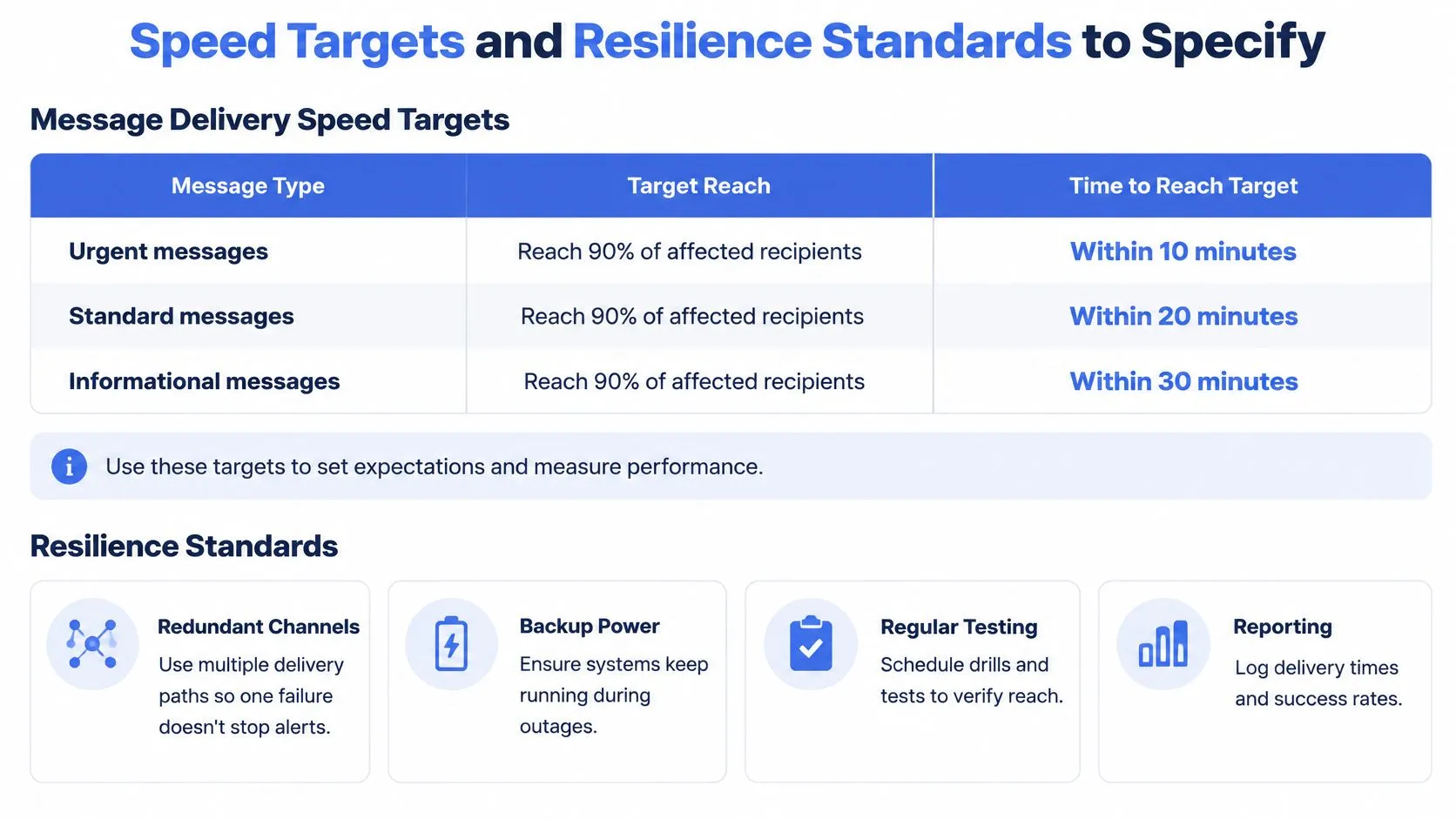
| Urgency | Reach target | Timeframe |
|---|---|---|
| Urgent | 90% of affected recipients | Within 10 minutes |
| Moderate | 90% of affected recipients | Within 2 hours |
| Non-urgent | 90% of affected recipients | Within 2 days |
Those numbers come from Florida campus emergency notification guidance, and they’re the most useful thing you can hand a vendor. They turn a vague promise of “rapid delivery” into a service level you can measure by channel, per message type. A system that hits 90% in ten minutes for a building lockdown and 90% in two days for a road closure is working correctly. One that hits both in the same hour is probably blasting everyone with everything.
The same guidance names three technical requirements: reach as many people as quickly as possible under normal conditions, keep alerting when power or telephone service is unavailable, and deliver targeted messages to specific groups in different locations. Translate that into infrastructure you can inspect. Separate power feeds and battery backups for the alerting platform. Separate communications paths, so the cellular modem doesn’t die with the campus fiber. Location or role-based segmentation that an operator can select under pressure without hunting through menus.
Turning targets into numbers a vendor must sign
A specification used by the Los Angeles Community College District sets harder figures: immediate notifications broadcast in under five minutes, critical components running at least six hours on backup power, and availability of at least 99.99% with no single point of failure, alongside unified control, live voice and integration with video management, access control and emergency phones (NIST publication on campus emergency communication performance). Ask for those commitments in writing, with the test method attached.
Audibility is the item most often assumed and least often measured. The same NIST guidance points to an ANSI criterion requiring an audible evacuation signal to exceed the highest background noise averaged over 60 seconds and reach at least 65 dBA. Speaker placement proves nothing on its own. A meter reading in the machine shop at midday, the cafeteria at lunch and the gym during practice proves something.
Four things to request from any vendor or campus team:
- Recurring audibility tests with a sound meter in your three noisiest rooms, logged with date and reading.
- Battery and failover drills that cut utility power and watch what stays up.
- Role-based authorization listing who can send, for which zones, with a second approver for campus-wide messages.
- Cross-system event logs that tie the alert to signage, PA and dispatch activity on one timeline.
Give responders a route that doesn’t depend on the notification platform’s uptime, such as a 911 dispatch app path written into the runbook and rehearsed.
Where Alerts Miss People on Campus
Smartphone ownership is the wrong metric. Almost everyone on a campus carries a phone, but that tells you nothing about whether the phone was in a hand, accessible, connected, unmuted, and being looked at when the message went out. Recent reporting cites a 2025 survey finding that 94% of colleges use SMS as their primary emergency-notification method, which concentrates the entire warning system in one channel with one set of failure conditions (FacilitiesNet coverage of campus alert redundancy).
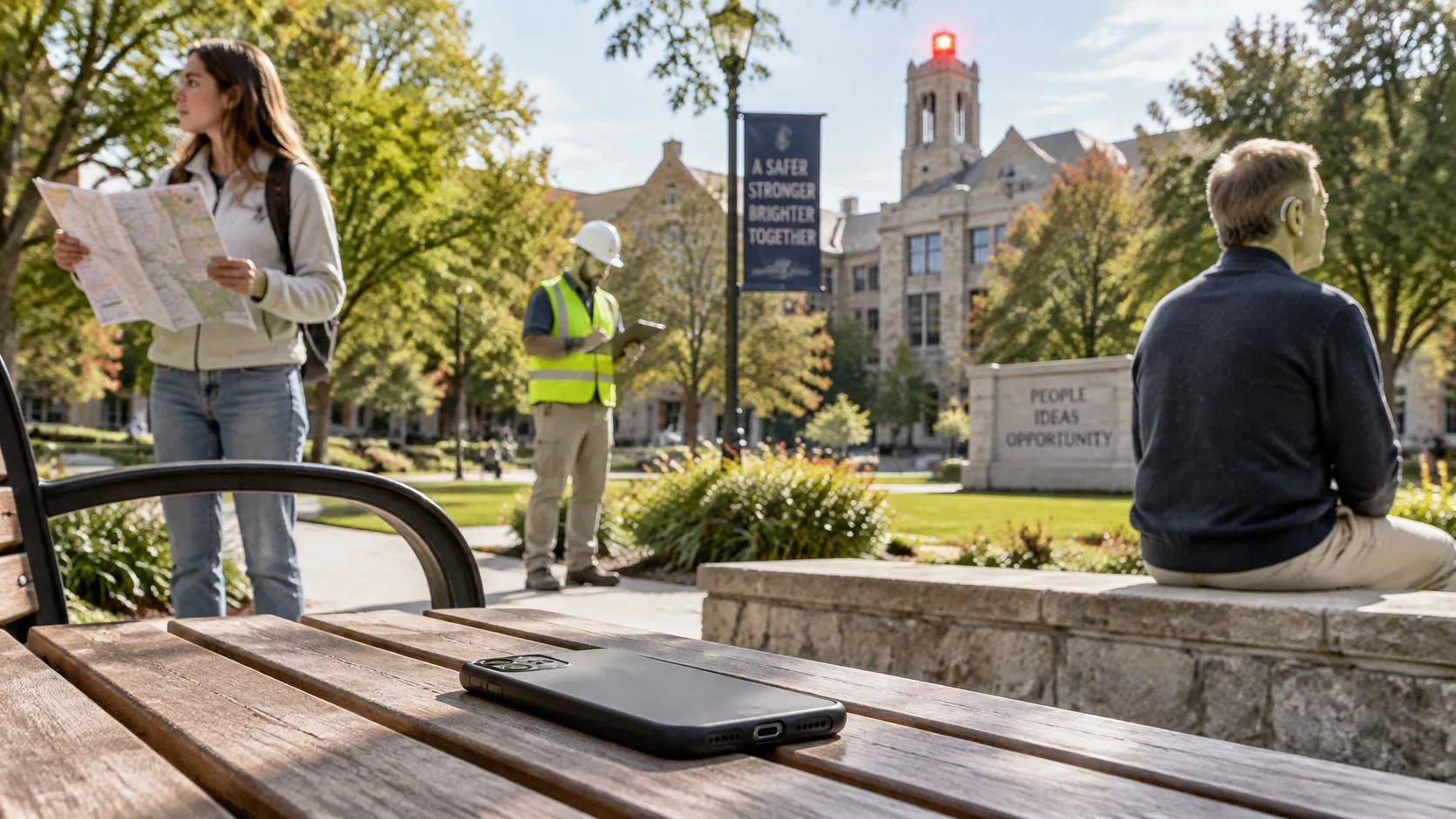
The people a text-first system misses fall into recognizable groups:
- Visitors and contractors with no account, no enrollment and no reason to have downloaded anything. Conference guests, delivery drivers, visiting lecturers, prospective students on tour.
- People with disabilities, including deaf, hard-of-hearing, blind, neurodivergent, multilingual and low-literacy recipients, who need formats a plain 160-character text doesn’t provide.
- People whose phones are muted, uncharged, disconnected or left behind, which describes a large share of any campus at any given hour.
- Occupants of lectures, libraries, laboratories and dormitories, where phones are routinely silenced, bagged or banned by policy.
Picture a lab fire at 2 p.m. A conference attendee is in a seminar room two floors up with her phone in a bag on silent. She isn’t on the list, isn’t looking at a screen, and can’t hear speech from an outdoor siren through a sealed window. The alert was sent successfully. She was never reached.
That’s why campuses are adding desktop takeovers and indoor and outdoor digital signage, because mobile-only delivery fails in exactly the device-free settings where people spend their days. The fix isn’t a better SMS vendor. It’s a second channel that occupies physical space.
Audit question one. What share of visitors and non-subscribers is covered by a channel that requires no opt-in? Audit question two. Which accessible formats exist for each message type, and who writes them when the alert is live? Audit question three. How does the institution confirm receipt, as opposed to confirming transmission?
Alert Fatigue, Location Data and Consent Rules
A campus-wide alert about an incident three buildings away trains people to ignore the next one. Scope matters as much as speed, and the discipline is to write messages for the people who must act, not for the people who might be curious.
The closed-loop message
Every alert should answer five questions in order: what happened, who is affected, what action to take, when the next update will arrive, and whether an acknowledgement or welfare check is needed. The fifth question is where most systems stop. An acknowledgement turns a broadcast into a roll call, and a welfare check catches the resident who didn’t respond.
Keeping that machinery accurate takes people. Someone has to maintain geofences, building maps, accessibility templates and pre-scripted messages, and staffing shortages remain a persistent constraint on preparedness and training even at institutions running five or more communication methods, with 93% using campus email and 89% using social media alongside their other channels (higher-education emergency notification analysis). A geofence nobody updated is worse than no geofence, because it produces confident, wrong instructions.
| Feature | Mass alert | Voluntary live sharing |
|---|---|---|
| Who receives it | Everyone in the affected zone | Contacts or responders the user chooses |
| Location data | None beyond the affected zone | Live route and location during the event only |
| Opt-out | Limited for safety-critical messages | Available at the start, before anything is shared |
| Best for | Campus-wide hazards | Solo walks, travel, individual distress |
What to ask about location data
Consent questions deserve straight answers in writing, not a privacy policy link. Is location collected only while an event is active, or continuously? How long are recordings retained, and who can pull them? Can a student opt out of location sharing without losing essential protection?
One workable pattern separates what must always arrive from what people can decline. For schools, only safety data is used for automated alerts. Members can opt out of non-emergency Organization messages by replying STOP, but they continue to receive safety-critical communications such as SOS alerts. That split, mandatory safety traffic and optional everything else, is the rule to ask every vendor about.
If your campus already runs a guest network, its consent screen is a useful model for the wording: state what is collected, why, and for how long, at the moment of collection. Splash Access on guest data consent walks through that pattern, and it translates cleanly to location sharing prompts.
Check Compliance and Gaps Before You Choose a System
Two duties sit behind everything above. The Higher Education Opportunity Act, signed on August 14, 2008, expanded the Clery Act framework by requiring institutions to establish procedures for promptly notifying the campus community about a significant emergency or dangerous situation involving an immediate threat to students or employees (text of the Higher Education Opportunity Act). Institutions also must describe notification and evacuation procedures in their annual security report and adopt a policy for annually testing those procedures. The requirement applies to U.S. institutions participating in federal student-aid programs.
The law names no vendor and no channel, which means the mix is your call and your responsibility. Pull the current annual security report and confirm it describes both the notification procedures and the testing schedule. If it doesn’t, that’s the first gap to close, before any procurement conversation.
The seven checks
- Count the population by group. Students, staff, visitors, contractors and residents. A coverage percentage without a denominator is a marketing number.
- Audit the opted-in share for each group, not just enrollment. The gap between “has an account” and “receives texts” is where most reach disappears.
- Map each channel to its failure mode in the comparison table and confirm you have at least three with different failure modes.
- Test the urgent, moderate and non-urgent targets with a real message at a real time of day, and record delivery latency per channel.
- Run an audibility test in your three noisiest locations against the 65 dBA benchmark, and write down the readings.
- Answer the three blind-spot questions on non-app reach, accessible formats and receipt confirmation. Write the answers down; verbal confidence is not coverage.
- Document authority and retention. Who can send, what gets logged, and how long records are kept, including recordings and location traces.
Personal live monitoring sits beside this work rather than inside it. It covers one person on a late walk, a rideshare that takes a wrong turn, a lone technician on a night shift, and it complements a broadcast system that was never designed to watch an individual. A personal safety app is not a substitute for dialing 911, and a university safety app shouldn’t be positioned as one.
Close the loop with a joint test: campus emergency management, the dispatch center and whoever owns the alerting platform, running one scenario end to end. Then schedule a 90-day review that reports receipt by channel, per group, with the misses named. Coverage on a slide is a claim. Receipt in a log is evidence.
Campus and company plans are a single agreement with one bill covering a population of students or workers, which keeps a whole cohort under the same coverage instead of a patchwork of individual sign-ups. And one line belongs in every plan: SOS and dispatch features are not a substitute for dialing 911 or local emergency equivalents.
A broadcast alert covers the crowd. 3rd-i covers the person the crowd didn’t reach, streaming live video, audio and location to trained Safety Agents who can escalate to 911 through RapidSOS when someone is on a late walk, in a rideshare, or alone on a night shift. Campus and company deployments are issued centrally, so a whole student body or workforce sits under one agreement with pooled minutes and Safety Agent monitoring on every seat. Visit 3rd-i for campuses and organizations to see how the personal layer fits beside your mass notification system.