
Emergency Alert App Comparison for 2026
By May 2013, 99.6% of Japanese municipalities had received J-Alert receivers, according to the ITU presentation on Japan’s early warning system. That near total coverage still didn’t answer the personal question that matters on a dark street. A siren can tell a whole town to move, but it can’t watch your walk home, confirm you’re the person in trouble, or hand your live location to the right dispatcher.
That’s the distinction you need before you download any emergency alert app. Reach is not protection. Judge every option by what happens after the alert, whether someone understands it, whether a named human looks at it, whether your location stays current while you’re moving, and whether verified context reaches the emergency communications center that covers you. If an app can’t show that chain, it’s selling a louder notification, not a safer trip.
Table of Contents
- Emergency Alert App Types Side by Side
- Live Video Location and 911 Handoff
- Reach Is Not Protection After the Alert
- How to Read Plans Without a Street Price
- Pick the App for Each Scene and Risk
Emergency Alert App Types Side by Side
| App type | Live video and audio | Location | Human monitoring | 911 handoff | Recording and transcription | Best fit |
|---|---|---|---|---|---|---|
| Government cell broadcast such as WEA | No | Cell-tower area, not a personal route | No | Official originators only | No | Weather and public hazards |
| Consumer check-in and location share | Rare | Periodic pin or shared trip | Usually friends only | User must call | No, chat and pin history only | Families who need arrival check-ins |
| Personal safety livestream | Yes, sometimes front and rear | Continuous route plus GPS | Trained agent on monitored plans | Possible via RapidSOS with context | Recording with transcription (3rd-i) | Late walks, rideshares, lone travel |
| Campus or workplace mass notification | Usually text, email, and push | Building, geofence, or member list | Security desk on staffed plans | Only if integrated | Admin delivery log, no video transcript | Campuses and companies |
| Monitored wearable panic device | Audio more often than video | GPS when the wearable is paired | Monitoring center is common | Often yes | Audio log, transcript rare | Lone workers who need a hardware trigger |
Screenshot that table before you shop. It forces a vendor to answer in plain terms instead of hiding behind words like instant, smart, or connected. A check-in app and a monitored livestream app may both send push notifications, but they do different jobs, and buying one for the other’s job leaves a gap you’ll discover at the worst moment.
Two Rules for Reading the Table
Rule one is simple. A video checkmark fails if nobody is assigned to watch. A stream to a friend who’s asleep, driving, or in a meeting is a recording waiting to happen, not monitoring. Ask who looks, how quickly they acknowledge, and what they’re authorized to do next.
Rule two is just as strict. A 911 claim is only as good as routing to the communications center for your actual location. If a contact in another state has to phone their local center and ask for a transfer, you don’t have a direct handoff. You’ve got a relay race.
Don’t buy a feature list. Buy a named watcher, a current location, and a confirmed route to help.
Public warning proves the point at national scale. The Federal Register record for Wireless Emergency Alerts shows authorities sent 8,316 WEA messages during 2022. Tornado warnings accounted for 2,325 alerts and flash-flood warnings for 2,184, together approximately 54.2% of all WEA messages that year, with smaller slices for severe thunderstorm, snow squall, hurricane, storm surge, and test alerts.
That volume tells you public alerting is frequent, local, and mostly about fast-moving hazards. It isn’t a rare national siren, and it isn’t a personal bodyguard. Keep it enabled, respect it, and don’t ask it to watch your rideshare. What makes a personal escalation usable while you’re moving is a separate test, and it’s stricter than getting a banner on your screen.
Live Video Location and 911 Handoff
Judge features by outcome during movement, in this order. Start the stream, keep location fresh, get a human to look, and deliver a payload to the correct emergency communications center. If any link in that chain breaks, the features before it lose most of their value.
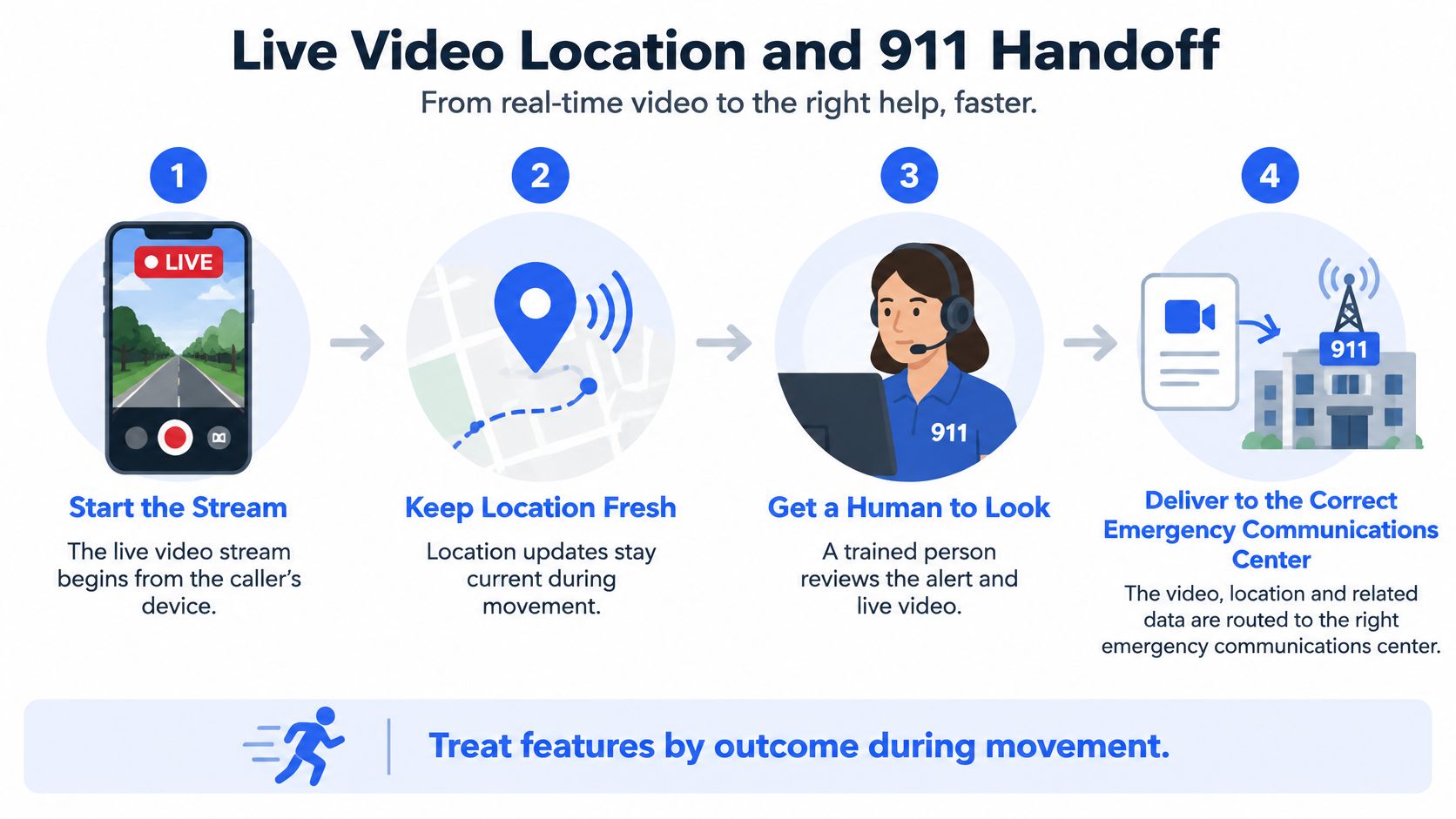
Pass Fail Tests for Video and Location
Dual-camera video and audio are context for watchers, not safety by themselves. Front and rear views help an agent tell a threatening approach from a false alarm, hear what’s said, and describe a scene without asking you to narrate while you’re scared. None of that helps if the first usable frame arrives after you’ve already passed the danger.
Test these points on your actual route, not on office Wi-Fi:
- Time to a usable frame: Start from a locked screen and time how long a watcher waits before they can identify where you are.
- Weak signal behavior: Walk through a parking garage, stairwell, or dead zone and watch whether the app downgrades cleanly or freezes.
- Locked screen start: Confirm you can go live without hunting through folders or typing a password with shaking hands.
- Explicit fallback: Require a stated location-only or audio-only mode when video drops, plus queued upload so evidence isn’t lost when coverage returns.
Location needs the same hard test. One dropped pin tells responders where you were, which can be blocks behind a moving rideshare. A continuous route shows direction, speed, and turns, and an entry note or pin can point responders to the closest door instead of the street address a map guesses.
Who Is Watching and What They Can Send
Separate a trained Safety Agent from a well meaning contact. An agent can view both cameras, call or chat, verify what’s happening, and escalate with context. Friends and family add comfort and local knowledge, but they may be asleep, and they shouldn’t have to decide whether your silence means danger.
A strong 911 payload carries identity, incident type, live location, and context, not just a phone number. RapidSOS emergency escalation describes API based transmission of user identity, incident type, real-time location, and contextual information directly to 911, with integrations into computer-aided dispatch, call-taking, and mapping systems. Demand timestamps for user SOS, agent acknowledgment, escalation, and dispatch receipt, because that audit trail shows where time went.
Don’t confuse app side delivery with ambulance arrival. Interoperability varies by jurisdiction, and a vendor can’t promise how fast a local agency responds. What a vendor can prove is routing accuracy, payload completeness, encryption, and delivery confirmation to the right center.
Our implementation follows that path. With one tap, your livestream, audio, and location go to a trained safety dispatcher and text communication starts. Pressing SOS, or an emergency contact triggering it for you, sends your stream and location straight to 911 through a Safety Agent, and our alarms travel over RapidSOS. Read how that routing works in our guide to a 911 dispatch app before you rely on any vendor’s instant claim.
Recording After the Moment Passes
Add recording and transcription as a feature check, not a bonus. You want a timestamped record of the trip with a searchable transcript, kept for review after the session ends. Ask whether the record survives a dropped connection, whether audio and video stay aligned, and who can access it. After an incident, that record helps you give a consistent account without reconstructing a frightening night from memory.
Reach Is Not Protection After the Alert
Public surveys suggest that most U.S. adults receive national emergency alerts on their phones, but research on how people respond to text-based warnings remains limited. A delivered alert still cannot confirm that you understood it, are safe, or have help on the way. Buyers should judge what happens after the notification, not just how widely it can be sent.
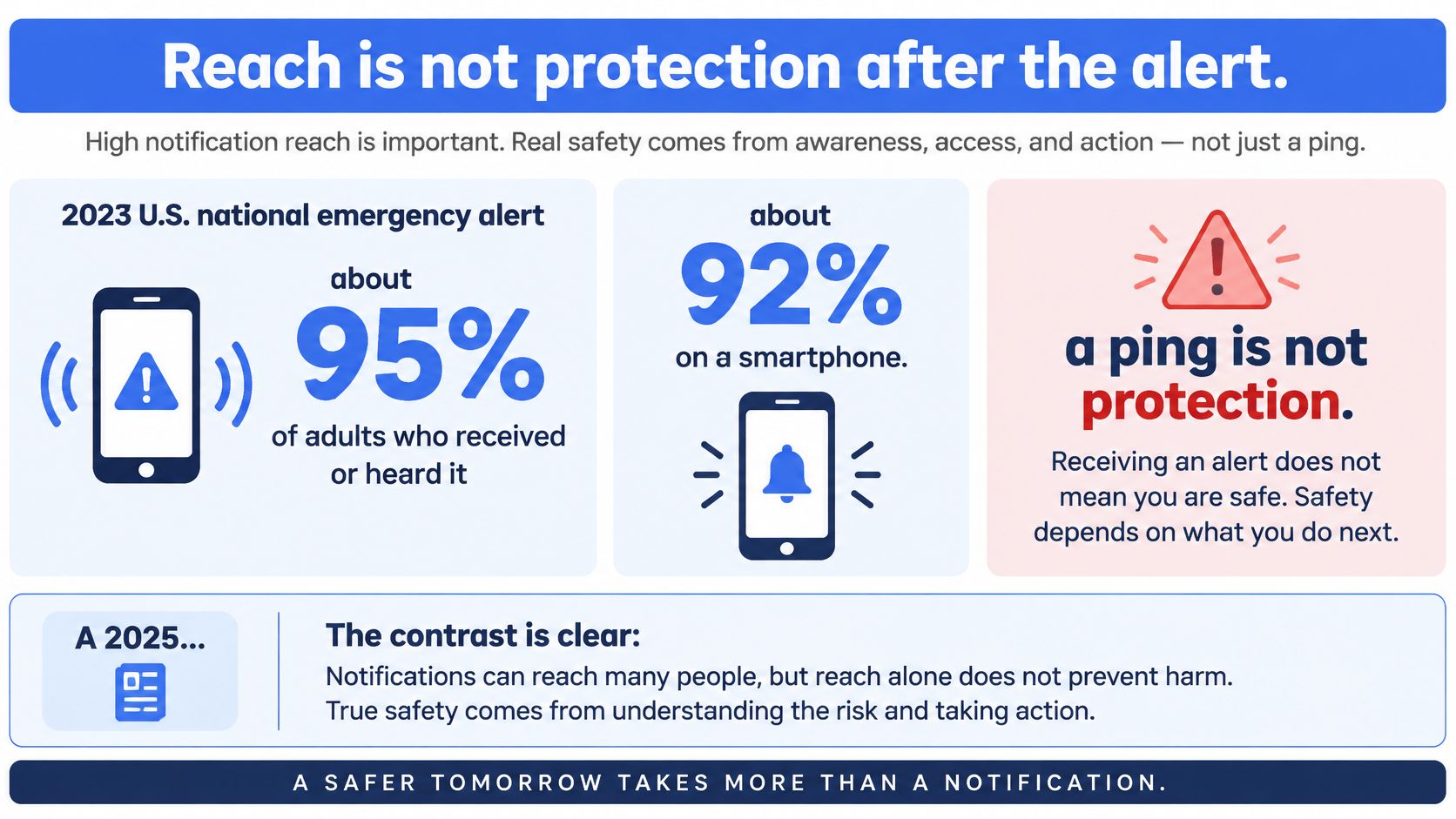
Separate three jobs. A public warning tells people in an area about weather and hazards. A private check-in lets trusted people see where you are and confirm you are okay. A monitored session adds live context and a route to emergency dispatch. Choose according to the person and situation: a late walker, rideshare rider, parent, student, campus safety team, or employer with night-shift staff may need different coverage.
Where Alerts Quietly Fail
The breakdown is often ordinary: Do Not Disturb silences a notice, a driver misses a banner, or repeated warnings lead someone to swipe without reading. A stale location pin can point to the wrong place, while video that nobody monitors offers little practical protection. An alert needs a response path, not just a delivery receipt.
Geographic targeting also has limits. County-level wireless alerts can reach people outside the intended area. That may be acceptable for a broad public warning, but personal emergency routing must get the person’s location to the 911 center that covers them. Compare systems by how they confirm who needs help and where, then how they pass that context on.
For older adults or anyone more at risk of a fall at home than an incident on a trip, assess wearable options separately. Start with fall detection advice from DME Superstore. A walking app is not a substitute for a fall-detection device, and a pendant is not designed to watch a rideshare route. Match the tool to the likely emergency.
Understanding Is Part of Safety
A warning that someone cannot read, hear, or act on under stress has not done its job. Federal rules adopted in 2025 expanded multilingual Wireless Emergency Alert templates across 13 non-English languages plus English and American Sign Language, covering 18 alert types, as described in the World Meteorological Organization bulletin on Common Alerting Protocol. Yet consumer apps may still assume a person can read one language, see the screen, and calmly type a reply.
Use a practical test when comparing any emergency alert app: can the intended person understand the notice, answer it, and reach a human? If the process relies on clear eyesight, unmuted sound, or typing while moving, it may fail under real conditions. Ask who receives the response and what happens if the user cannot answer.
Setup rule: A critical alert only helps if the right people have allowed it before the emergency.
3rd-i Critical Alerts send the user’s emergency through Do Not Disturb. Emergency contacts connected to an SOS receive a critical alert that overrides silent mode and Do Not Disturb, sounds like an amber alert, and shows the user’s location. Siren notifications go only to emergency contacts who are also app friends and have critical alerts set to allowed. Set this up with the people who may need to respond, and review how a 24 hour a day app fits your overnight coverage.
A monitored two-way app complements official warnings; it does not replace a direct 911 call. If you can safely call 911, call. Use the app to add watchers, location, and context, not to delay the call while you narrate into a camera.
How to Read Plans Without a Street Price
Compare the meter and the response, not just the advertised tier. A low-cost plan can leave a gap if its minutes run out during a long trip. Before choosing, ask what keeps working when the person needs help most: monitoring, location sharing, and a route to emergency dispatch.
| Buyer | Meter that matters | Must be included | Red flag |
|---|---|---|---|
| Individual | Streaming and recording minutes | Safety Agent and 911 escalation on every tier | Monitoring sold only as a top-tier add-on |
| Family | Pooled minutes across members | One-tap check-ins and help started for another person | Each person billed as a fully separate watcher plan |
| Campus | Issued seats and pooled minutes | Admin safety notices and student live trips | A consumer download with no security desk view |
| Company | Seats for lone and night staff | Admin Security Center and shift coverage | Alert blasts with no one assigned to watch |
Questions by Buyer
For an individual plan, ask whether streaming and recording minutes are capped, whether Safety Agent monitoring and 911 escalation are included at every tier, and whether a live SOS can start from a locked phone. A visible alert is only the start. The plan should explain who receives the stream and location, and how emergency context reaches dispatch.
Families should check whether members share a pool of minutes. One teenager’s long bus ride can use more of that pool than another member’s short trip. Ask whether a family member can start help for someone else, too. If the traveler cannot act, a parent should know what steps are available.
Campus and company buyers should get seat counts, pooled minutes, and administrator messaging details in writing. Confirm whether administrators can send mass text messages, emails, and push notifications, and ask how live trips are monitored during late walks, night shifts, lone work, and rideshares. A system that only broadcasts notices does not provide monitored trips.
3rd-i offers Solo and Family plans in Basic, Plus, and Pro, with streaming and recording minutes as the meter. Family minutes are pooled, and Safety Agent monitoring and 911 escalation are included on every individual plan. To get current Solo Basic, Plus, and Pro rates, request a quote from 3rd-i before you compare budgets. Organizations can enroll members, issue seats, and designate administrators with access to a dedicated Security Center panel. Use the best panic button criteria to compare how people trigger help, then ask for numbers that match your use case.
Put these three questions on every quote:
- Minutes exhausted mid-trip: What happens if someone runs out of minutes while live?
- Degraded mode: Does location still share when video cannot?
- Consent point: Does location and stream sharing with RapidSOS begin only after the user starts SOS or dispatch?
Price the response, not just the download. The lowest cost is no bargain if a solo trip goes unwatched.
Pick the App for Each Scene and Risk
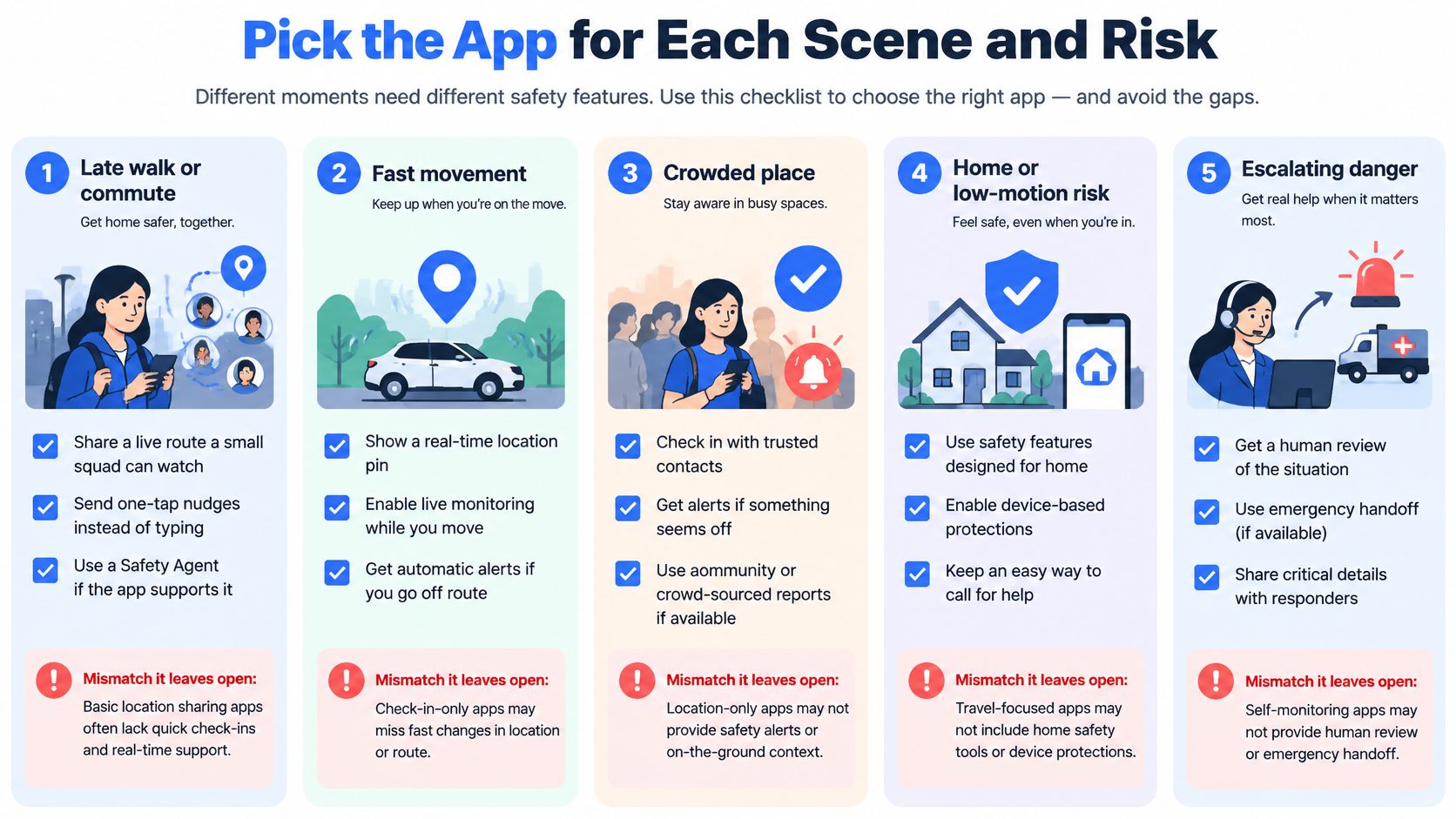
Stop asking which app is best in the abstract. Ask which setup covers the scene in front of you, and name the mismatch a different app type leaves open. That discipline prevents the common error of buying a weather tool for a personal threat, or a check-in tool for a shift nobody watches.
Late Walk or Commute
Choose a live route a small squad can watch, with one-tap nudges instead of typing while you walk. You want a Safety Agent available if you can’t talk, because there are moments when speaking clearly into a phone makes a situation worse. Texting a friend your cross street every few blocks fails exactly when your hands and attention are needed elsewhere.
Our users can go live and let their squad watch the whole trip, with a Safety Agent and real emergency dispatch one tap away. Squad members can send a one-tap check-in asking if you’re okay, and you answer with one tap. The mismatch to avoid is a periodic pin. It reassures everyone right up until the route changes between updates.
Rideshare and Meeting Someone New
Pick a shared live trip with trusted contacts watching and a record if the route changes. A weather alert doesn’t watch a stranger’s car, notice a wrong turn, or preserve what was said in the back seat. Before any first meeting, pair the app with basic precautions such as telling a contact where you’re going and staying safe when meeting online so your plan doesn’t depend on one tool.
The mismatch here is arrival-only tracking. Knowing someone didn’t arrive helps after the fact. A watched live trip helps during the ride, when a contact can call, an agent can verify, and escalation can start while the car is still moving.
Family Coverage
Choose pooled watching, one-tap replies to check-ins, and the ability for a contact to start help for someone else. Families don’t need more group chat. They need a clear answer to who is watching, who can act, and whose phone will make noise at night.
When help is started for a friend, emergency alarms are routed to the 911 center that covers where the friend is, with their location already passed on. That matters when your college student is in another city and you’d otherwise waste minutes explaining to your local center that the emergency isn’t near you. The mismatch is a family plan that bills everyone separately and gives nobody authority to escalate for another member.
Campus Deployment
Campuses should issue seats, not hope students download a consumer app and configure it correctly. Administrators need to send safety notices to some or all members, and students need to go live on a night walk back from class without building a watcher list from scratch. Pilot with issued seats and a Security Center, then measure completed watched trips, not downloads.
A mass notification system alone leaves a mismatch. It can tell thousands of students to avoid an area, but it can’t watch one student cross that area. Pair broadcast notices with monitored live trips, and assign a desk that owns the response when a student goes live.
Company Lone and Night Shift Work
Employers need an organization group, named administrators, and a Security Center so coverage doesn’t depend on a coworker staying awake. A cleaner closing a building, a nurse crossing a parking lot, or a technician visiting a site alone needs an assigned watcher and an escalation path. A buddy system built on personal phones collapses when the buddy is on vacation.
The mismatch is an alert blast with no owner. Sending a safety reminder to night staff is communication, not coverage. If nobody is accountable for watching a live session and acting on silence, you haven’t reduced lone worker risk. You’ve documented that you warned people about it.
Verdicts by Risk
Keep Wireless Emergency Alerts enabled for weather and public hazards. They’re broad and authoritative, but they aren’t a personal bodyguard. Use a check-in app when the only job is a trusted person knowing someone arrived, and accept that it won’t verify a threat or hand context to dispatch.
Choose a monitored livestream app for late walks, rideshares, or lone work where someone must see context and escalate. That’s the job we built our service for, with the mechanics judged by watcher, route freshness, and confirmed handoff rather than notification volume. Campuses and employers should adopt that model through issued seats and a Security Center, not through optional downloads.
Whatever you pick, do three things this week. Write down current emergency contacts and keep them current. Allow critical alerts for people who should hear a siren, and test that setting while everyone is calm. And call 911 directly when you can, because no emergency alert app replaces emergency services.
End on the money question, because it decides real coverage. What the plan meters determines whether the app is still live on your longest, latest trip. The cheapest download is not cheaper if the risk is an unwatched solo trip.
If your risk is a late walk, rideshare, or lone shift where someone must watch and be able to escalate, 3rd-i gives you live video, audio, and route sharing with trained Safety Agents and 911 escalation through RapidSOS. Set up your squad, allow critical alerts for your emergency contacts, and run one test trip before you need it for real. Visit us to choose a Solo, Family, campus, or company setup that matches the scene you’re trying to cover.