
Family Check in App Guide for Safer Daily Routines
A student is taking a rideshare home after a late library shift. Her mother watches the route, then the location cursor stops moving. Twelve minutes pass. The app still shows a paused dot, but it doesn’t tell her whether the car is waiting in traffic, the phone has lost signal, or something is wrong. She can send messages, but she has no reliable answer and no clear escalation path.
That gap is where a family check-in app proves its value, or exposes its limits. A map can show where someone was. A check-in system should help determine what happens when that person doesn’t respond, who gets alerted, whether a trained human intervenes, and how emergency services receive useful context.
Location sharing has become ordinary in major markets. A 2026 survey found that 62% of Americans share their mobile location with a loved one or friend, rising to 75% among Gen Z and 70% among Millennials. Safety was the dominant motivation, with 78% of location sharers citing safety rather than trust-building, according to industry survey data on family tracking.
The important choice goes beyond Apple Find My versus Life360 versus another map. It’s whether your routine needs passive visibility, a scheduled accountability prompt, or an escalation chain that continues after a missed response. This guide evaluates apps on that basis, with particular attention to families, students, campuses, and lone workers.
Table of Contents
- Why Choosing the Right Family Check In App Matters Now
- The Four Features That Actually Define a Family Check In App
- Comparing Live Location, Check-Ins, and Shared Monitoring
- How Human Monitoring and 911 Escalation Change the Math
- Best Picks by Use Case for Parents, Students, and Employers
- Privacy Boundaries and Surveillance Trade-Offs
- Pricing, Plans, and Deployment for Households and Teams
- FAQ on Family Check In Apps
Why Choosing the Right Family Check In App Matters Now
A parent receives no response after a child’s expected arrival time. The map still shows a recent location, but it cannot explain whether the phone lost signal, the trip stalled, or the person needs help. That uncertainty exposes the difference between location sharing and a family check-in app built around follow-up.
Among parents whose children have phones, 91% said they actively use location sharing, 62% said they always do, and 88% said they plan to adopt it once their children have phones, according to the family tracking market report. Adoption is widespread. Reliability after a missed response is a separate question.
A passive location app may refresh a route, display battery status, or send a departure notification. If someone misses an expected arrival or ignores a prompt, the family still has to interpret the silence, contact the person, alert emergency contacts, and decide whether 911 is appropriate. Some services stop at a push notification. Others retry, involve a monitoring team, or provide context for an emergency hand-off.
The missed check-in is the test that matters
Judge the app by five questions:
- What triggered the alert? A scheduled timer, geofence, SOS request, or manual report?
- Who sees it first? A parent, partner, campus team, employer, or trained Safety Agent?
- What happens if the user doesn’t respond? Does the system retry, call, escalate, or stop at a notification?
- What information travels with the alert? Current coordinates, route, audio, video, battery status, medical notes, or only a timestamp?
- Who contacts 911? The family, the platform, a monitoring team, or nobody?
The family tracking app category has expanded beyond a niche utility. Industry estimates reported in coverage of the category put the global market at $3.8 billion in 2025, with a projection of $9.7 billion by 2034 and a projected compound annual growth rate of 10.9%, as discussed in the family tracking market analysis. Similar marketing language can conceal very different response models, so compare escalation behavior rather than feature counts.
Practical rule: Choose the app by what it does after silence, not by the quality of its map screenshot.
For a low-concern routine, passive sharing may be enough. A student walking alone, a senior living independently, or a worker entering a high-risk site needs accountability, human response, and emergency hand-off. Those capabilities matter when the person who needs help cannot tap the screen.
The Four Features That Actually Define a Family Check In App
Every family check-in app should be judged against four functional pillars. If one is missing, the product may still be useful, but it shouldn’t be treated as a complete safety system.
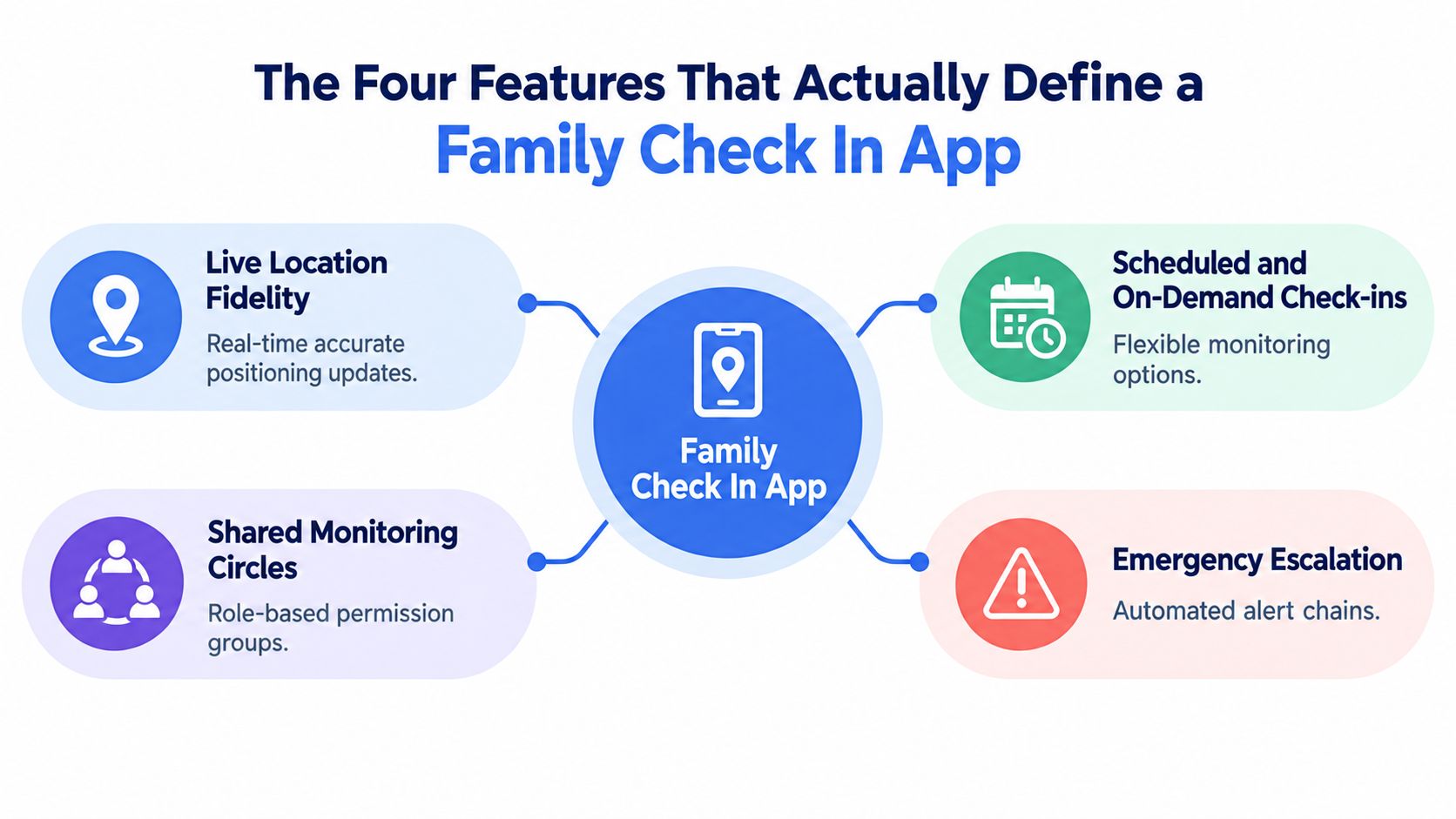
Live location fidelity
A location dot is only useful when people understand its freshness and limitations. Check whether the app displays update status, route direction, battery condition, and whether the phone is moving or stationary. A school departure alert can tell a parent that a child left campus, but it doesn’t explain a long stop unless the app provides enough context.
Live video and audio can add context during an active session, but they also increase battery use and privacy exposure. Use them for defined moments, such as a late walk or rideshare, rather than treating continuous streaming as the default for every family member.
Scheduled and on-demand check-ins
A scheduled check-in asks for a response at a known time. An on-demand check-in lets someone request a status update when circumstances change. The stronger design supports both, with a clear missed-response state instead of just expiring the reminder.
For example, a worker can set a timer before entering a site, while a parent can send a one-tap prompt when a flight lands. The important question is what the system does next. A reminder that becomes a repeated alert, then a human review, is materially different from a reminder that disappears.
Shared monitoring circles
Families rarely need every person to see everything. Look for groups with role-based permissions, such as parents, siblings, trusted friends, campus staff, or an employer administrator. A partner might receive an emergency alert without receiving continuous location history, while a campus team might monitor an opt-in walk session only until the student reaches a destination.
Permission design also affects trust. If users can’t understand who can see their location, they’ll either reject the app or leave it enabled without meaningful consent.
Emergency escalation
This is the pillar most product pages describe vaguely. Confirm whether a missed check-in triggers only a push notification, a staged alert ladder, a phone call, or contact with a staffed monitoring service.
Apps such as Daily OK and I’m Alive illustrate the escalation concept with missed-check-in notifications, staged alerts, and, in one case, an AI voice check-in before notifying contacts, as described in the Daily OK App Store listing. The system behaves less like a calendar reminder and more like a state machine, moving from active, to overdue, to contacted, to escalated.
Comparing Live Location, Check-Ins, and Shared Monitoring
The category matters more than the brand name. Dedicated safety apps, mainstream location platforms, and senior or lone-worker tools solve different problems, so comparing them only by map quality produces the wrong conclusion.
| Feature | Dedicated Safety Apps, for example 3rd-i | Mainstream Location Apps | Senior or Lone-Worker Apps |
|---|---|---|---|
| Live location refresh and battery cost | Usually session-based, with richer active-session context and potentially higher battery use during streaming | Often designed for background sharing, with battery impact depending on settings and device | May prioritize periodic updates or active safety sessions |
| Scheduled and ad-hoc check-ins | Often combines timers, one-tap status updates, nudges, and SOS workflows | Commonly stronger on arrival, departure, and location alerts than on missed-response escalation | Usually strong on scheduled check-ins and overdue states |
| Shared monitoring circles and role controls | Built around selected contacts, watchers, and emergency roles | Familiar family groups, but permissions may be broad | Often supports designated responders or care circles |
| Privacy and consent settings | Can emphasize session controls, temporary visibility, and emergency-only access | Background sharing can become the default family habit | Often separates routine monitoring from alerts |
| What happens after a missed check-in | May route through contacts, trained monitoring personnel, or emergency escalation depending on the service | Usually sends notifications to selected family members | May trigger staged notifications, calls, or a response-center workflow |
Dedicated safety apps
A dedicated safety product is the better fit when the family cares about what is happening during a journey, not merely where the person was recently detected. 3rd-i, for example, combines live route sharing with video and audio, one-tap check-ins, selected watcher groups, and Safety Agent escalation. Its relevant family tracking app workflow is built around active safety moments rather than permanent observation.
The marketing claim to ignore is any suggestion that a live map alone guarantees protection. The failure mode is coverage, battery, device access, or a family that assumes the platform is monitoring when nobody has started a session.
Mainstream location apps
Life360 and Google Family Link are familiar and practical for everyday visibility. They work well when everyone agrees to share location and a family member is available to interpret alerts. They usually fail at the silent interval after a missed check-in because the burden remains with the household.
For unusual situations, families may also need a separate human investigation service rather than more tracking. A resource such as London tracing agents can be relevant when someone must be located through a formal tracing process, not watched through an active app session.
Senior and lone-worker tools
Senior-focused and lone-worker apps often handle scheduled check-ins better than mainstream map platforms. Their weakness can be social fit. A tool designed for a shift worker or care routine may feel intrusive to a teenager or partner unless the family agrees on boundaries and response roles.
The right choice depends on the failure you are trying to prevent. If it is “Where are they?”, mainstream sharing may work. If it is “They were expected to respond and didn’t,” check-in automation matters. If it is “Nobody knows what to do next,” human escalation is the deciding feature.
How Human Monitoring and 911 Escalation Change the Math
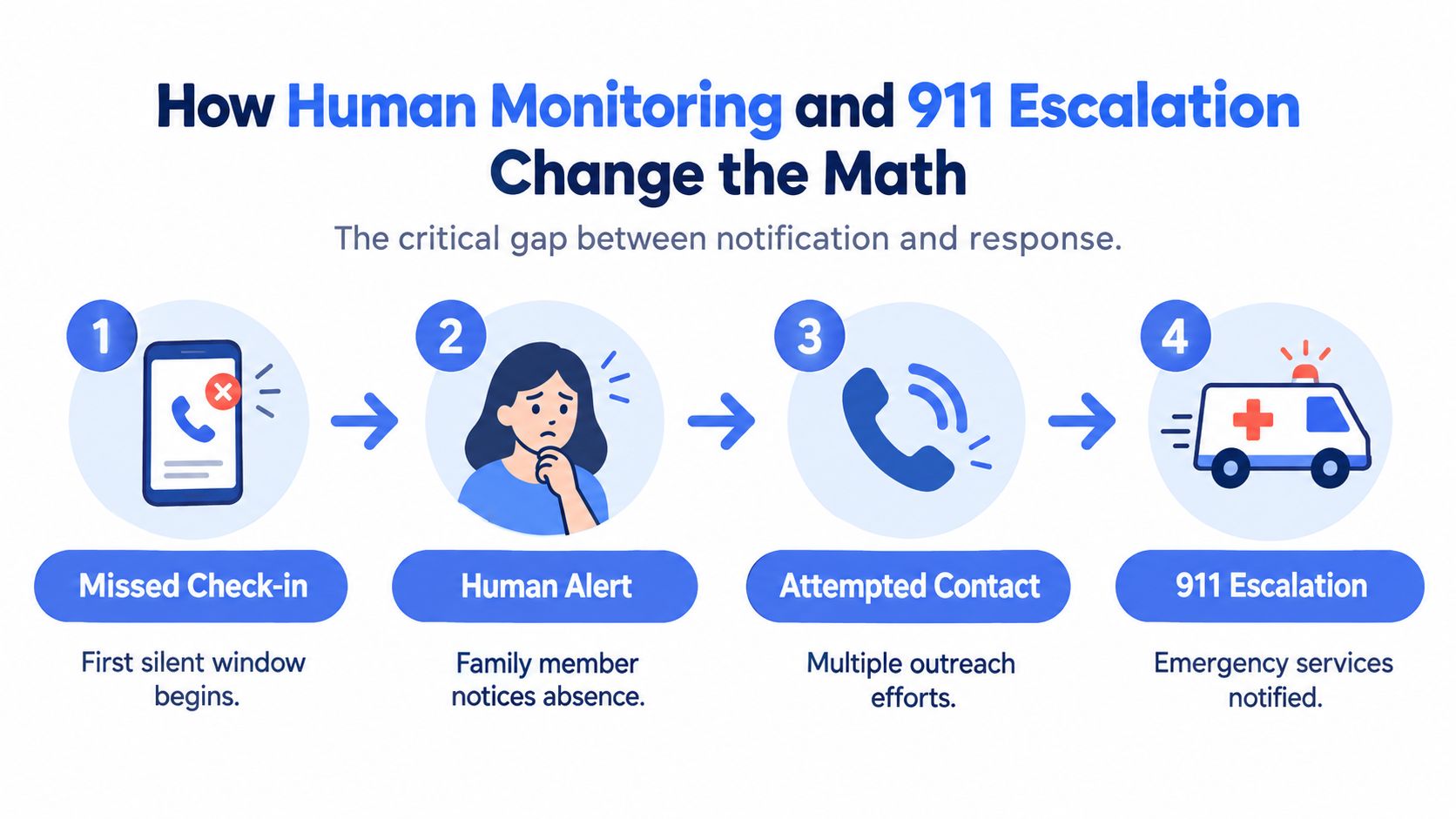
Most family check-in apps stop at an alert. That leaves a silent window between the moment a user misses a timer and the moment a relative recognizes the message, reaches the user, understands the situation, and decides whether to call emergency services.
Human monitoring changes who carries that burden. In a workflow such as 3rd-i’s, a missed or active emergency can involve a Safety Agent who attempts contact, reviews available context, reaches emergency contacts, and can escalate to 911 through RapidSOS. The 24-hour safety app describes this model as a human-in-the-loop service rather than a notification-only feature.
Four questions determine the response
Who notices first? A family notification requires a relative to see and understand the alert. A staffed service assigns that first review to a person whose role is safety response.
Who attempts contact? The app may send a message, place a call, or provide a two-way communication channel. A human responder can adapt when the user doesn’t answer a standard prompt.
Who decides escalation? In a household-only model, the family makes the judgment. In a monitored model, the Safety Agent follows the service workflow and can coordinate with emergency contacts.
What reaches dispatch? A bare phone number or map link gives responders limited context. A stronger hand-off can include live coordinates and relevant information through an emergency dispatch integration such as RapidSOS. The app remains a supplement to emergency services, not a replacement for calling 911 when immediate danger is known.
A notification tells someone that a problem may exist. Monitoring gives a person responsibility for finding out what happened.
This distinction matters for lone workers and students because the person receiving the alert may be asleep, driving, at work, or unsure whether a missed response is serious. It also matters for families that live apart. A well-designed escalation path reduces the chance that distance, uncertainty, or divided attention turns a warning into an unattended message.
Best Picks by Use Case for Parents, Students, and Employers
The best family check-in app depends on the routine, the relationship, and the consequence of a missed response. Don’t choose a product because it has the longest feature list. Choose the smallest system that handles your highest-concern scenario without creating alert fatigue.
| Use Case | Primary Pick | Alternative Pick | Why This Pick |
|---|---|---|---|
| Parents of teens | 3rd-i for high-concern journeys | Life360 for everyday visibility | Use active sessions, check-ins, and escalation when a late walk or rideshare needs more than a map |
| Students and young adults | 3rd-i for late walks and rideshares | Life360 for routine family sharing | Combines temporary oversight with one-tap communication and emergency response options |
| Lone or field workers | 3rd-i for monitored safety sessions | Timely or SoloProtect for structured worker check-ins | Prioritizes timers, response procedures, and documented escalation |
| Campus safety teams | 3rd-i for opt-in monitored journeys | A campus-approved lone-worker platform | Supports defined late-library or late-transit sessions without requiring constant family surveillance |
Parents of teenagers
Use mainstream location sharing for ordinary coordination, such as knowing whether someone has left school or arrived home. For higher-concern moments, use scheduled check-ins, temporary live sessions, and an escalation plan agreed in advance.
The relationship issue matters as much as the technology. A teenager should know when tracking starts, who can view it, what counts as a missed response, and when the session ends. The feature that drives the recommendation is controlled escalation, not permanent visibility.
Students and young adults
Students need a low-friction workflow. A person walking from a library, parking area, or rideshare drop-off should be able to start a session, notify selected watchers, and respond without typing a long message.
Look for route visibility, a watcher count, one-tap prompts, and a way to request help for another person. A student shouldn’t need to explain the entire situation before a trusted contact knows that something changed.
Employers with lone workers
Employers should evaluate duty of care, not family-style convenience. A worker entering a remote site or working a solo shift needs a silent timer, a documented contact procedure, role-based access, and a clear escalation record.
Compare 3rd-i with tools such as Timely and SoloProtect on the operational question: who owns the alert after it fires? If the answer is “the supervisor happens to notice,” the deployment has a weak control point. Employers also need written policies covering consent, retention, device ownership, and what happens when an employee’s phone loses power.
Campus safety teams
Campus teams should avoid turning safety into universal surveillance. Offer opt-in monitoring for defined activities, such as a late library session or walk between buildings, with an automatic end point and a named response team.
The decisive feature is shared monitoring with clear roles. Students should know whether contacts are peers, campus staff, a contracted response center, or emergency dispatch. Ambiguity creates false reassurance.
Privacy Boundaries and Surveillance Trade-Offs
Every family check-in app is also a surveillance tool. Pretending otherwise makes adoption harder, especially for teenagers and partners who want safety without one-sided control.
Research involving 19 parent-teen pairs found that collaborative oversight works best when parents and teens negotiate boundaries together, according to the study on collaborative family monitoring. The practical lesson is direct: consent isn’t a one-time installation screen. It’s an operating agreement.
Set boundaries before turning on tracking
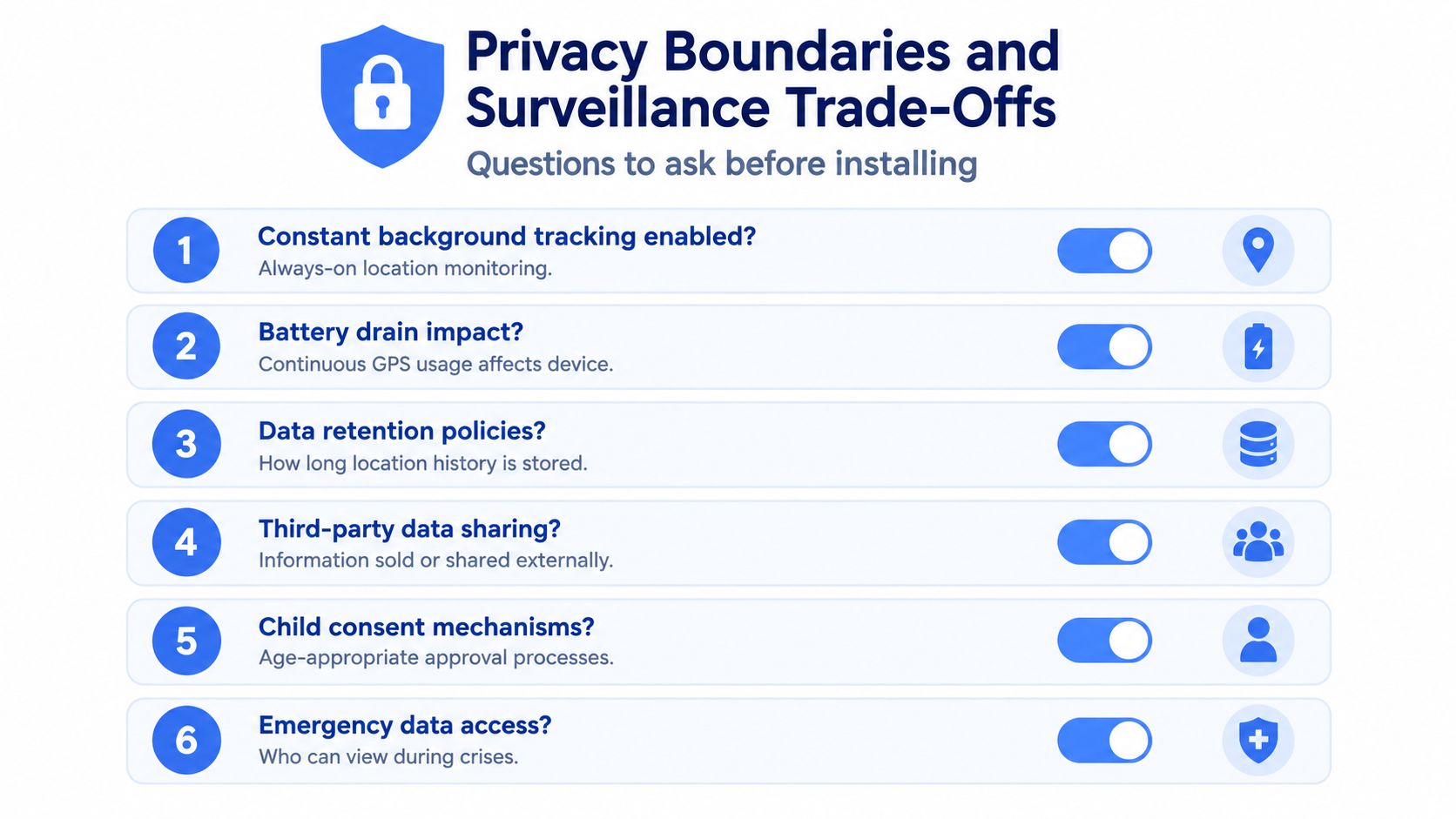
Write down the rules in plain language:
- Define activation moments. Turn live sharing on for rideshares, late walks, solo travel, or another agreed situation.
- Use check-in windows. Set an expected response period instead of demanding continuous confirmation.
- Name the first recipient. Decide whether a missed alert goes to a parent, partner, friend, supervisor, or monitoring service.
- Limit historical access. Ask whether people can see a current route only or review past location data.
- Create an off-ramp. Revisit the arrangement as children become adults or a relationship changes.
- Test the emergency mode. Everyone should know what an SOS does, who receives it, and what information may be shared.
Background location can make ordinary life easier, but it can also create pressure to explain every stop. Read receipts and repeated “are you safe?” prompts may increase anxiety rather than reassurance. Independent security research has identified recurring concerns in parental monitoring software, including sensitive-data leakage, unencrypted transmission, and gaps in privacy policies, as discussed in this security and privacy analysis of monitoring software.
Dedicated services can offer session-based controls such as temporary live sharing, while mainstream tools often encourage ongoing location access. A feature such as live location sharing should be evaluated by asking when visibility ends, not just how quickly it begins.
Pricing, Plans, and Deployment for Households and Teams
Price per seat is a weak way to compare safety products. A low-cost app may provide unlimited passive location while offering no human response when someone misses a check-in. A monitoring plan can charge for pooled usage, active sessions, recording, or staffed escalation because those services require operational support.
Mainstream location products often offer restricted free tiers and premium plans in the $7 to $15 monthly range, a budgeting reference reflected in Life360’s published membership pricing. The range varies by vendor and plan. Check what the fee covers: software alerts sent to people you know, or a response service that can escalate when nobody answers.
| App Tier | Monthly Cost | What You Pay For | Escalation Coverage |
|---|---|---|---|
| Mainstream location app, free tier | Free, where offered | Basic location sharing and alerts with plan limits | Household members handle response |
| Mainstream premium sharing | $7 to $15, as a reference range | Expanded sharing, history, or alerts depending on vendor | Usually notification-led |
| Monitoring-oriented family plan | Vendor-specific | Pooled active usage, check-ins, recording, and staffed support where included | May include Safety Agent escalation and emergency routing |
| Campus or company deployment | Contract-specific | Centrally managed seats, pooled usage, policies, and coverage | Defined by the service agreement and response protocol |
Roll out the system deliberately
Pair devices in the right order. Start with the person who needs protection, then add watchers and responders. Test permissions from every account instead of assuming an administrator has the same view as other users.
Set the default privacy mode before inviting the wider group. Add primary and backup contacts, define the missed-check-in interval, and record who may authorize emergency escalation. Run a controlled test without creating a real emergency, then review the logs, notification order, human monitoring response, and any hand-off to 911.
After the first month, check whether people respond promptly, whether alerts arrive during Do Not Disturb, whether battery use is acceptable, and whether anyone has started muting notifications. Alert noise creates a safety problem because ignored warnings have no practical value.
For households, prioritize pooled monitoring minutes and escalation coverage over the number of accounts. For teams, require written service boundaries, administrator permissions, incident records, and a defined emergency-services hand-off. Deploy the app only after everyone understands what happens after a missed check-in, who takes responsibility, and how the workflow works under pressure.
FAQ on Family Check In Apps
How can a check-in app be misused for coercive control?
A controlling partner or estranged relative can misuse location access to monitor movements, demand immediate responses, or punish a person for disabling tracking. Use separate accounts, review every viewer and administrator, and avoid installing monitoring software on a device controlled by someone who may pose a threat. In an active domestic violence situation, prioritize a specialist safety plan and secure communications over family tracking.
What happens to location data on company servers?
The answer depends on the vendor’s retention, encryption, access, and sharing policies. Ask whether the service stores route history, recordings, transcripts, or only current coordinates; how long each remains available; who can access it; and whether third parties receive it. Don’t accept “secure” as a complete answer. Read the policy and request deletion or retention details before deployment.
When is a check-in app the wrong tool?
It isn’t the right tool for an immediate emergency when someone can call 911 directly. It may also be unsuitable for very young children without reliable phones, people at risk from a device-monitoring abuser, or users who need medical-grade fall detection rather than peer-to-peer check-ins. Choose a specialist solution when the primary risk requires clinical sensing, domestic violence support, or direct emergency intervention.
3rd-i offers live video, audio, and location sharing, one-tap check-ins, selected monitoring circles, trained Safety Agent support, and RapidSOS emergency escalation for family, campus, rideshare, and lone-worker scenarios. Review the workflow and decide whether 3rd-i fits the moments when a missed check-in needs more than a notification.