
SOS Alert Meaning: What It Signals and When to Use It
An SOS alert means urgent help is needed now, not that one specific kind of emergency has happened, and by itself it doesn’t guarantee that anyone has called 911 or 112. The name comes from a Morse pattern, three short signals, three long, three short (··· --- ···), chosen because it was unmistakable rather than because the letters stood for anything.
Most advice on this topic stops at “learn the button sequence.” That’s the easy half. Pressing a side button five times takes two seconds to memorize, and it tells you nothing about the part that decides whether help arrives: who receives the signal, what they’re allowed to do with it, and whether a dispatcher ever hears about it.
The same three letters name a phone shortcut, a family notification, a public warning broadcast, and a monitored service with a trained person on the other end. Those four things have different recipients and different outcomes. Sorting out SOS alert meaning is less about memorizing a definition and more about learning to tell which system you’re holding.
Table of Contents
- What an SOS Alert Means and Where It Came From
- Four Systems That All Use the Word SOS
- How an SOS Alert Moves From Your Phone to Help
- Which to Use
- Accidental Triggers, Limits and Common Misunderstandings
- Set Up SOS Before You Need It
What an SOS Alert Means and Where It Came From
An SOS alert is a distress declaration. It says the situation is urgent and someone needs to respond, and it says nothing about the category of trouble. A crash, a cardiac event, a person following you down a street, and a child who wandered off in a crowd can all produce the identical signal.
An SOS alert communicates severity and the need for a response. Everything else, who needs help, where they are, and what kind of help, has to travel with it.
That’s the whole definition, and it’s why a bare alert leaves the receiver with work to do.
A pattern, not an abbreviation
SOS is not an acronym for “Save Our Souls” or “Save Our Ship.” As the history of the SOS distress signal records, the original international rules defined a distinctive, unmistakable sequence rather than an abbreviation for any phrase: three short signals, three long signals, three short (··· --- ···). The pattern was picked because it’s symmetrical, easy to transmit, and hard to confuse with ordinary message traffic, which made it suitable for ships in immediate danger.
The timeline is short. Germany introduced the pattern in national radio regulations that took effect on April 1, 1905, the Second International Radiotelegraph Convention in Berlin adopted it internationally on November 3, 1906, and the rule became effective July 1, 1908, according to that same account of the signal’s origin. It later spread beyond maritime radio into aviation and everyday speech, but its technical foundation stayed the Morse sequence.
What the signal can’t tell you
Because the pattern carries urgency and nothing else, three things are always missing until something supplies them:
- Who is affected. The alert may come from the person in trouble, from a phone in their pocket, or from a friend acting on their behalf.
- Where they are, precisely. A location attached to an alert is an estimate with a margin, not a front door.
- What help is needed. Police, ambulance, fire, a ride home, and a witness are different requests, and the signal doesn’t choose between them.
Say a friend sends you an SOS at 11pm during a walk home, with no message attached. The correct reading is “come urgently and find out,” not “they’ve been robbed” and not “they’re ill.” You call, you look at whatever location or video came through, and you decide. Guessing the incident type from three letters is how people either overreact or wait too long.
Three readings of the same word
In daily life, “SOS alert” points at three different things. The first is a genuine request for emergency help, routed toward responders. The second is a notification to your own circle that you need them, which may never touch an emergency service at all. The third is a public crisis notice sent to everyone in an area, such as the UK Government Emergency Alerts service, which 63% of respondents in the UK Government’s 2025 public survey of risk perception, resilience and preparedness said they were aware of.
A public warning is the reverse direction of travel. It’s information coming to you, not your location going to anyone.
So when an alert lands on your screen, run three questions before you act:
- Who sent it, a person, a device, or a government system?
- Which system delivered it, and what does that system do by design?
- Have emergency services been contacted, or is that still your job?
Four Systems That All Use the Word SOS
The phrase describes several products and services that happen to share a name, and the difference between them is the recipient. Android’s official Emergency SOS guidance presents the feature as a configurable set of actions rather than one standardized workflow, which is exactly why two people can press the same buttons and get different results.
| System | Who receives it | What it triggers | Reaches 911 or 112 directly? |
|---|---|---|---|
| Android Emergency SOS | Emergency contacts, and emergency services if configured | Calls for help, shares location, records video | Yes, when the call-for-help action is enabled |
| iPhone Emergency SOS | Local emergency number and emergency contacts | Emergency call and location sharing | Yes |
| iPhone satellite SOS | Emergency services via satellite | Message and location relay when no cellular or Wi-Fi is available | Yes, through satellite relay |
| Google SOS Alerts | Users in an affected area | Crisis information, official numbers, maps, translations | No |
| Monitored safety app (such as 3rd-i) | Trained Safety Agent and selected contacts | Live video, audio and location, escalation to 911 via RapidSOS | Through a Safety Agent, where available |
| Maritime or aviation distress | Rescue coordination centers | Distress radio or beacon transmission | Yes, via rescue services |
The two Android features people mix up
Emergency SOS on Android can call for help, share your location with emergency contacts, and record video, depending on how you’ve set it up. Google’s separate SOS Alerts feature does something else entirely: it surfaces crisis information, official phone numbers, maps, and translations for an event near you. One is you asking for help. The other is Google telling you about a flood or a wildfire. Neither one implies the other has happened.
Phone shortcuts versus a monitored service
iPhone Emergency SOS places the call to the local emergency number and then notifies your emergency contacts. Satellite SOS covers the gap where there’s no cellular or Wi-Fi signal, relaying a message and your location instead of a voice call. A monitored app takes a third route: a trained Safety Agent joins your live stream and texts with you, so you don’t have to say out loud that something is wrong, and that agent can escalate to 911 with your context attached.
Where you trigger it matters too. The recipient and the outcome change again when the alert comes from a vehicle rather than a handset, which is worth understanding before you rely on an SOS button in your car.
Before you count on any of these, check three things on your own device: which system the feature belongs to, who receives the alert, and whether it reaches emergency services. Settings, operating system version, and region all change the answer, so the version on your friend’s phone isn’t evidence about yours.
How an SOS Alert Moves From Your Phone to Help
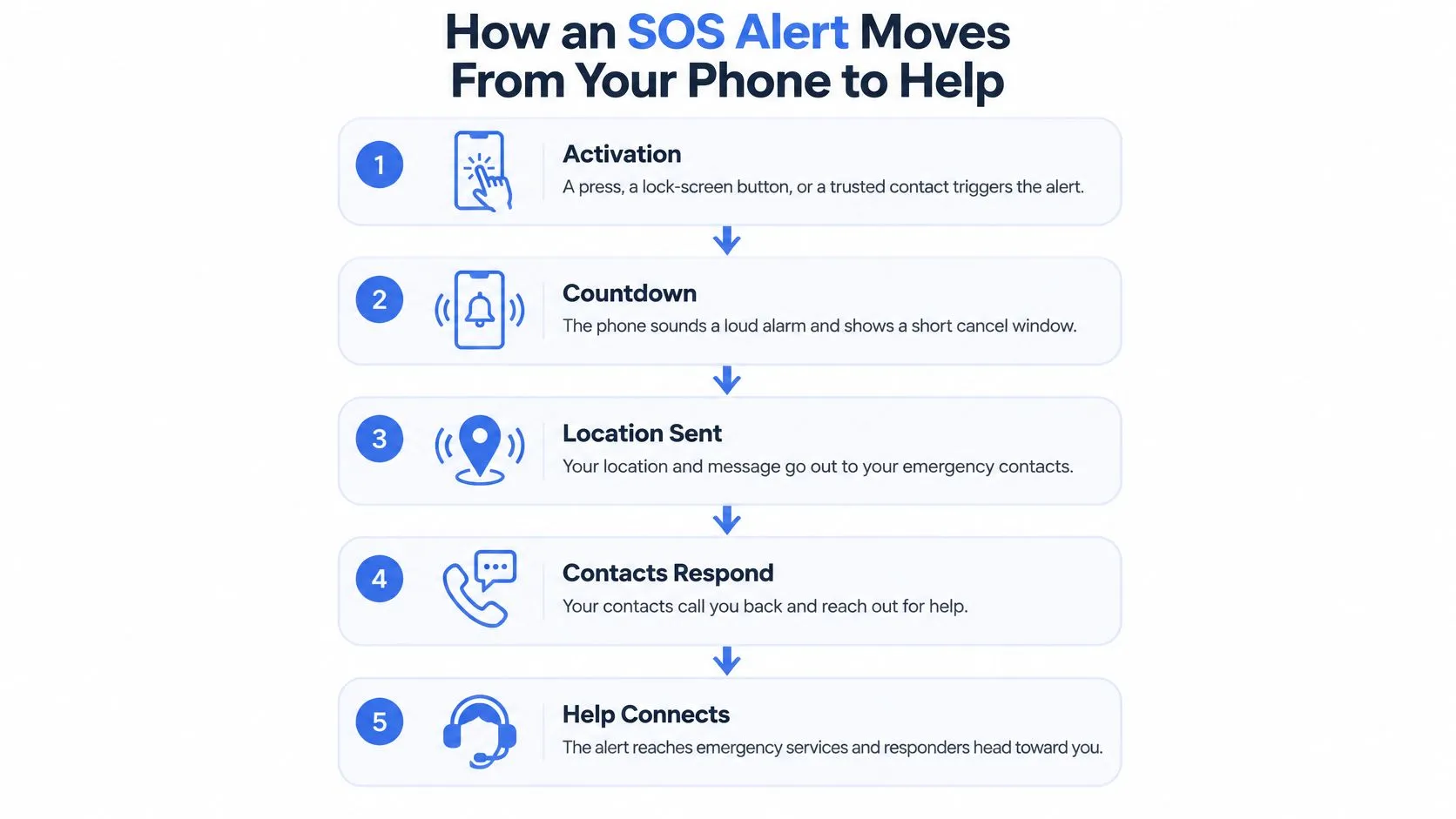
A distress signal only counts if someone is listening. The ITU’s account of the pioneers of radio distress signalling shows the original dot-dash pattern was chosen to be unmistakable to a human operator, and a digital SOS does the same job: it requests immediate human assessment and, where needed, escalation to emergency services. That request travels as a chain of separate states, and each state carries a different guarantee.
- Activation. You press the trigger, use a lock-screen control, or an emergency contact starts it on your behalf. From a locked phone, a live SOS can start with as few as 2 taps. The state changes from nothing to alert initiated.
- Location packaged. The phone or app sends coordinates with an uncertainty radius, a timestamp, and your recent route. Freshness matters as much as precision: a rough position from moments ago beats an exact one from yesterday.
- Contacts notified. Your people receive the alert. In the 3rd-i app, emergency contacts who are also app friends and have critical alerts set to allowed get a siren that overrides silent mode and Do Not Disturb, sounds like an amber alert, and shows your location.
- A monitor engages. A person or automated system opens the case and confirms it is watching. With 3rd-i, a trained Safety Agent joins the stream and texts with you, reading both cameras while 911 sits behind them.
- Escalation. If responders are needed, the platform forwards the stream, location, and context to emergency dispatch. Pressing SOS, or an emergency contact triggering it for you, sends your stream and location straight to 911 through a 3rd-i Safety Agent, with dispatch delivered through RapidSOS. That dispatch layer is currently available only in the United States and may not be available in all areas or at all times.
- Resolution. You or your contact confirms, cancels, or escalates further. A four-digit PIN cancels an SOS raised for a friend who turns out to be fine.
Read that chain the way you would read a package tracking page:
Watch the wording: “alert sent,” “human monitor engaged,” and “911 contacted” are separate transitions with different guarantees. An app should show you which one you’re in, because only the last one means responders have been told.
Why a coordinate alone isn’t enough
A complete incident record holds the initiator, timestamp, current and recent route, location confidence, communication status, and any audio or video. A coordinate by itself forces your contact or a dispatcher to infer what is happening. A coordinate plus live video and a monitored conversation shows whether the event is accidental, medical, threatening, or already over.
Location quality comes in degrees, and degrees decide outcomes. The FCC’s guide to wireless 911 service explains that Phase II location requirements have generally targeted approximately 50 to 300 meters depending on technology, while dispatchable location can add street address, floor, and room. That is why an emergency entry note naming the nearest building entrance or floor can beat another decimal place of GPS. For the mechanics of the network side, our explainer on how 911 finds your location walks through it, and Nimbio’s description of how cellular gate access works shows the same principle applied to getting responders through a locked entrance.
Which to Use
If you can safely call your local emergency number, call first. An SOS alert complements that call, it doesn’t replace it. Our SOS and dispatch features aren’t a substitute for dialing 911 or your local equivalent, and no app should tell you otherwise.
Where an alert earns its place is when speaking is unsafe, when you want your people informed at the same time, or when you need a monitored conversation before dispatch is involved.
| Criterion | SOS alert in an app | Direct call to 911, 112 or 999 |
|---|---|---|
| Who answers first | Trained monitor or your selected contacts | Emergency dispatcher |
| Speed | Needs a data connection and an available monitor | Immediate when the call connects |
| Location information | GPS with uncertainty and live route | Carrier location, may be approximate |
| Must you speak? | No, silent alerts are possible | Yes, the dispatcher needs your voice |
| Works without a data signal | Usually no | Often yes, if any cellular network is available |
| Best used when | You can’t safely speak, want contacts informed or need a witness | Anyone is in immediate danger or injured |
Three situations, three different choices
A collision with injuries on a road you know: dial the emergency number, give the road name and direction of travel, and stay on the line. Voice carries detail fastest here.
A late walk where you think someone is following you and speaking would escalate things: start a silent SOS. A Safety Agent joins the stream and texts with you, so nothing has to be said aloud, and your contacts see the route.
A friend who stopped replying hours ago and can’t be reached: trigger the alert on their behalf. That opens one group text with your friend and the Safety Agent, and it sends their live stream if they’re live or their last known location if they aren’t.
Call when anyone is in immediate danger. Use the app when speaking isn’t safe or you need others to know.
The number itself depends on where you are. Use 911 in the United States, 999 in the UK, and 112 across the European Union, where calls to 112 made up 62% of all emergency calls in 2024, according to the European Commission’s 2024 report on the implementation of EU emergency number 112. Save the number for your location, including when you travel, and remember that a feature available at home may be unavailable or intermittent elsewhere.
Accidental Triggers, Limits and Common Misunderstandings
An SOS trigger has to solve two opposite problems at once. Too easy to fire, and pockets and purses send false alarms. Too hard, and the feature fails the exact person it exists for: someone panicking, injured, or working with limited hand movement. A fire alarm pull station faces the same trade-off, and the usual answer is an action that is simple to do on purpose but hard to do by accident.

Researchers keep measuring this balance. A study in JMIR Human Factors found perceived accessibility was the strongest predictor of willingness to use an emergency-response system (β=0.33, P=.02), while concerns about complexity, false alarms, and privacy reduced confidence. Accessibility research more broadly reports the same gap: a feature can pass formal technical compliance checks and still fail a real person in an emergency, especially under stress. Work on an older-adult distress system makes the tension concrete: a three-second press cuts accidental alerts but can fail people with cognitive impairment or motor dysfunction.
Design features worth checking for
Check any SOS feature for a deliberate press length, clear cancellation feedback before anything escalates, human verification before dispatch, voice or lock-screen access, alerts that break through Do Not Disturb, and privacy controls you can find. In the 3rd-i app, a live SOS can start from a locked phone in as few as two taps, a four-digit PIN cancels an SOS triggered for a friend who turns out to be fine, and the critical alert, which overrides silent mode and Do Not Disturb, reaches only emergency contacts who are also app friends with critical alerts set to allowed.
Two limits sit inside that same design. The RapidSOS SOS and dispatch features are currently available only in the United States and may not be available in all areas or at all times. And by starting or using SOS or dispatch, you authorize 3rd-i to share your information, which may include location, with RapidSOS and public safety responders so they can help.
Three claims that don’t hold up
An SOS guarantees a police response. Because SOS names several different systems, the recipient varies: some triggers dial the local emergency number, some notify your contacts, and some route your stream and location through a trained agent. Confirm what yours does where you live.
An SOS replaces the emergency number. It isn’t. SOS and dispatch features are not a substitute for calling the local emergency number, and when anyone is in immediate danger, a voice call is still the right move.
An SOS works anywhere regardless of signal or settings. Test the trigger, check coverage before you travel, and confirm whether any satellite or offline path exists on your device.
Set Up SOS Before You Need It
Setup takes about ten minutes on a quiet evening, and it’s the only version of this work you can do without adrenaline in the way. Do it once, then re-check it a few times a year.
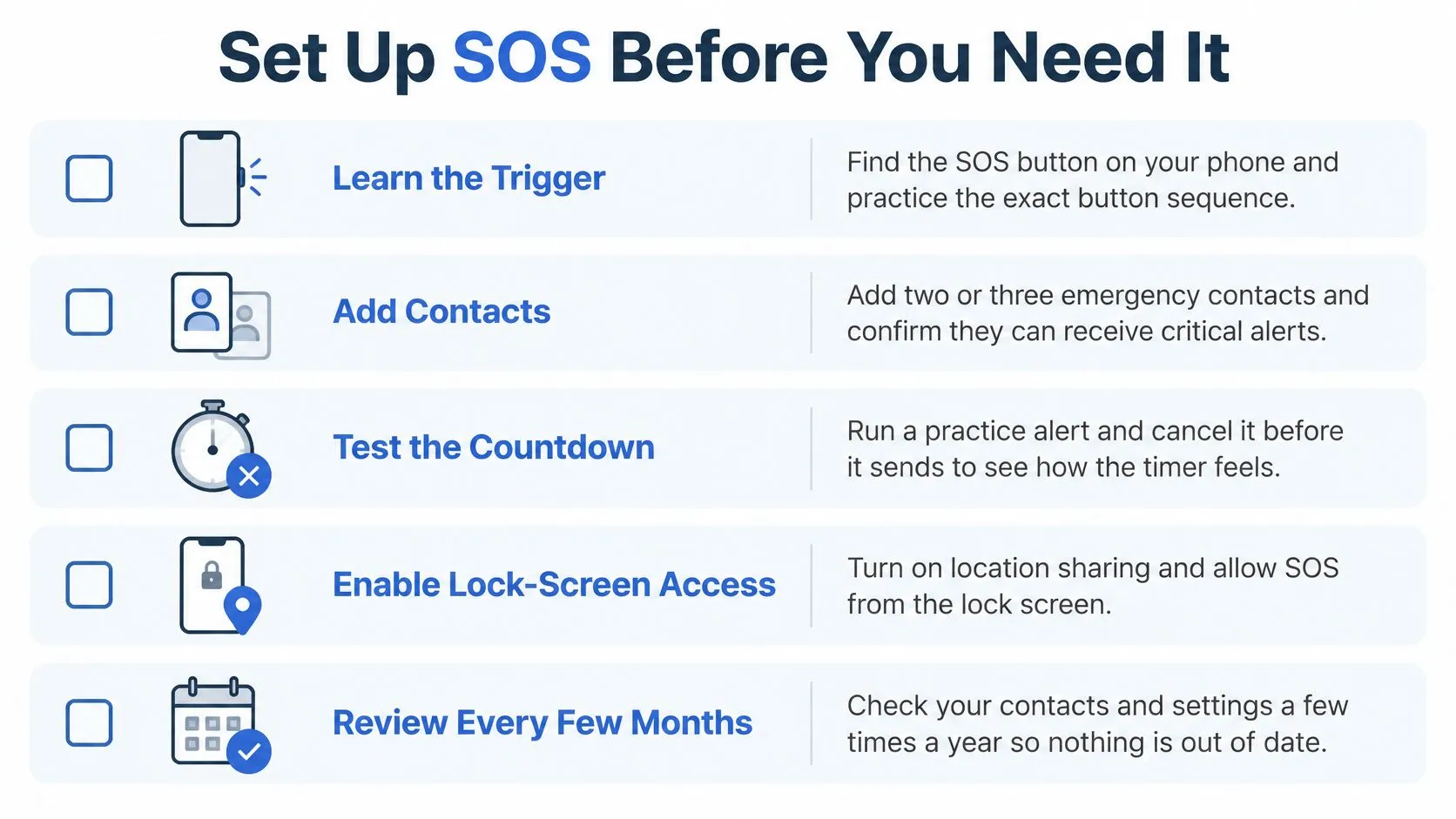
- Find the SOS trigger in your settings and learn the exact button sequence, including whether it calls, shares location, or records. Our walkthrough of Emergency SOS on iPhone covers the menus worth opening.
- Add two or three emergency contacts, then confirm they can receive critical alerts. A contact who silences everything at night isn’t a contact yet.
- Check Do Not Disturb and silent-mode exceptions so an emergency can get through to the people you chose.
- Save your local emergency number and the support contact for any safety app you use in the phone’s contacts rather than only in your head.
- Confirm regional coverage and offline behavior. Ask specifically whether the feature needs a data connection, because most app-based alerts do.
- Rehearse it. Run the trigger far enough to see the countdown and cancel screen, or read the steps aloud, so your hands know the sequence before your brain is busy with something else.
- Agree with your people what an SOS from you means and what they should do first: call you, watch the stream, or dial emergency services themselves.
Then hold your settings against the systems comparison and name the recipient for each feature you’ve enabled. If you’re relying on monitored help for late walks, rideshares, or lone shifts, an SOS to a Safety Agent connects you to a real person, with 911 behind them, and our Lock Screen widgets put Go Live, SOS, and Trigger SOS for a Friend just below the clock so the trigger is reachable without opening your phone.
Open your SOS settings today and confirm one thing: which system will receive your next alert.
Knowing who receives your alert is the part most SOS advice skips, and it’s the part we built around. 3rd-i streams your live video, audio, and location to the contacts you choose and to trained Safety Agents who can text with you discreetly and escalate to 911 through RapidSOS with full context. Visit 3rd-i to see how the SOS chain works end to end, then set up your contacts and test your trigger before your next late walk or night shift.