
Tile for Pet: Does a Bluetooth Tracker Work?
A Tile tag is a Bluetooth finder for a pet nearby, not a live GPS tracker, and its best-case range is up to 350 feet for Mate and 500 feet for Pro. Those distances only hold in open air with a clear path to your phone.
Most shoppers treat a tile for pet tracking the way they treat a phone spec sheet. They pick the bigger number and assume the collar will draw a moving dot. That assumption fails the first time the animal leaves the yard. A Bluetooth tag speaks only to phones that can hear it. A GPS collar speaks to satellites and a cellular network, then draws its own map. The two tools answer different emergencies, and mixing them up is how a cheap tag gets sold as a safety system.
If you came looking for ceramic floor tile that shrugs off claws and puddles, this article doesn’t cover flooring. Everything below is about the small tracker that clips to a collar, and about the escapes it can and can’t handle.
Table of Contents
- Tile Tags Compared With GPS Collars
- How Bluetooth Finding Works for Pets
- Four Pet Scenarios and Which Tracker Fits
- Safe Mounting Options for Collars and Harnesses
- How to Pair and Set Up a Tile Tag
- Privacy, Battery and Reliability Limits
- Choose the Right Tracker for Your Pet
Tile Tags Compared With GPS Collars
A Tile tag finds a pet that is still nearby. It doesn’t show where the animal is right now once it has left Bluetooth range. Put the three common tracker types on the same five questions and the choice gets simple: how the position is produced, how fresh it is, and what you pay every month.
| Tracker type | How it locates | Live tracking | Range | Ongoing cost |
|---|---|---|---|---|
| Bluetooth tag (Tile Mate, Tile Pro) | Bluetooth, plus nearby phones in the Tile network | No, last known or crowd-updated location | Up to 350 ft (Mate) and 500 ft (Pro), best case | Low upfront cost; optional paid plan |
| Standalone GPS tracker | Satellite GPS with cellular data | Yes, near real time | Anywhere with cellular coverage | Subscription required |
| GPS collar with cellular | Satellite GPS and cellular data built into the collar | Yes, near real time with a live map | Anywhere with cellular coverage | Higher price plus monthly plan |
Bluetooth tags such as Tile Mate and Tile Pro are cheap to start and fine for a pet that stays close to the house. Standalone GPS trackers send satellite positions over cellular data, so they keep reporting after the animal is blocks away, as long as the carrier has a signal. A GPS collar builds that same hardware into the collar and shows a live map. You pay more up front and you pay a monthly plan.
Demand for some kind of tracker is wide. In 2024, 56% of people surveyed across 20 markets said they owned a cat or dog, and 47% of those pet owners were first-time owners, according to Mars’s Global Pet Parent Study. First-time owners are the group most likely to buy a tag because the box says “pet tracker” and then discover the map only refreshes when a phone is close.
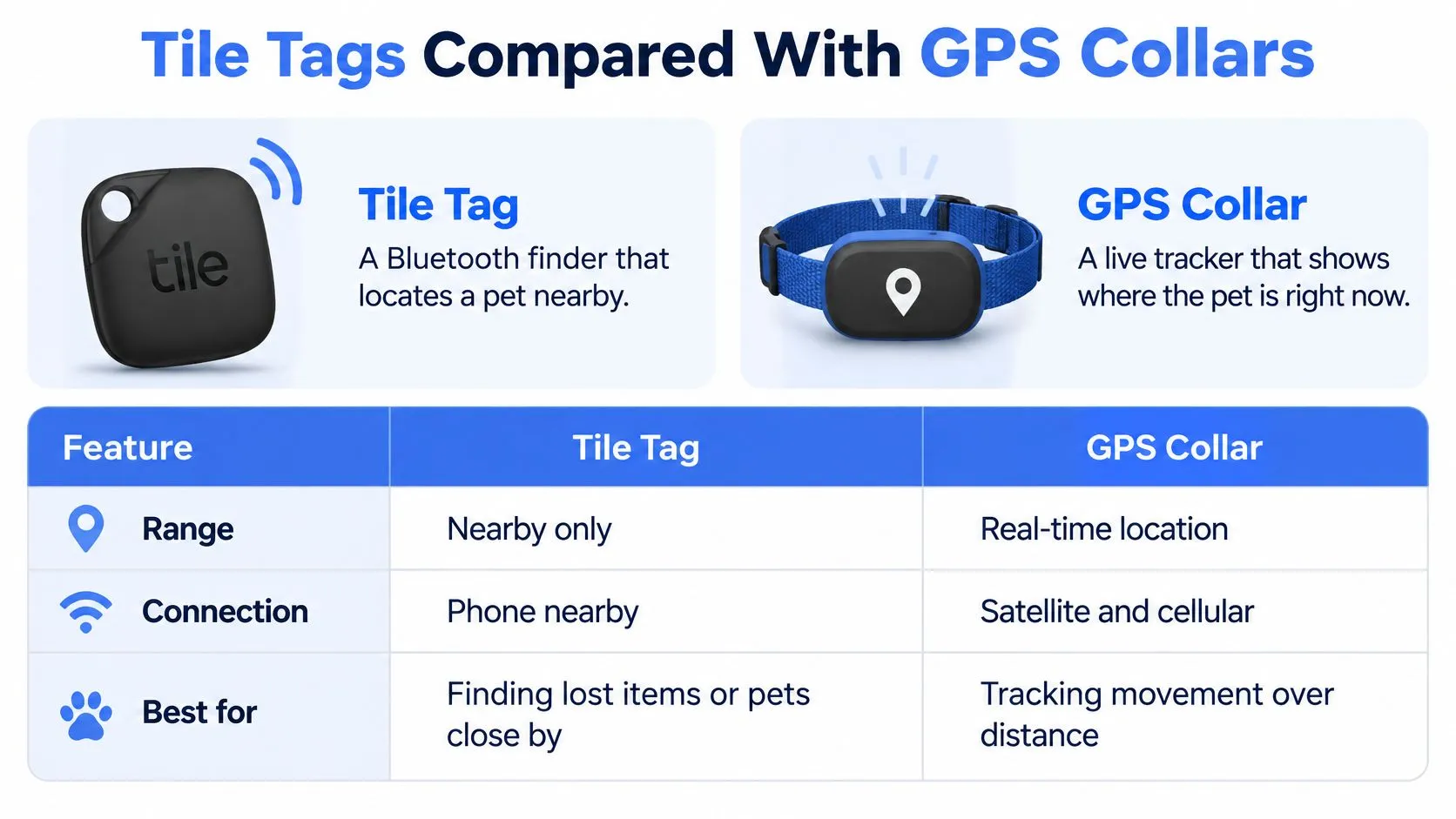
The rule of thumb is short. Use a tag for a pet that stays close to home. Use a GPS collar for a pet that escapes or travels. If your dog bolts at the park gate, the middle row and the bottom row are the ones that still work after the animal is out of sight.
How Bluetooth Finding Works for Pets
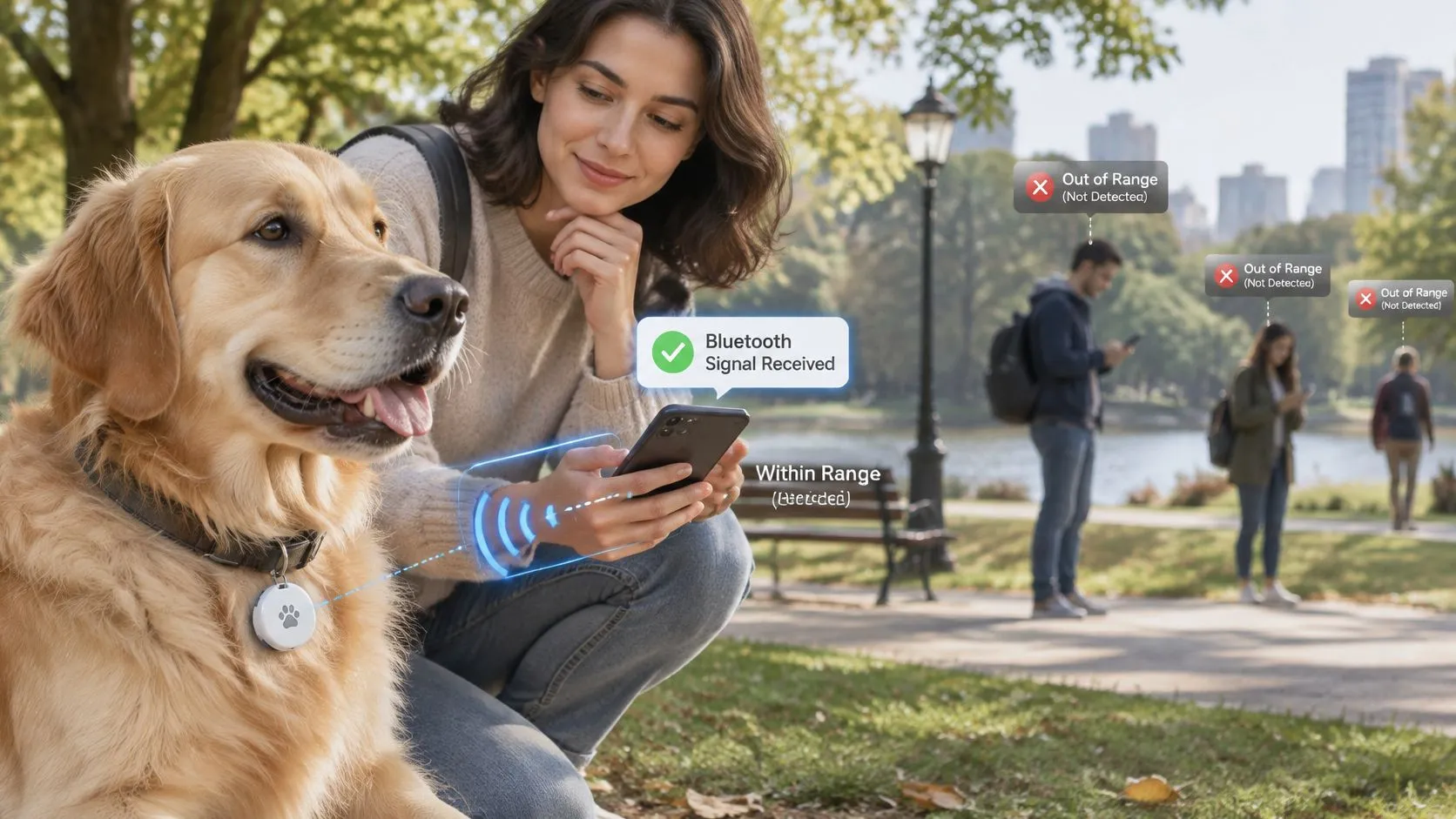
The tag broadcasts a short Bluetooth signal. Only a phone within a short distance can hear it, the way a whistle only reaches nearby ears. Your own phone hears it when you’re in the yard. A stranger’s phone hears it only if that person is running the Tile app and has location sharing turned on.
That second path is the crowd update. Nearby phones in the network can relay the tag’s position back to you, so the pin refreshes when someone walks past, not on a timer. Tile’s own guidance says the product uses Bluetooth and relies on nearby phones in its network to update a pet’s location. It can’t continuously report position without a participating phone nearby. Mate is listed at up to 350 feet and Pro at up to 500 feet, and those figures are best-case maximums. Walls, vehicles, floors, interference, and phone permissions cut the practical range hard.
What you do when the pet is missing
- Open the app and check the last known location on the map. Treat that pin as a starting point, not a current address.
- Walk toward it while watching the proximity reading. The reading gets stronger as you close in, and weaker if you turn the wrong way.
- Use the tag’s sound to finish the search in a yard, a stairwell, or under a car. Sound works only when your phone is already close enough to command the tag.
The delay between the pet leaving range and your next update isn’t fixed. It depends on how many participating phones happen to pass. Location permission has to stay on, including in the background, or your phone neither shares nor receives positions. The same permission habit shows up with a key fob tracker: if the phone can’t hear Bluetooth, the map goes quiet.
Three jobs get confused in product photos. Finding a pet in the house is one job. Recovering a pet in a city full of participating phones is a second. Watching a pet that may cross low-density or rural ground is a third, and a tag is a weak tool for that third job. A short walkthrough of the app’s find flow makes the difference between a last-seen pin and a live dot easier to see.
A tag tells you where the pet was last seen, not where it is now. It is a low-cost extra locator, not GPS, not a geofence, and not an emergency-response service.
Four Pet Scenarios and Which Tracker Fits
Match the escape you fear before you match a product page. The four situations below run from the strongest fit to the weakest.
| Scenario | Tile tag fit | Why |
|---|---|---|
| Pet hides in the yard or house | Strong fit | Phone stays in range, and sound plus proximity finds the pet fast |
| Pet slips out in a busy urban neighborhood | Good fit | More passing phones raise the chance of a location update, though timing varies |
| Pet roams wooded, rural or low-density areas | Weak fit | Few participating phones are nearby and terrain blocks signal; a GPS collar is safer |
| Pet travels in a car or escapes at a parking lot | Limited fit | The vehicle moves faster than updates arrive |
Strong and good fits
A cat behind the sofa, or a dog under the deck, is the job a tag does well. Your phone never leaves range, the proximity bar climbs as you walk the rooms, and the ring closes the last few feet. You don’t need a crowd of strangers for this one.
A dog that slips a gate on a busy block is a reasonable fit, not a sure one. More passing phones raise the odds that someone relays a pin. The timing still isn’t yours to set. You might get an update in minutes on a downtown sidewalk, or you might wait until the evening commute. While you wait, a practical next step is to browse pet emergency articles from Global Pet Sitter so you already know who to call, what photos to share, and how to describe the animal.
Weak and limited fits
Woods, fields, and sparse roads are a poor match. Few participating phones pass, and trees, hills, and distance swallow the signal. A GPS collar is the safer buy if this is the land your pet uses.
A pet in a moving car, or one that bolts across a parking lot into traffic, outruns the update. The vehicle is already blocks away by the time a phone might have heard the tag. Advertised range also shrinks indoors and outdoors because of walls, floors, vehicles, metal, interference, and phone permissions. Test that drop on your own street before you trust the box, rather than treating the listed feet as a guarantee.
Practical rule: Name the scenario your pet fits, then buy the tracker that still works after that scenario starts.
Safe Mounting Options for Collars and Harnesses
The tag has to stay on the pet, and it must never sit where it can catch a fence, a branch, or the throat. A tracker that snags is worse than no tracker.
| Attachment | Best for | Watch for |
|---|---|---|
| Collar loop or clip holder | Dogs and cats who wear a collar daily | Can slip off; check the clip weekly |
| Breakaway collar pouch | Cats and small pets | Pouch must suit the tag size; fabric can tear |
| Harness tag attachment | Dogs who wear a harness on walks | A harness is not a collar; keep the tag away from chewing |
| Carrier or keychain tag | Pets in carriers and crates | Not worn by the pet, so it does not track the animal alone |
Fit check before the first outing
Slide two fingers under the collar. If you can’t, it’s too tight. If you can fit a whole hand, it’s too loose and the clip will work free on a fence. Inspect the clip once a week, and take the tag off if the pet chews it. A heavy or bulky mount irritates a small cat, so the tag should lie flat against the collar rather than dangle near the face or a leg.
A breakaway pouch is the safer cat option because the collar can release if it catches. The pouch still has to match the tag’s size, and thin fabric splits after a season of scratching. On a dog that only wears a harness for walks, clip the tag to the harness strap, away from the mouth, and remember the harness comes off at the door. A carrier tag or keychain stays with the crate, which helps you find the crate, not the animal that left it.
Don’t use a collar that also clips to a leash unless you check the tag on every walk. Leash tension twists cheap holders until they open. A mount is only as good as today’s fit. Check it again after the pet grows, gains winter coat, or comes back from the groomer with a shorter neck.
How to Pair and Set Up a Tile Tag
Set the tag up in one sitting, with the mount already chosen, and don’t call it done until you’ve walked away from the house.
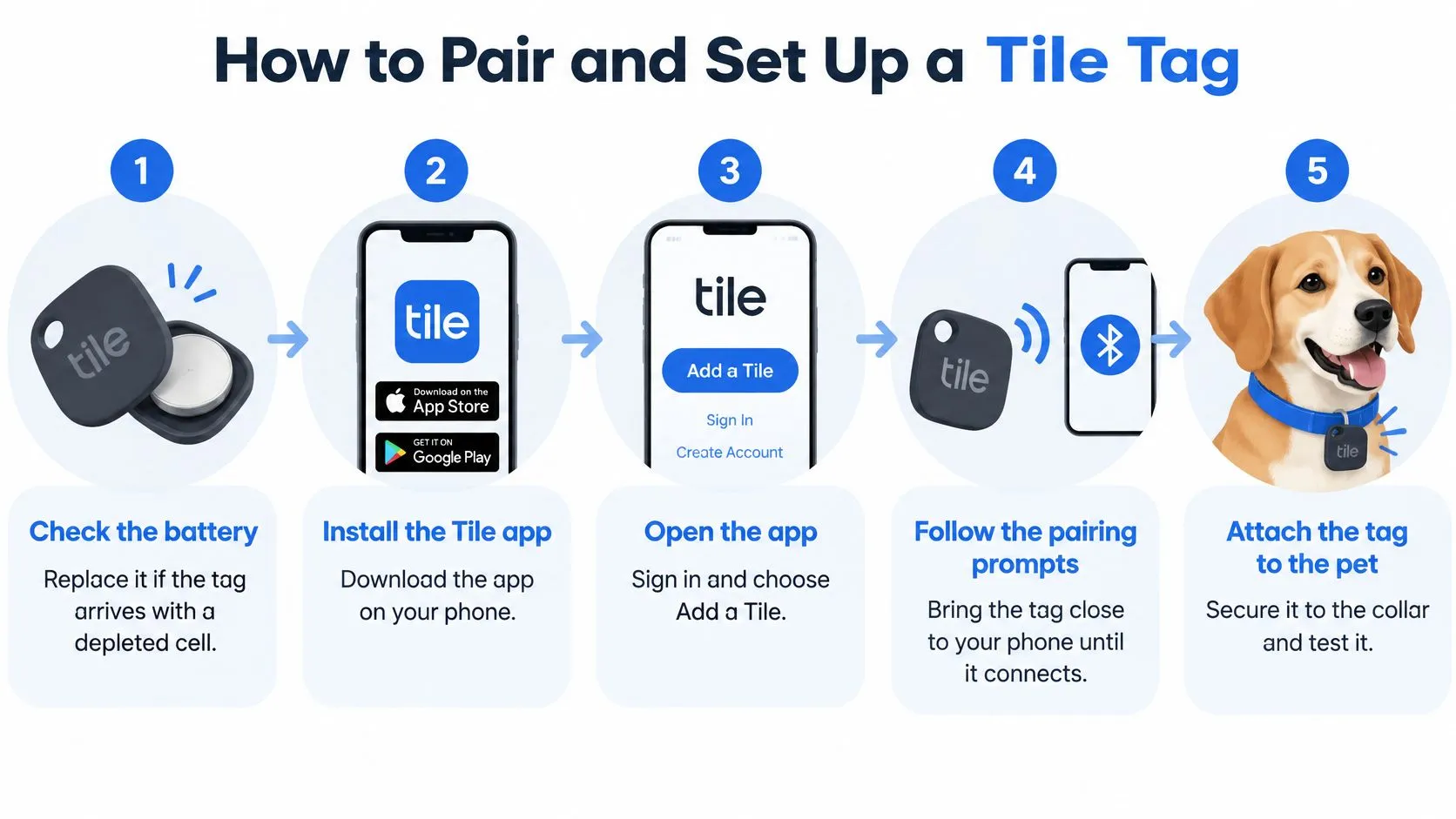
- Check the battery. Replace the cell if the tag arrives dead or the app shows a weak charge. A depleted tag pairs once and then goes silent on day two, which feels like a software bug.
- Install the Tile app and create an account. Use an email the whole household can reach. A private login means nobody else can search when you’re the one who’s out.
- Add a new tag and press the button when the app asks. Hold the tag next to the phone until pairing finishes. Pairing across the room often fails, and people blame the account instead of the distance.
- Name the tag after the pet and add a photo. “Milo” with a face photo beats “Tile 2” when three family phones open the map at once. Skip the photo and someone rings the wrong tag.
- Turn on Bluetooth and location, including background use. Crowd updates need that background setting. Bluetooth off, or location set to never, means zero updates no matter how close the pet is. The same permission trap shows up when people can’t find their keys with a tracker they never fully allowed.
- Attach the tag with the mount you already picked. Clip it flat, then tug it. A loose loop that you plan to “fix later” is the loop that stays loose.
- Run a range test before you rely on it. Walk away from the house with the tag and note where the proximity reading drops on your own street. Repeat the walk at the park or the place the pet visits most. An untested tag gives false confidence.
Success looks ordinary. The tag appears on the map, and the proximity reading changes as you walk away and come back. If you also travel with the animal, it helps to find apps for tracking travel paperwork so vaccines and ID stay with you while the collar tag only covers the local search.
Privacy, Battery and Reliability Limits
A paired tag still fails in three quiet ways. None of them show up on the product photo.
Privacy. Location and history are visible to everyone you add to the account. Review that sharing list this week. Remove former housemates, pet sitters, and ex-partners who no longer need the map. A shared login is not a courtesy once that person has moved out.
Battery. The cell lasts months, not forever. Set a monthly reminder and open the app’s battery status when it fires. A dead tag looks exactly like a pet that has left the neighborhood: the map stops moving.
Reliability. The tag stops reporting when Bluetooth is off, when location permission is off, or when the phone is switched off. Crowd updates also depend on other people’s phones being nearby, active enough to scan, and opted in. You don’t control that crowd. A rural evening with empty sidewalks can mean no new pin at all.
Pet safety. A tag doesn’t replace a collar with ID tags, and it doesn’t replace a microchip registered to current phone numbers and an email you read. It can’t confirm the animal is safe, fed, or even alive. It only says a radio was heard. Baylie’s Wish Foundation promotes the 3rd-i app as a safety tool for people, which is a different job from finding a pet: live video and a human watcher for the owner, not a Bluetooth ping for the collar.
Do these three things this week. Review who can see the tag. Set the battery reminder. Confirm the ID tag and the microchip contact details match the number you answer.
Choose the Right Tracker for Your Pet
Decide with four questions, in this order, before you open a cart.
- Where does the pet spend time? Home and yard point to a tag. Roaming, rural ground, or travel point to a GPS collar.
- Does the pet escape, or ride in a car? If yes, a last-seen pin arrives too late. Buy cellular GPS.
- What can you pay up front and each month? A tag is the low starting cost, with an optional paid plan. GPS means a subscription from day one.
- How fast do you need an update? If “within a minute, wherever they are” is the answer, Bluetooth can’t meet it.
A pet that lives at home and also travels needs both, not a compromise. Keep the tag on the everyday collar for yard and house searches. Add a GPS collar for trips, boarding runs, and any route where the car or the woods take over. The tag stays a low-cost supplement. It should never be the only safety measure, and the scenario table already shows which escapes it loses.
One action covers this week. Buy one tag, run the range test on your own street, and confirm that location and Bluetooth permissions are on. If the reading dies in the places your pet goes, move to a GPS collar before the pet needs it. A side-by-side of Tile vs AirTag helps if you’re also choosing between Bluetooth brands, but neither brand becomes a live tracker by changing the logo.
3rd-i builds a personal safety app that streams live video, audio, and location to people you choose and to trained Safety Agents, and it can escalate an emergency to 911 through RapidSOS. That live watch is for you on a late walk, a rideshare, or a search through a dark lot, not a substitute for the collar tracker on the pet. If you want that kind of real-time backup while you’re out looking, visit 3rd-i .